# INTRODUCTION
## 🔍 **What is Gonzo Proxy?**
**GonzoProxy** is a modern proxy platform powered by a unique **P2P network of 20+ million real devices** worldwide.
We provide **IP addresses with natural usage history**, making you **indistinguishable from a real user** in the eyes of any online service.
***
### 🌍 Our IP Source
Our IPs come from **real users** who **voluntarily and legally** install a special app on their computers and mobile devices.
They share a portion of their internet connection and **get rewarded** for it.
✅ This ensures:
* **100% legal** network operation
* A **natural “digital footprint”** for every IP address
***
### 🧠 Real Devices = Real Trust
When you connect through our network, you literally **"become" a real human** in the eyes of online platforms.
#### Here's what that means:
* **Clean usage history**
* IPs from **residential and mobile ISPs**
* **Stable geolocation** and **authentic digital fingerprints**
👉 For example, when Facebook or Google checks your IP, it looks like a **normal user profile**, not a suspicious proxy pattern.
***
### 💡 GonzoProxy Benefits
* 🔄 **Traffic never expires** — Use your paid GBs anytime
* ♾️ **Unlimited proxies** — Create as many as you want for free
* 🔐 **No KYC verification** — Access 95% of websites without ID checks
* 🎯 **Precise targeting at no extra cost** — Choose country, city, and ISP for free
* 📞 **24/7 Telegram support** — Instant help whenever you need it
* 🏢 **Registered UK company** — 3 years in the market, officially incorporated
***
### 🚀 Start Using GonzoProxy Today
Stop worrying about account or campaign bans.\
**Use real IPs trusted by the platforms.**
***
### 📱 Stay Connected
* [Telegram Channel](https://t.me/GonzoProxy)
* [Telegram Chat ](https://t.me/GonzoProxy_Chat)
* [Instagram](https://www.instagram.com/gonzoproxy)
* [24/7 Support](https://t.me/GonzoProxy_bot)
💬 Our team is always here for you! Reach out anytime — we’ll solve any issue within minutes.
# 🌐 What is a Proxy?
**Proxy** (from the word *proxy* meaning "substitute") is a server that sits between you and a website. It sends requests on your behalf and returns the results to you.
### A Simple Analogy:
**You** are the client 🍔\
**The Proxy** is the courier 🛵
You give the courier an address and a task. The courier goes on your behalf, collects the necessary information, returns it, and gives it to you. The entity providing the information never knows who the real client is — it only sees the courier.
***
### 💡 What Can Proxies Do?
🕵️♂️ **Hide your IP address** — websites see the proxy’s IP, not your real one.\
🚫 **Bypass blocks** — useful if a site is unavailable in your country.\
🧙♂️ **Mask your activity** — websites can’t pinpoint who you are.\
🤖 **Automate tasks** — mass scraping, account registrations, auto-posting, and other tasks.
***
### ✅ Use Cases & How GonzoProxy Helps
#### 📢 Ad Campaigns
* Real IPs reduce the risk of bans by up to **90%**
* Fewer **checkpoints and selfie verifications** on Facebook and Google Ads
* **Stable ad account performance**, even in high-risk niches
#### 👥 Account Farming & Validation
* Each account gets a **unique IP from the required region**
* No **cross-account bans** during bulk registrations
* **Longer account lifespans** without red flags
#### 🕷️ Parsing & Crawling
* No blocking even under **heavy load**
* **Automatic IP rotation** at the first sign of restriction
* Access to **data that’s normally blocked** for datacenter proxies
#### 🤖 Automation
* **Direct integration** with scripts, bots, and automation tools
* **Stable, high-speed connections** with no drops
* Full compatibility with **anti-detect browsers** for real-user emulation
#### 🔄 Multi-Account Management
* **Safely manage** multiple profiles across social platforms
* Protection against **mutual account linking and bans**
* **Reliable long-term usage** on Facebook, Twitter, Instagram, OnlyFans, and more
***
### 👾 Try Gonzo Proxy
🔗 [Visit GonzoProxy.com](https://GonzoProxy.com)
***
### 📱 Stay Connected
* [Telegram Channel](https://t.me/GonzoProxy)
* [Telegram Chat ](https://t.me/GonzoProxy_Chat)
* [Instagram](https://www.instagram.com/gonzoproxy)
* [24/7 Support](https://t.me/GonzoProxy_bot)
💬 Our team is always here for you! Reach out anytime — we’ll solve any issue within minutes.
# 🌍 Types of Proxies in Gonzo Proxy
We offer two main types of proxies to ensure reliable and realistic performance online:
***
### 1️⃣ Dynamic Residential Proxies 🏠
**What it is:** IP addresses from our unique P2P network of **20+ million real user devices** around the world.
#### 🔧 How it works:
* Uses a **sticky session** — one IP is held for up to **72 hours**
* If the source device goes offline, the system **automatically assigns a new IP** based on your settings
* Each proxy has a **unique address** — we recommend a **"1 proxy = 1 account"** setup
* **Unlimited proxy creation** — you only **pay for the data used**
#### ✅ Key Benefits:
* **Paid traffic never expires** — use your data anytime
* **Precise geo-targeting** (country, city, ISP) at no extra cost
* **Look like real users** to all anti-fraud systems
* Ideal for **long-term use with ad accounts** and platforms with strict moderation
💡 **Expert Tip:** For maximum account stability, set targeting by **city or ISP** — this ensures more consistent IPs if they are automatically rotated.
***
### 2️⃣ Unlimited Mobile Proxies 📱
**What it is:** Mobile IP addresses from telecom operators (3G/4G/5G) with **truly unlimited data usage**.
#### 🔧 How it works:
* A single mobile proxy can be used for **multiple accounts**
* Easily **change the IP** for each new account with one click in the dashboard
* The system issues a **new, clean mobile IP** each time — fully independent from the previous one
* **Unlimited IP changes** with no extra fees
#### ✅ Key Benefits:
* **Unlimited traffic** for a flat rate — **$45/month**
* **Highest trust level** from social networks and financial platforms
* **Cost-efficient** — one mobile proxy with IP rotation can replace dozens of static ones
* **Flexible plans** available for 7 or 30 days, **no auto-renewal**
#### ⚠️ Notes:
* Currently available only in **Ukraine and Poland** (more countries coming soon)
* **City and ISP targeting not available yet**
* Perfect for cases where **IP quality matters more than precise geolocation**
💡 **Expert Tip:** Mobile proxies are especially effective for **social media, financial services, and crypto projects**, where traditional proxies are often blocked.
***
Would you like this content exported as a `.md` file or integrated into your GitBook structure directly?
***
### 👾 Try Gonzo Proxy
🔗 [Visit GonzoProxy.com](https://GonzoProxy.com)
***
### 📱 Stay Connected
* [Telegram Channel](https://t.me/GonzoProxy)
* [Telegram Chat ](https://t.me/GonzoProxy_Chat)
* [Instagram](https://www.instagram.com/gonzoproxy)
* [24/7 Support](https://t.me/GonzoProxy_bot)
💬 Our team is always here for you! Reach out anytime — we’ll solve any issue within minutes.
# 💻 GonzoProxy Residential Proxies
## 🏠 What are Residential Proxies?
**Residential proxies** are IP addresses from a large-scale **P2P network** connecting over **20 million real user devices** around the world.
Unlike **datacenter proxies**, which are easily detected by security systems, residential proxies are **indistinguishable from real users**. This allows them to **bypass blocks, anti-fraud systems, and other restrictions** with high efficiency.
***
### ⚙️ Technology and IP Cleanliness
#### 🔌 How Our Network Works:
* **Unique P2P technology** — users voluntarily install our SDK application on their computers and mobile devices
* **Mutually beneficial collaboration** — device owners share a portion of their internet bandwidth and receive rewards
* **Direct access** — you connect through real devices, inheriting **their reputation and trust level**
***
#### ✅ Why Our IPs Are Clean and Reliable:
* **Genuine digital history** — every IP has a natural usage pattern and reputation of a typical user
* **Residential and mobile connections only** — we do not use datacenter/server IPs
* **Multi-level filtering** — our system automatically removes IPs with bans, bad history, or high risk
* **Constant pool updates** — new IPs are regularly added, while problematic ones are removed
* **Up to 90% IP cleanliness** — the vast majority of our IPs have a **low fraud score** across verification systems
***
### ✅ Residential Proxies Help With:
* Creating accounts without getting blocked
* SEO promotion
* Managing ad accounts
* Purchasing limited items faster than anyone
* Developing and testing software
***
## 💰 How to Start Using Residential Proxies?
#### 🔹 Step 1: Buy Traffic
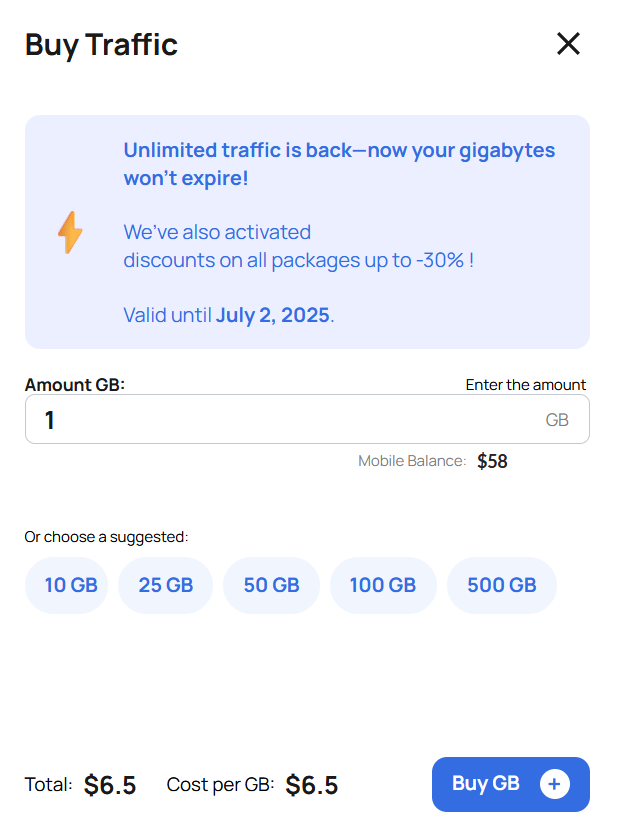
* Buy traffic in gigabytes
* Traffic **has no expiration date**
* Charging is based on **used traffic**
💲 Price per 1 GB depends on the purchase volume:\
**from $6.5 to $2**
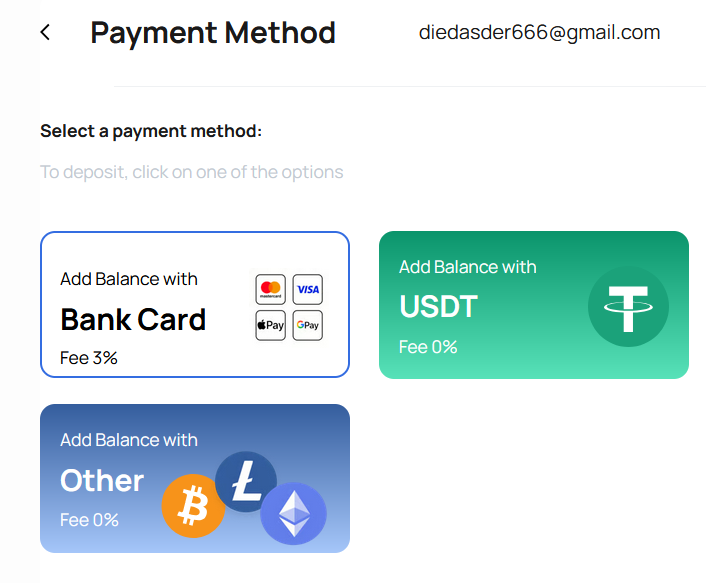
#### 🔸 Payment Methods
* 💳 **Bank Card** (instant crediting)
* 💰 **Cryptocurrency** (supports 20+ currencies)
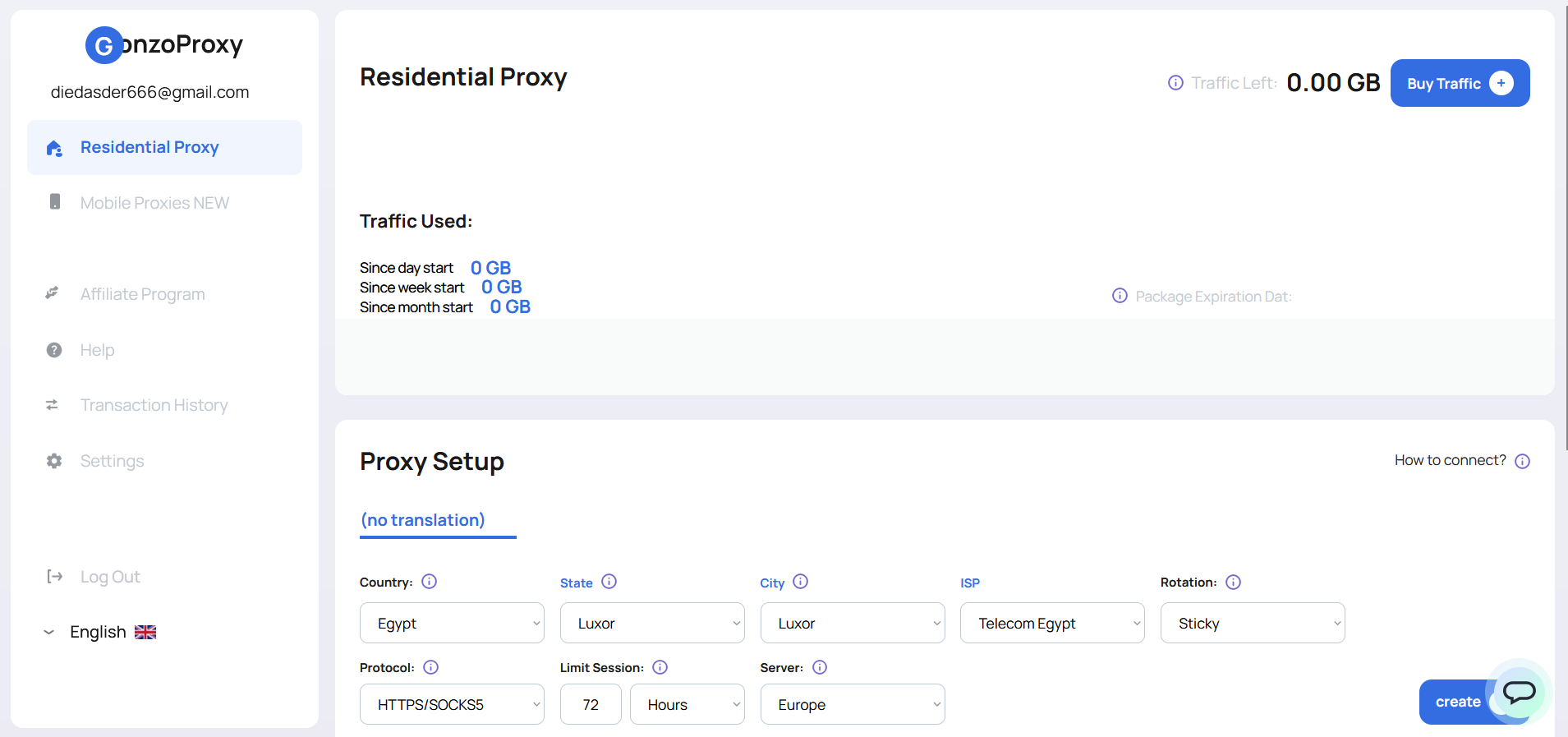
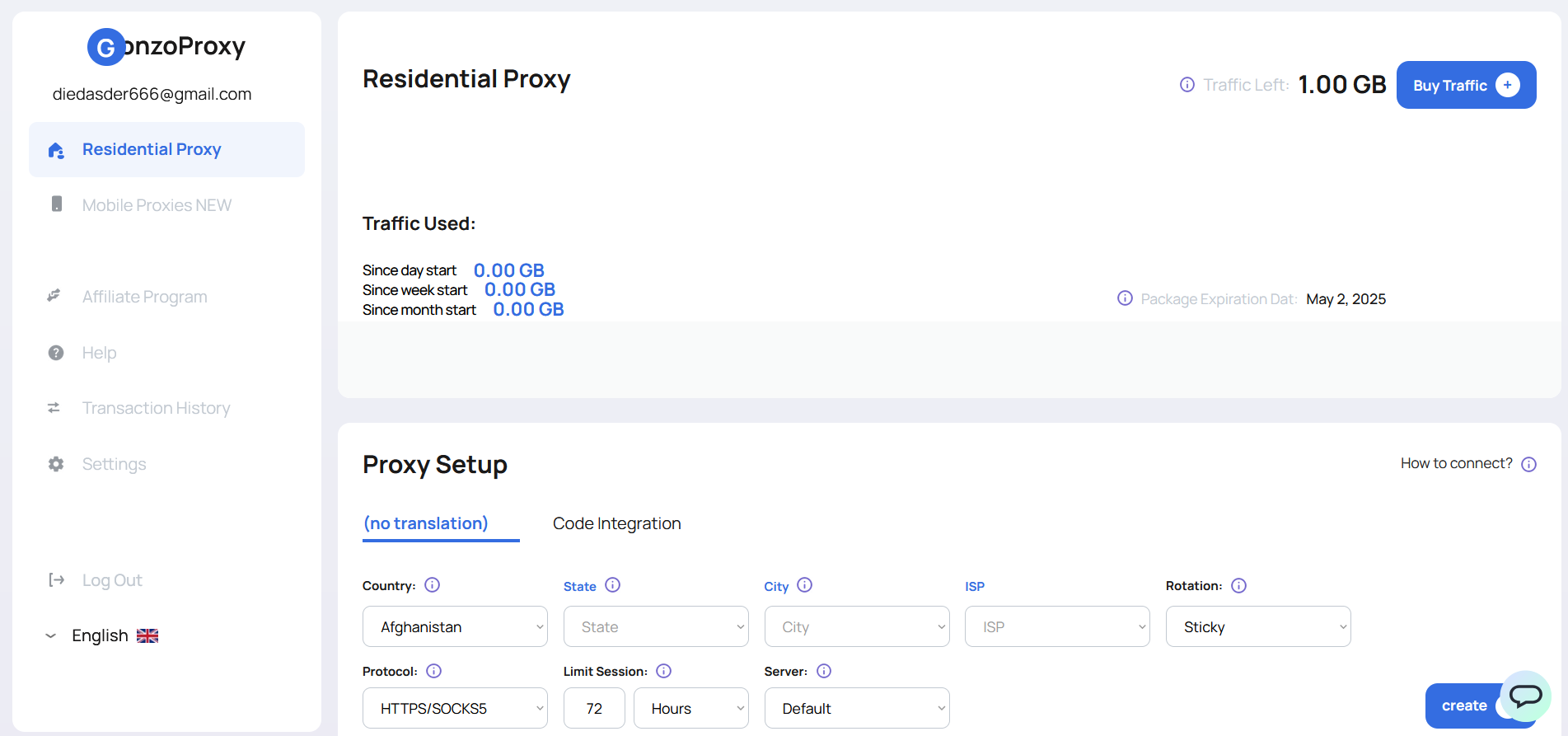
💡 After payment, the purchased traffic will appear **in the top right corner** of your dashboard.
## 🧩 Step 2. Proxy Setup
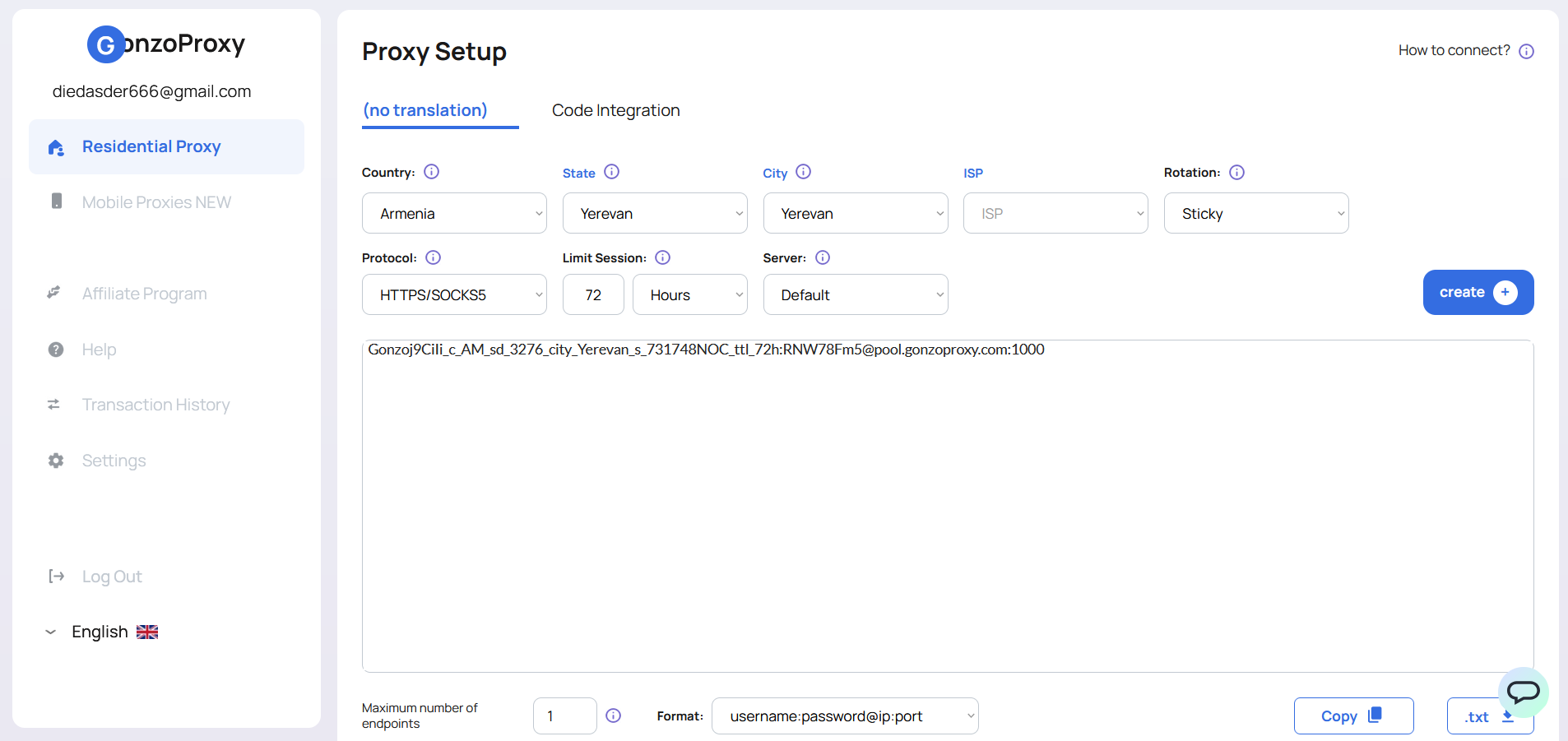
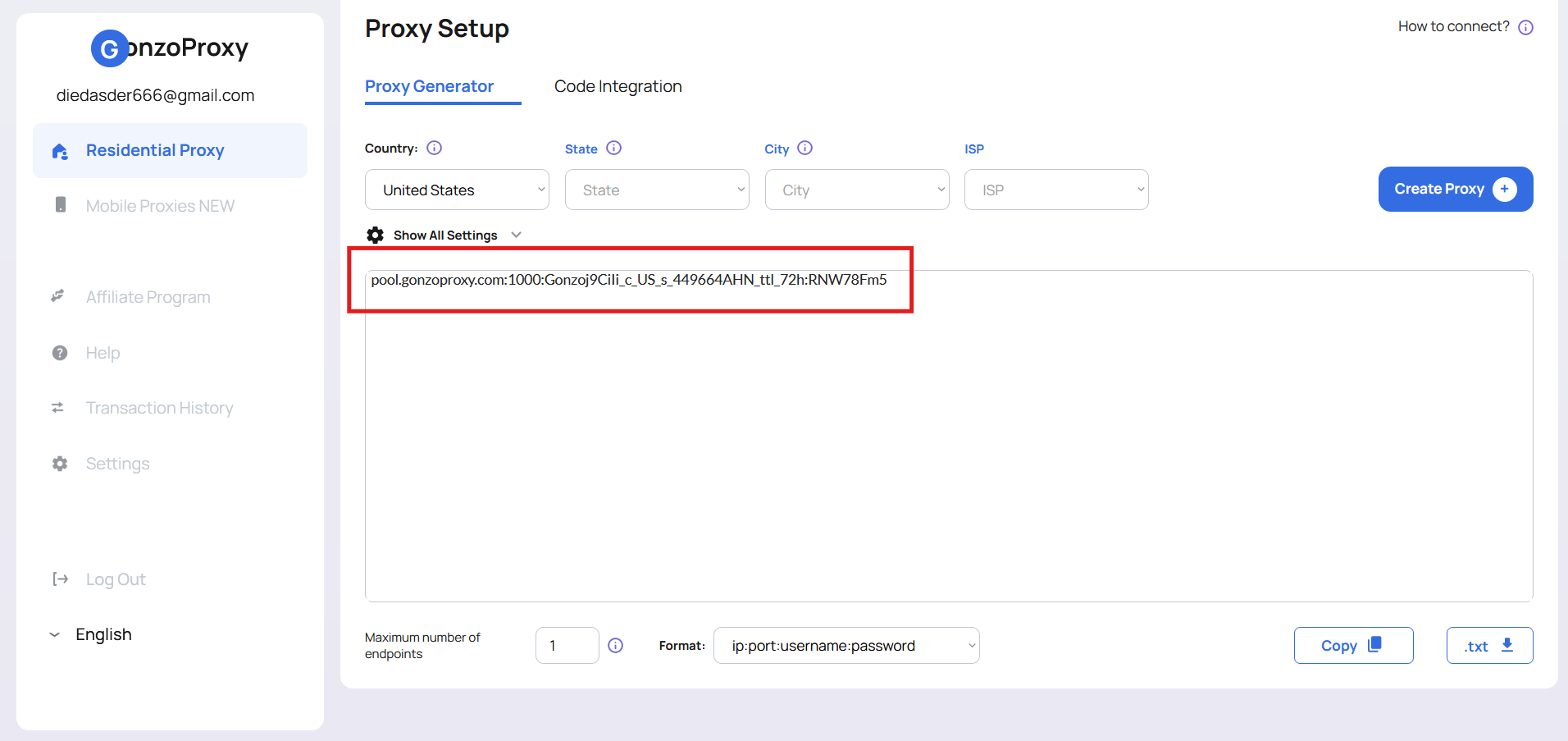
In the **Proxy Setup** window, you can generate proxies with custom parameters tailored to your use case.
***
### 🌍 Country
Select the country from which the IP addresses will originate.\
**150+ countries available.**
***
### 🏙️ City / State / ISP
Fine-tune your targeting by city, region, or internet provider.
* **ISP (Internet Service Provider)** — the company that provides internet access (e.g., *Comcast, AT\&T, Vodafone*)
* **Recommendation:** For account-related work, choose **either a city or an ISP**, not both — this improves IP consistency if it changes
***
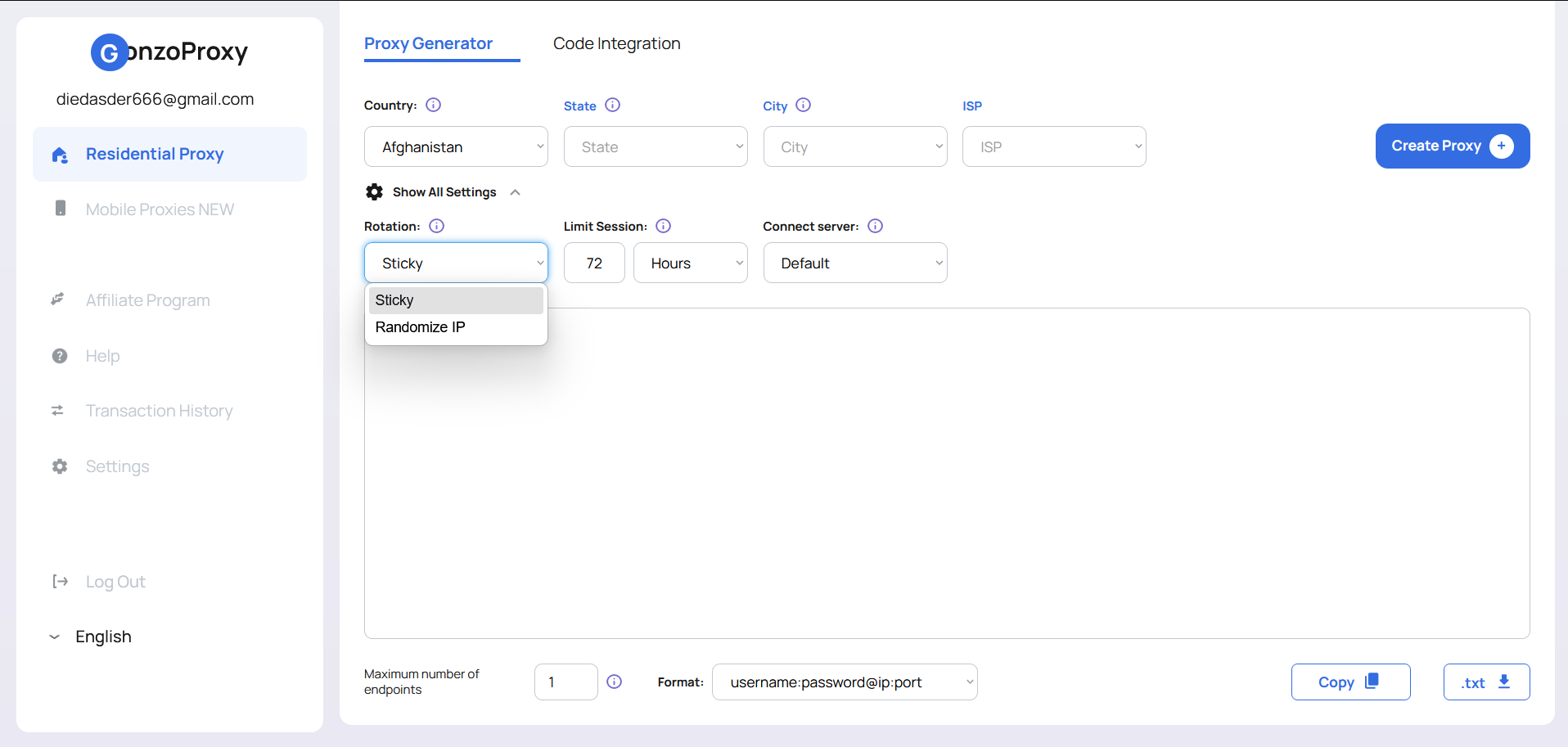
### 🔄 Rotation — IP Change Mode
Decide how frequently the IP address should change:
#### • **Sticky (Sticky Session)**
* Keeps the same IP for up to **72 hours** or until the source device disconnects
* **Best for:** managing accounts, ad platforms, long sessions
* **How it works:** the system assigns you one IP and holds it as long as possible
#### • **Randomize IP**
* Each request is made using a **new IP**
* **Best for:** scraping, automation, anonymous browsing
* **How it works:** every new request is routed through a random IP from your selected pool
***
### 🔧 Protocol
Choose your connection protocol:
* **HTTPS**
* **SOCKS5**\
All GonzoProxy residential proxies support both.
***
### ⏳ Limit Session — Session Duration
Set how long one IP should remain active before it changes automatically.
* After the time expires, a new IP will be assigned
* **Recommended settings:**
* **24–72 hours** for stable account work
* **5–30 minutes** for periodic IP rotation
* **1–2 hours** for general use cases
***
### 🖥️ Server — Proxy Server Region
Affects only **connection speed**, not the IP address itself.
* **Standard** — auto-selects the best server based on your location
* **Europe / Asia / USA** — choose the nearest region for optimal speed
#### 🔧 Example Configuration
**Goal:** Generate a proxy with an IP from **Armenia**, with a **72-hour session limit**.\
**Result:** The system will retain the same IP as long as possible and then automatically switch to a similar IP from the same region.
***
### 🌐 Step 3: Use the Proxy in an Anti-Detect Browser
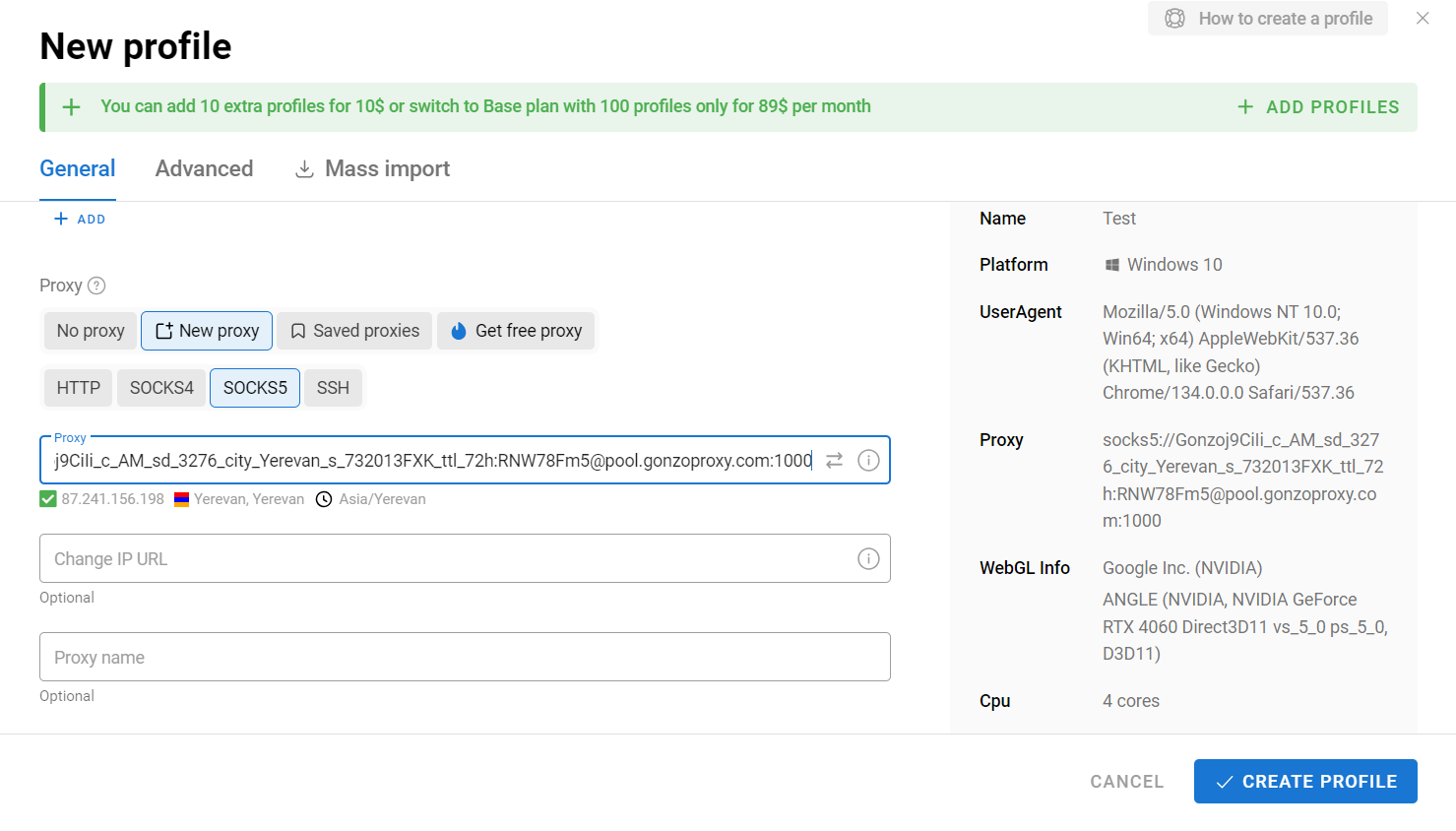
* Load the created proxy into an anti-detect browser (e.g., **Dolphin Anty**)
* Create a **new profile** and set up our proxy
* Check the proxy for functionality
### 🔎 Step 4: Test the Proxy
Check access to popular websites:
* 📩 Gmail
* 📘 Facebook
* 💰 Binance
* 📸 Instagram
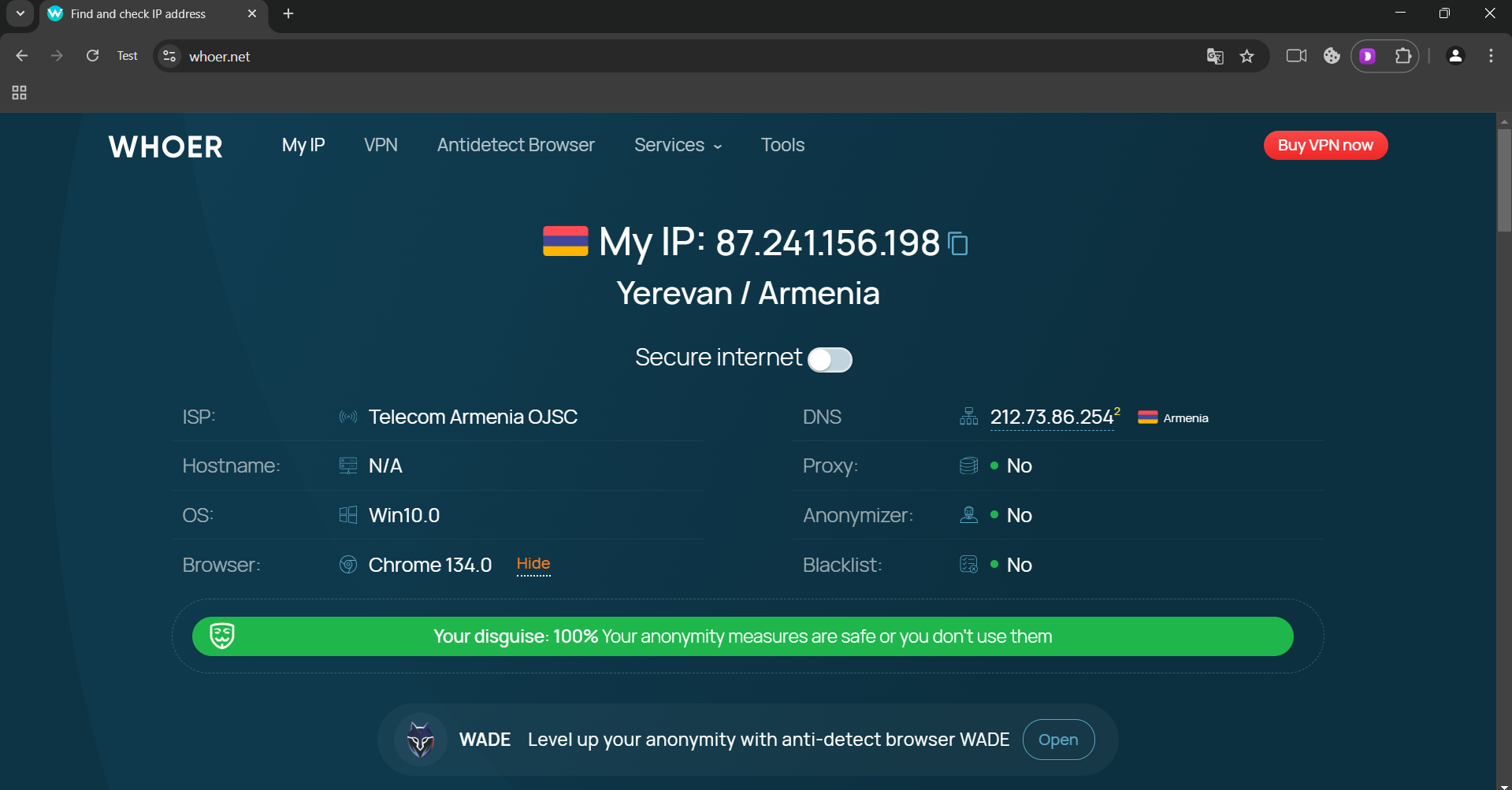
📍 Additionally, verify the IP and country on **whoer.net** — everything works fine 🎯
### 🎉 Done!
Now you can use residential proxies without any issues.
***
## 🧠 Expert Tips for Professionals
Pro-level recommendations to enhance security, performance, and efficiency when using residential proxies.
***
### 🔐 Maximizing Security
* **Golden Rule:**\
**1 proxy = 1 account** — never use the same IP for multiple accounts on the same platform.
* **Smart Targeting:**\
Choose **either a city or an ISP**, but not both — this helps maintain IP consistency when addresses rotate.
* **Rotation Strategy:**\
For high-risk or critical accounts, set the session limit to **24–48 hours** instead of the maximum 72.
***
### ⚙️ Performance Optimization
* **Save Bandwidth:**\
Disable loading of images, videos, and heavy scripts — can save up to **40% of traffic usage**.
* **Faster Scraping:**\
Use **multiple proxies simultaneously** to distribute load across sessions for large-scale scraping.
* **Lower Latency:**\
Select **proxy servers geographically close** to your location to minimize ping and maximize speed.
***
### 🎯 Task-Specific Recommendations
* **Ad Accounts:**\
Use IPs from the **same region as your target audience** for better trust and delivery.
* **Social Media:**\
Maintain **consistent connection parameters** (same IP/region) per account for longevity.
* **E-commerce & Drops:**\
For purchasing limited-edition items, use **different IPs from the same city** to simulate natural behavior.
***
### 🛠️ Technical Highlights & Support
* If a source device disconnects, the system will **automatically assign a similar IP** based on your settings.
* You can create an **unlimited number of proxies for free** — you **only pay for the traffic you consume**.
* **Fully compatible** with all popular tools, scrapers, and platforms.
* **24/7 support** via Telegram: [@gonzoproxy\_bot](https://t.me/gonzoproxy_bot) — average response time is just a few minutes.
***
### 🚀 Start Today
Leverage the power of **GonzoProxy residential IPs** and say goodbye to bans, anti-fraud triggers, and restrictions.
***
### 👾 Try it here: [GonzoProxy.com](https://GonzoProxy.com)
***
### 📱 Stay Connected
* [Telegram Channel](https://t.me/GonzoProxy)
* [Telegram Chat ](https://t.me/GonzoProxy_Chat)
* [Instagram](https://www.instagram.com/gonzoproxy)
* [24/7 Support](https://t.me/GonzoProxy_bot)
💬 Our team is always here for you! Reach out anytime — we’ll solve any issue within minutes.
# 📱 GonzoProxy Mobile Proxies
### 📲 What are mobile proxies?
Mobile proxies are IP addresses belonging to real subscribers of cellular carriers around the world. Each address is assigned by a carrier to a real person with a SIM card, which means it carries the full reputation of a genuine mobile connection.
Websites and services simply cannot tell a request coming through a mobile proxy apart from an ordinary person scrolling their feed on the subway. That's exactly why mobile IPs get the highest trust level of any proxy type.
***
### ⚙️ Technology and network features
**How it works:**
* IP addresses are assigned directly by cellular carriers through their own networks (3G/4G/5G)
* A single carrier IP is typically shared via NAT among thousands of real subscribers at once, so an IP-level block would affect real users too, which carriers and antifraud systems factor in
* We connect through legitimate carrier traffic exchange points, so you get a genuine mobile address, not an imitation of one
**Why mobile IPs are considered the cleanest:**
* Carriers constantly reassign IPs between real subscribers, so each address has a living usage history
* No signs of datacenter or server infrastructure
* Websites see standard mobile traffic behavior, not a bot pattern
***
### 🌍 Network parameters
* Pool of 5M+ IP addresses
* Coverage in 100+ countries
* Targeting by country, region, and carrier
* Maximum website trust and the lowest block rate among all proxy types
* Speed lower than residential and datacenter proxies due to the nature of mobile networks
* Unlimited concurrent sessions
***
### ✅ What mobile proxies help with
* Creating and warming up social media accounts without bans
* Working with services that aggressively ban residential and datacenter IPs
* Bypassing limits on the number of registrations from a single address
* Testing mobile apps and ads under real-world conditions
* Working with financial and crypto services where maximum trust matters most
***
### 🔁 Rotation
Two modes are available:
* **New IP per request** — a new IP is issued on every request
* **Sticky session** — the IP stays fixed for a set period, up to 72 hours
In sticky mode, the IP changes when the session period expires, when the session is recreated, or when the node drops off the network. This last case is especially relevant for mobile (and residential) proxies, since the IP is tied to a real device.
***
### 🧠 Expert tips
**When to choose mobile over residential:** If a service is particularly aggressive about IP-based bans, or you've already run into blocks on residential addresses, mobile proxies give you extra headroom thanks to the carrier's NAT effect.
**A note on rotation behavior:** Because of how mobile networks work, the IP can sometimes change before the sticky session time you set has expired. That's normal carrier behavior, not a fault on our end.
**Speed and use cases:** For tasks where speed matters most (large-scale parsing, fast checkouts), residential or datacenter proxies are a better fit. Mobile proxies shine where website trust matters more than raw speed.
***
### 🛠️ Technical Highlights & Support
* If a source device disconnects, the system will **automatically assign a similar IP** based on your settings.
* You can create an **unlimited number of proxies for free** — you **only pay for the traffic you consume**.
* **Fully compatible** with all popular tools, scrapers, and platforms.
* **24/7 support** via Telegram: [@gonzoproxy\_bot](https://t.me/gonzoproxy_bot) — average response time is just a few minutes.
***
### 🚀 Start Today
Leverage the power of **GonzoProxy residential IPs** and say goodbye to bans, anti-fraud triggers, and restrictions.
***
### 👾 Try it here: [GonzoProxy.com](https://GonzoProxy.com)
***
### 📱 Stay Connected
* [Telegram Channel](https://t.me/GonzoProxy)
* [Telegram Chat ](https://t.me/GonzoProxy_Chat)
* [Instagram](https://www.instagram.com/gonzoproxy)
* [24/7 Support](https://t.me/GonzoProxy_bot)
💬 Our team is always here for you! Reach out anytime — we’ll solve any issue within minutes.
# ⚙️ GonzoProxy Datacenter Proxies
### 🏢 What are datacenter proxies?
Datacenter proxies are IP addresses issued from data centers rather than from real users. These addresses physically belong to server infrastructure, so websites can generally detect them as proxy or bot traffic more easily.
In exchange, datacenter proxies deliver maximum speed and the lowest price per gigabyte, making them the best choice wherever performance matters more than blending in as a real user.
***
### ⚙️ Technology and network features
**How it works:**
* IP addresses are hosted on servers in data centers and aren't tied to any real device
* They lack the natural usage history that residential and mobile IPs have
* The connection runs directly through a dedicated server channel, with no real device in between
**Why datacenter proxies are easier to detect:**
* The IP has no history as an ordinary user's address, so antifraud systems recognize ranges that belong to data centers
* Many services maintain lists of known datacenter subnets and block them by default
* Best suited for tasks where IP cleanliness isn't critical, but speed and price are
***
### 🌍 Network parameters
* Pool of 10M+ IP addresses
* Coverage in 100+ countries
* Targeting by country, region, city, and provider
* Highest speed among all proxy types
* Lowest price per gigabyte
* Response time around 0.4 seconds
* Unlimited concurrent connections
***
### ✅ What datacenter proxies help with
* Scaling parsing and data collection where speed matters more than disguise
* Processing large request volumes quickly without high traffic costs
* Testing infrastructure and applications across different geos
* Handling tasks where a service doesn't strictly check whether an IP belongs to a data center
***
### 🔁 Rotation
Two modes are available:
* **New IP per request** — a new IP is issued on every request
* **Sticky session** — the IP stays fixed for a set period, up to 72 hours
In sticky mode, the IP changes when the session period expires or when the session is recreated.
***
### 🧠 Expert tips
**When datacenter proxies won't work:** For ad accounts, social media, and any service with strict antifraud protection, residential or mobile proxies are the better choice — datacenter IPs will get flagged quickly there.
**Where datacenter proxies really deliver:** Large-scale parsing of open sources, price monitoring, and any high request-per-second workload where the price per gigabyte is what matters most.
**Combining proxy types:** Many clients use datacenter proxies to handle bulk volume, and bring in residential or mobile proxies only where they need maximum authenticity as a real user.
***
### 🛠️ Technical Highlights & Support
* If a source device disconnects, the system will **automatically assign a similar IP** based on your settings.
* You can create an **unlimited number of proxies for free** — you **only pay for the traffic you consume**.
* **Fully compatible** with all popular tools, scrapers, and platforms.
* **24/7 support** via Telegram: [@gonzoproxy\_bot](https://t.me/gonzoproxy_bot) — average response time is just a few minutes.
***
### 🚀 Start Today
Leverage the power of **GonzoProxy residential IPs** and say goodbye to bans, anti-fraud triggers, and restrictions.
***
### 👾 Try it here: [GonzoProxy.com](https://GonzoProxy.com)
***
### 📱 Stay Connected
* [Telegram Channel](https://t.me/GonzoProxy)
* [Telegram Chat ](https://t.me/GonzoProxy_Chat)
* [Instagram](https://www.instagram.com/gonzoproxy)
* [24/7 Support](https://t.me/GonzoProxy_bot)
💬 Our team is always here for you! Reach out anytime — we’ll solve any issue within minutes.
# 📱 GonzoProxy Mobile Proxies
### 📱 What are Mobile Proxies?
Mobile proxies work through **real smartphones with mobile internet**.\
Websites see you as a regular user on a phone — no suspicion at all.
### ✅ Perfect for:
* Account registrations
* Working with mobile apps and platforms
📌 **Unlimited traffic** — pay **only for the** 💰 How to Buy a Mobile Proxy?**days of use**.
***
### 💰 How to Buy a Mobile Proxy?
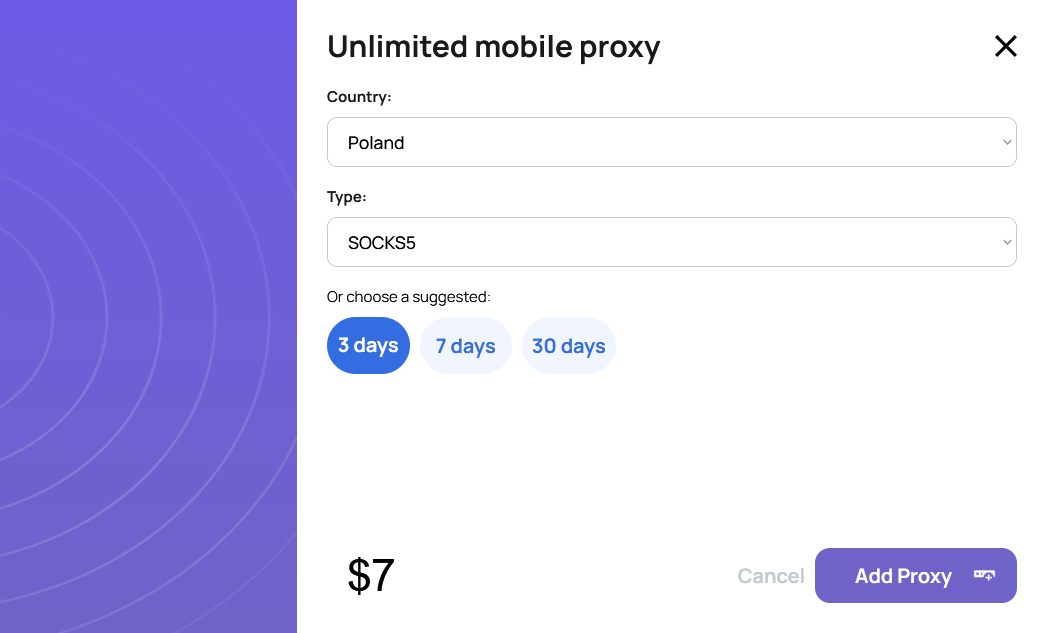
#### 🌍 Step 1: Choose Your Parameters
* Country from which you need the IP
* Proxy type: **HTTP** or **SOCKS5**
#### 🔸 Step 2: Choose a Plan
* **$7** — 3 days
* **$15** — 7 days
* **$45** — 30 days
#### 💳 Step 3: Pay Using Your Preferred Method
* 🔹 From account balance
* 💳 Bank card (instant crediting)
* 💰 Cryptocurrency (supports 20+ currencies)
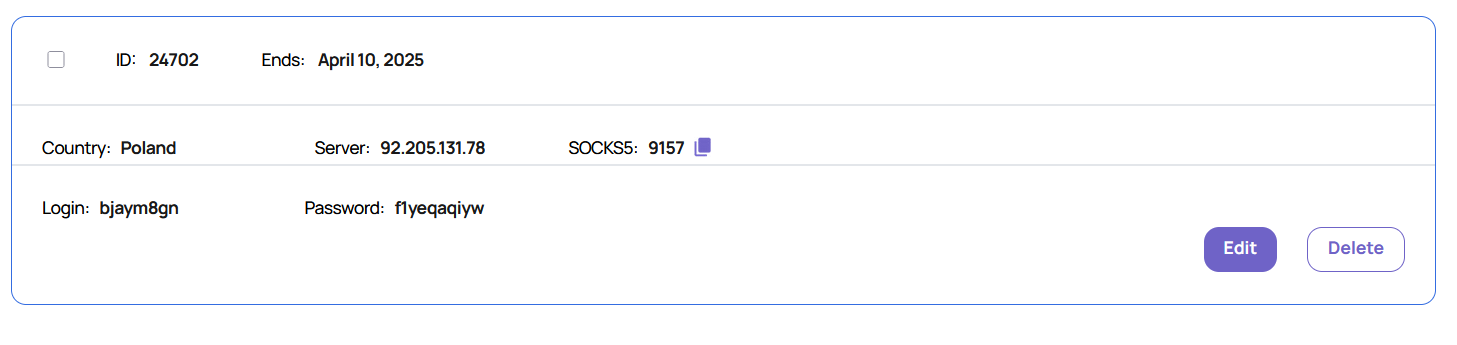
#### ✅ Step 4. Test the Mobile Proxy
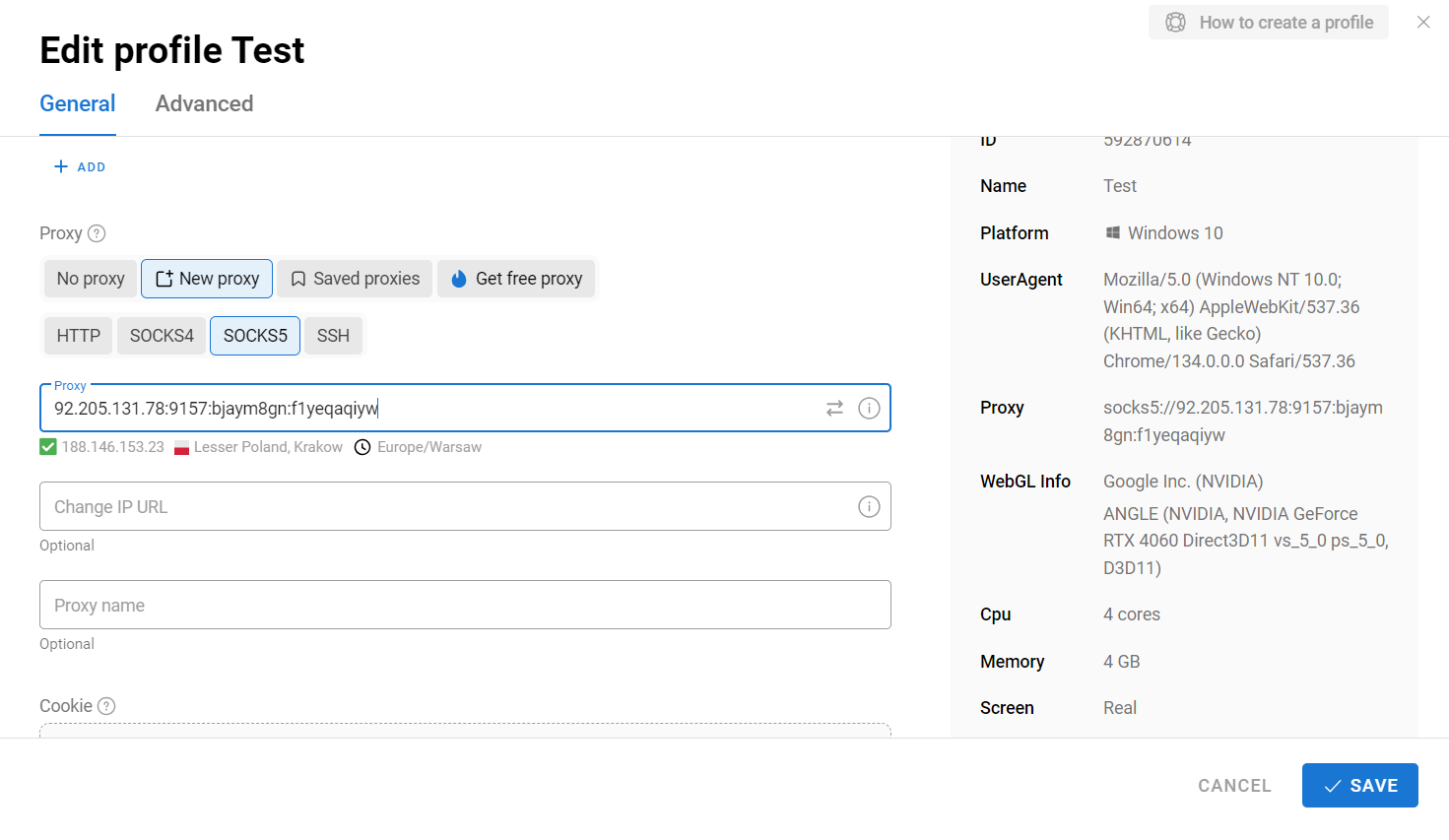
* Load the proxy into an anti-detect browser (e.g., Dolphin Anty)
* Create a new profile and set up the proxy
* Check its functionality
### 🔎 Test It on Popular Platforms:
* 📩 Gmail
* 📘 Facebook
* 💰 Binance
* 📸 Instagram
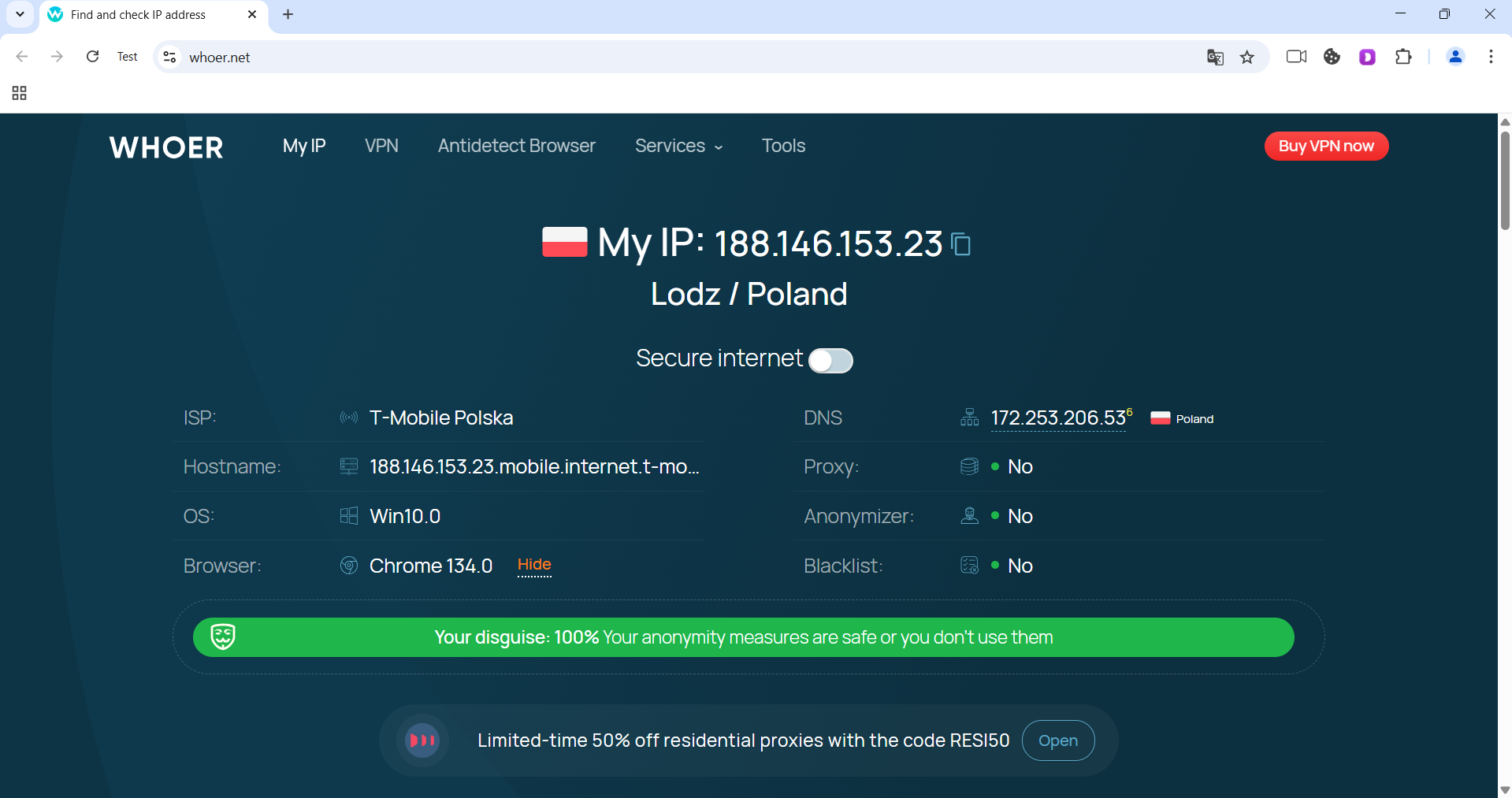
📍 Also check the IP and country on **whoer.net** — everything works fine 🎯
### 🎉 Done!
Now you can safely use the mobile proxy without any limitations or blocks.
***
### 👾 Try it here: [GonzoProxy.com](https://GonzoProxy.com)
***
### 📱 Stay Connected
* [Telegram Channel](https://t.me/GonzoProxy)
* [Telegram Chat ](https://t.me/GonzoProxy_Chat)
* [Instagram](https://www.instagram.com/gonzoproxy)
* [24/7 Support](https://t.me/GonzoProxy_bot)
💬 Our team is always here for you! Reach out anytime — we’ll solve any issue within minutes.
# 🚀 How to find a transaction HASH and what are cryptocurrency networks?
You sent cryptocurrency, and the seller suddenly asks:
> **“Please send the TxID and specify the transfer network!”** 🤔
Don’t worry — let’s break down in detail what this “network” is, why it’s important, and how to quickly find your transaction in any blockchain!
***
### 📌 What is a cryptocurrency network?
A cryptocurrency network (blockchain) is a decentralized database where all transactions of a specific cryptocurrency are recorded.\
Each cryptocurrency has its own network, so it’s important to select the correct one when transferring funds.
***
### 🔍 Why is this important?
If you send cryptocurrency using the wrong network, your funds could be **lost** or **delayed**.\
That’s why it’s crucial to **always double-check the network** before making a transfer!
***
### 📌 Examples of popular networks and cryptocurrencies
Here are some of the most common networks and the cryptocurrencies they support:
* 🟠 **Bitcoin** – Bitcoin (BTC)
* 🔷 **Ethereum** – Ethereum (ETH), USDT ERC-20, USDC ERC-20, and other ERC-20 tokens
* 💎 **Binance Smart Chain (BSC)** – BNB, USDT BEP-20, CAKE, and other BEP-20 tokens
* ⚡ **Solana** – Solana (SOL), USDC, NFTs, and other SPL tokens
* 🌀 **Polygon** – MATIC, USDT, USDC, and other tokens
* 💸 **XRP Ledger** – Ripple (XRP)
* 🧠 **Cardano** – Cardano (ADA)
* 🐶 **Dogecoin** – Dogecoin (DOGE)
* 🪙 **TRON** – TRON (TRX), USDT TRC-20
* 🧱 **TON** – Toncoin (TON)
***
### 📌 What is a Blockchain explorer?
🕵️♂️ A **blockchain explorer** is a website that allows you to view and track transactions of any cryptocurrency in real-time.
With a **TxID** (Transaction Hash) in a blockchain explorer, you can check:
* 📬 Sender and receiver addresses
* 💰 Amount and transaction fee
* ✅ Transaction status
* 🗓️ Date and time of the transfer
***
### 📌 How to find the sending network and TxID?
Here’s how to do it in popular services:
### 1️⃣ MetaMask 🦊
* Open MetaMask → go to **Activity**.
* Click on the transaction → **“Copy transaction ID”**.
* The network (Ethereum, BSC, Polygon) is shown at the top of MetaMask.
### 2️⃣ Trust Wallet 📱
* Open Trust Wallet → select **History**.
* Tap on the transaction.
* Copy the **transaction hash**.
* The network name is shown at the very bottom.
### 3️⃣ Exchanges (Binance, Bybit, OKX, etc.) 💱
* Go to the **“Transaction History”** or **“Withdrawal”** section.
* Open the transaction, find the **TxID** and the **specified network** (ERC-20, BEP-20, etc.).
***
### 📌 Popular blockchain explorers by network
Here is a handy list of blockchain explorers for various cryptocurrency networks:
#### 🟠 Bitcoin (BTC)
* [Blockchain.com](https://www.blockchain.com/)
* [Blockstream.info](https://blockstream.info/)
* [BTC.com](https://btc.com/)
* [Blockchair](https://blockchair.com/)
***
#### 🔷 Ethereum (ETH)
* [Etherscan.io](https://etherscan.io/)
* [Ethplorer.io](https://ethplorer.io/)
* [Blockchair.com](https://blockchair.com/)
***
#### 💎 Binance Smart Chain (BSC)
* [BscScan.com](https://bscscan.com/)
* [Ankrscan.io](https://ankrscan.io/)
***
#### ⚡ Solana (SOL)
* [Solscan.io](https://solscan.io/)
* [Explorer.solana.com](https://explorer.solana.com/)
***
#### 🌀 Polygon (MATIC)
* [Polygonscan.com](https://polygonscan.com/)
***
#### 💸 XRP Ledger (XRP)
* [XRPScan.com](https://xrpscan.com/)
* [Bithomp.com](https://bithomp.com/)
***
#### 🧠 Cardano (ADA)
* [CardanoScan.io](https://cardanoscan.io/)
* [AdaScan.net](https://adascan.net/)
***
#### 🐶 Dogecoin (DOGE)
* [Blockchair.com](https://blockchair.com/)
* [BlockCypher.com](https://live.blockcypher.com/)
***
#### 🪙 TRON (TRX)
* [Tronscan.org](https://tronscan.org/)
* [TronGrid.io](https://trongrid.io/)
***
#### 🧱 TON (Toncoin)
* [TONscan.org](https://tonscan.org/)
* [TON.live](https://ton.live/)
***
### 📌 Example of checking a transaction on Ethereum
👉 Paste the TxID (for example):\
`0xb4bc263278d3f77a652a8d73a6bfd8ec0ba1a63923bbb4f38147fb8a943da26d`\
into [Etherscan.io](https://etherscan.io/) and get detailed information.
* 📤 **Sender address**
* 📥 **Recipient address**
* 💰 **Amount in ETH**
* ✅ **Confirmation status**
* ⛽ **Transaction fee (gas)**
* 🗓️ **Date and time of the transaction**
***
### 📝 Final tips
✅ Always **verify the network** before sending cryptocurrency.\
✅ Use **reliable blockchain explorers**.\
✅ **Save the TxID** of important transactions in case of any disputes.
Now you're fully ready to identify the correct network and track any transaction using its TxID! 🎉
***
### 📱 Stay Connected
* [Telegram Channel](https://t.me/GonzoProxy)
* [Telegram Chat ](https://t.me/GonzoProxy_Chat)
* [Instagram](https://www.instagram.com/gonzoproxy)
* [24/7 Support](https://t.me/GonzoProxy_bot)
💬 Our team is always here for you! Reach out anytime — we’ll solve any issue within minutes.
# 🔧 Clearing your browser’s cache and cookies
If you see a **“Session expired”** message or any other error when trying to access the **GonzoProxy** website, you’ll likely need to clear your cache and cookies.
This helps remove outdated or broken data that might be preventing the site from working properly.
Below are step-by-step instructions for different browsers:
***
### 🧹 How to clear cache and cookies for a specific site
***
#### 🔵 Google Chrome
*(Also works for Yandex Browser, Opera, Microsoft Edge, and other Chromium-based browsers)*
1. Go to the [**GonzoProxy**](https://gonzoproxy.com/?utm_source=gitbook\&utm_medium=eng\&utm_content=coockie) website.
2. Click the **lock icon (🔒)** or **info icon** to the left of the website address in the address bar.
In the menu that appears, click **“Cookies and site settings”**.
In the popup window:
* Delete each entry.
* Click **Done** when finished.
3. **Optional – To also clear site cache:**
Press **F12** or **Ctrl + Shift + I** to open the developer tools.
Go to the **Application** tab.
In the left sidebar, choose **Storage**.
Check these boxes:
* **Cookies**
* **Cache Storage**
* **Local Storage**
Click **Clear site data**.
✅ Now refresh the page (**Ctrl + R**) and try logging in again.
***
#### 🟠 Mozilla Firefox
1. Visit the [**GonzoProxy**](https://gonzoproxy.com/?utm_source=gitbook\&utm_medium=eng\&utm_content=coockie) website.
2. Click the **lock icon (🔒)** to the left of the address bar.
* Choose **“Clear cookies and site data…”**.
* Confirm by clicking **Remove**.
3. **Optional – For deeper cleanup:**
* Click the menu button (three lines in the top right corner) → **Settings** → **Privacy & Security**.
* Scroll down to the **Cookies and Site Data** section.
* Click **Manage Data…**.
* Type **GonzoProxy** in the search box.
* Select the site and delete its data.
✅ Reload the site and check if the issue is resolved.
***
### ⚠️ Important Notes:
* Clearing cookies and cache will log you out of the site (if you were logged in).
* You might need to refresh the page after cleanup:
* **Windows/Linux** — `Ctrl + R`
* **macOS** — `Cmd + R`
***
### 👾 Try it here: [GonzoProxy.com](https://gonzoproxy.com/?utm_source=gitbook\&utm_medium=eng\&utm_content=coockie)
***
### 📱 Stay Connected
* [Telegram Channel](https://t.me/GonzoProxy)
* [Telegram Chat ](https://t.me/GonzoProxy_Chat)
* [Instagram](https://www.instagram.com/gonzoproxy)
* [24/7 Support](https://t.me/GonzoProxy_bot)
💬 Our team is always here for you! Reach out anytime — we’ll solve any issue within minutes.
# 🥸 Anti-detect browser Dolphin{anty}
In this video, we show how to set up GonzoProxy residential proxies in the anti-detect browser Dolphin{anty}.
{% embed url="" %}
# 🔍 Setup AdsPower
Imagine juggling multiple online accounts—be it for social media, e-commerce, or marketing—without the constant fear of getting them all banned. That's where **AdsPower** steps in. This anti-detect browser is a favorite among affiliate marketers, e-commerce pros, and anyone managing numerous accounts.
***
### 🧠 **Why AdsPower stands out**
In a sea of browsers claiming "anonymity and security," **AdsPower** truly delivers. It's more than just a profile manager; it's a comprehensive platform catering to both beginners and seasoned teams. Here's why AdsPower is a game-changer:
#### 1. **Mastering browser fingerprints** 🧬
Controlling browser fingerprints is fundamental for anti-detect browsers, and AdsPower takes it to the next level. You're not just tweaking headers or user agents; you're crafting an entire digital persona.
**Key features:**
* **Mobile OS Fingerprints:** Supports not just desktop OS but also mobile ones like Android and iOS. This is crucial for platforms like TikTok and Instagram that prioritize mobile users.
* **Dual Engine Support:** Work with both Chromium and Firefox. Most browsers stick to one engine, but AdsPower offers flexibility.
* **Comprehensive Customization:** Adjust everything from GPU, WebGL, WebRTC, system language, fonts, device noise, screen resolution, and more. You can manually create a "digital fingerprint" that mirrors any user.
📌 **Bottom Line:** AdsPower doesn't just hide your identity; it makes you appear as a completely different user to anti-fraud systems—seamlessly and without glitches.
***
#### 2. **Code-free automation** ⚙️
AdsPower comes equipped with RPA (Robotic Process Automation), allowing you to automate browser actions without any coding skills.
**Automation capabilities:**
* **Script-Free Scenarios:** Launch automation sequences without writing a single line of code.
* **User Actions:** Automate clicks, page navigations, text inputs, logins/logouts, and multi-account management.
* **Templates:** Utilize pre-built templates to avoid starting from scratch.
The entire setup is visual and intuitive, making it accessible even for those without a technical background.
📎 **Learn More:** [AdsPower RPA Guide](https://www.adspower.com/blog/step-by-step-instructions-for-using-rpa-automation-from-adspower)
***
#### 3. **Unique synchronizer tool** 🧩
AdsPower's Synchronizer is a standout feature you won't find elsewhere. It lets you perform the same action across multiple browser profiles simultaneously—no scripts, no plugins, no hassle.
**Synchronizable actions:**
* **Navigation:** Open links across profiles.
* **Text Input:** Enter text fields simultaneously.
* **Form Filling:** Complete forms in bulk.
* **Clicks:** Click buttons across profiles.
* **Extensions:** Install browser extensions en masse.
Think of it as mirroring actions across tabs. One click, and it's replicated in 10, 50, or even 100 profiles. Ideal for managing account networks, duplicating tasks, or executing bulk actions—all without additional programming or paid add-ons.
📎 **Discover More:** [AdsPower Synchronizer](https://www.adspower.com/blog/post/Synchronizer)
***
#### 4. **Streamlined team collaboration** 👥
AdsPower excels in team management, offering more than just user additions. It's a full-fledged system for controlling access and actions within the browser.
**Team features:**
* **Permission Levels:** Define who can view or edit specific profiles.
* **Activity Logs:** Track who did what and when, making it easy to identify any issues.
* **Task Assignment:** Delegate responsibilities like account farming, launching, or monitoring.
Perfect for agencies, affiliate teams, and partnerships where collaboration is key.
***
### 💻 **Getting started with AdsPower**
**Installation Steps:**
1. **Download:** Visit the [official AdsPower website](https://www.adspower.com/) and click "Get Started."
2. **Choose OS:** Select the installer for your operating system (Windows or Mac).
3. **Install:** Open the downloaded file and follow the on-screen instructions. Mac users might need to grant installation permissions.
***
### 📝 **Setting up AdsPower**
**Registration process:**
1. **Launch AdsPower:** Open the application and click on "Sign Up."
2. **Fill Details:** Enter your email, create a password, input the verification code, and click "Register."
3. **Alternative Sign-Up:** You can also register using social accounts like Google, Facebook, or VK.
Once registered, you'll access your dashboard to create and customize unique profiles.
***
### 🔧 **Configuring AdsPower**
Setting up AdsPower involves four main components: **Profile**, **Proxy**, **Fingerprint**, and **Cookies**. Let's break it down:
***
#### 1. **Profile setup: crafting a new identity**
Each profile simulates a unique user environment, making it appear as if each account operates from a different device.
**Steps:**
* **New Profile:** Click "New Profile" in the top-left corner.
* **Profile Name:** Choose a name like `fb_account_1` or `shop_test2`.
* **Browser:** Select between Chrome or Firefox.
* **Operating System:** Choose MacOS or Windows.
* **User-Agent:** Let AdsPower auto-select for optimal results.
* **Group:** Organize profiles into groups like "Google Ads Test."
* **Cookies:** Skip for now; we'll address this later.
* **Notes:** Add reminders like "Account for white-hat campaigns" or "For farming."
***
#### 2. **Proxy integration: masking your IP**
Proxies are essential for changing your IP address, giving each profile a distinct online presence.
**Example:**
You've purchased US residential proxies from [GonzoProxy ](https://gonzoproxy.com/?utm_source=gitbook\&utm_medium=anti-detekt-brauzer-adspower)and received the following:
`Gonzoj9CiIi_c_US_sd_443_s_663698TEC_ttl_72h:RNW78Fm5@pool.gonzoproxy.com:1000`
**Configuration:**
* **Proxy Type:** Select SOCKS5 or HTTPS.
* **Host:** `pool.gonzoproxy.com`
* **Port:** `1000`
* **Username:** `Gonzoj9CiIi_c_US_sd_443_s_663698TEC_ttl_72h`
* **Password:** `RNW78Fm5`
***
#### ✅ **3. Proxy verification**
After entering the proxy details, click "Check Proxy."
A green checkmark indicates:
* **Active Proxy:** The proxy is functioning correctly.
* **Live IP:** The IP address is valid.
* **Ready to Use:** Safe to proceed with this configuration.
If the check fails, double-check for typos or incorrect entries.
***
#### 4. **Fingerprint customization: fine-tuning your profile**
Adjust various settings to ensure each profile mimics a real user's environment:
* **WebRTC:** Disable to prevent IP leaks.
* **Timezone:** Set based on IP to avoid discrepancies.
* **Geolocation:** Align with IP address.
* **Language:** Match system language to IP location.
* **App Language:** Consistent with IP-based language.
* **Screen Resolution:** Use predefined settings for authenticity.
* **Fonts:** Stick to default to blend in.
* **Hardware Noise:** Enable all to simulate real device behavior.
* **WebGL Metadata:** Manually set to common values like "Google Inc." or "Apple."
* **WebGPU:** Base on WebGL settings for consistency.
With these configurations, your profile will appear as a distinct user with a unique IP, device, language, and behavior.
***
### 💸 **Pricing plans**
AdsPower offers flexible pricing to suit various needs:
* **Free Plan:** Manage up to 5 profiles at no cost.
* **Paid Plans:** Starting at $5.4 per month, depending on the number of profiles and team members.
For users who want to try it before buying, there’s a **free 3-day trial**, after which the price is **$14 per month**.
***
**In Summary:**
AdsPower is a robust tool designed for secure and efficient multi-account management. Whether you're an affiliate marketer, seller, trader, or anyone handling multiple online accounts, AdsPower provides the anonymity and control you need to operate safely and effectively.
***
### 📱 Stay Connected
* [Telegram Channel](https://t.me/GonzoProxy)
* [Telegram Chat ](https://t.me/GonzoProxy_Chat)
* [Instagram](https://www.instagram.com/gonzoproxy)
* [24/7 Support](https://t.me/GonzoProxy_bot)
💬 Our team is always here for you! Reach out anytime — we’ll solve any issue within minutes.
# 🐬 Setup Dolphin{anty}
You’ve bought residential or mobile proxies from GonzoProxy. Now your task is simple: Quickly set them up in Dolphin{anty} and get started.
### 🔧 Optimal Settings in Dolphin{anty}
These settings work great for Facebook, TikTok, Google, crypto, and similar tasks:
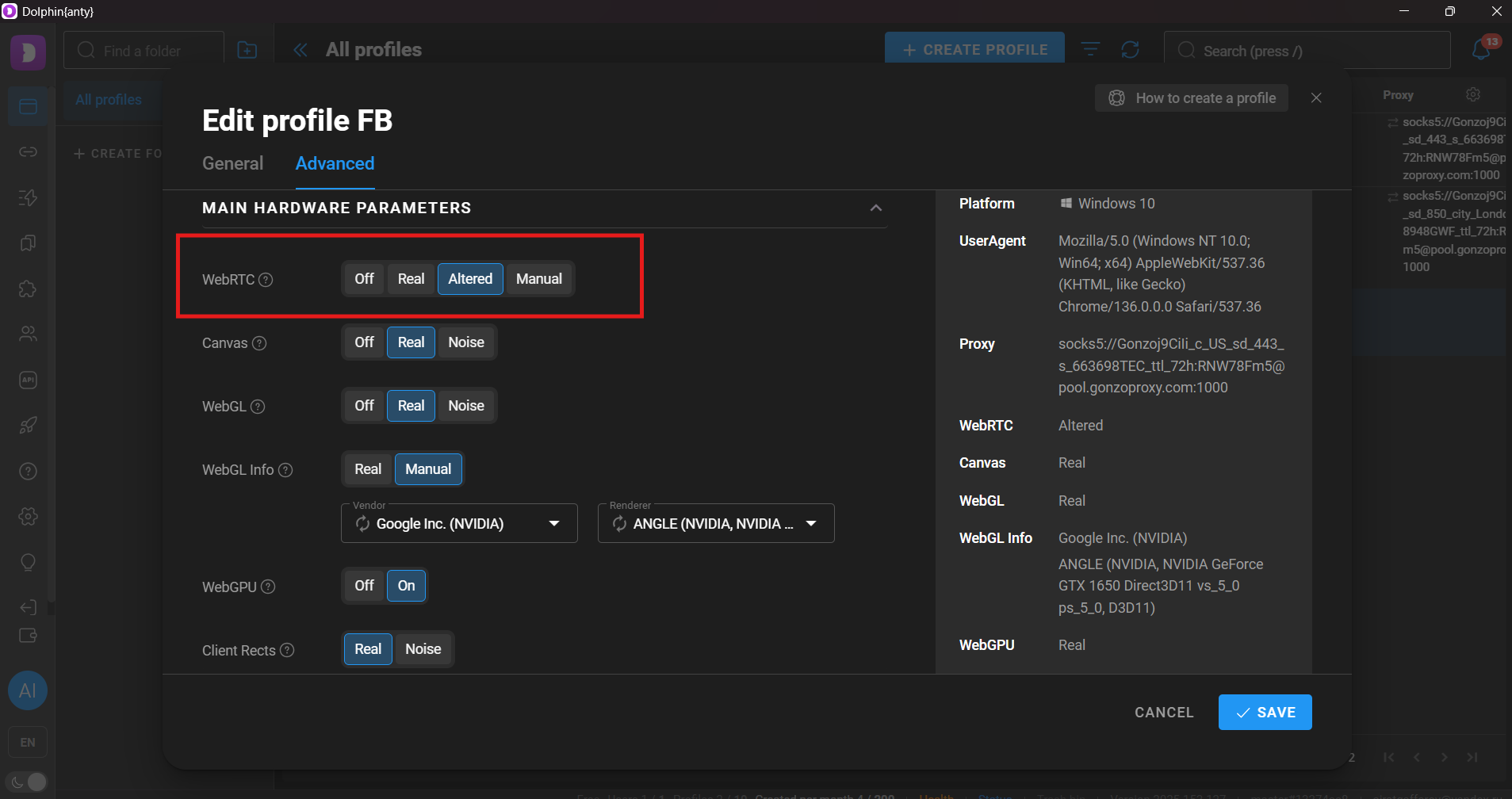
#### 1. WebRTC
* Choose **Altered** to replace your real IP with your proxy IP.
* **Manual**: Only if you have a static IP and know what you’re doing.
* **Off/Real**: Never use—risky, leaks your real IP.
→ **Result:** Your IP matches your GonzoProxy IP without leaks.
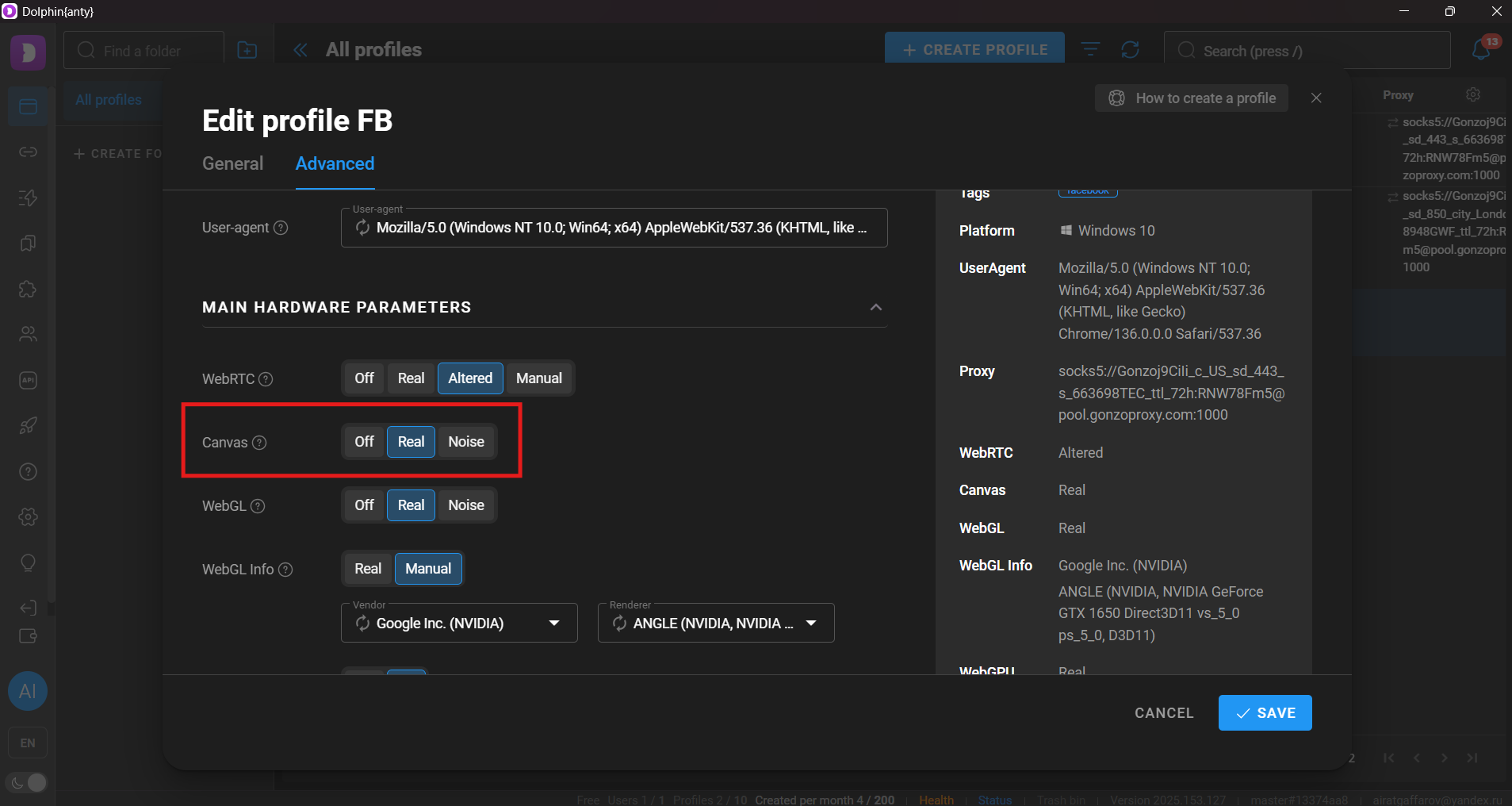
#### 2. Canvas
* **Noise**: For mass account creation, CPA, push, TikTok automation.
* **Real**: For manual work, farming, or long-term accounts.
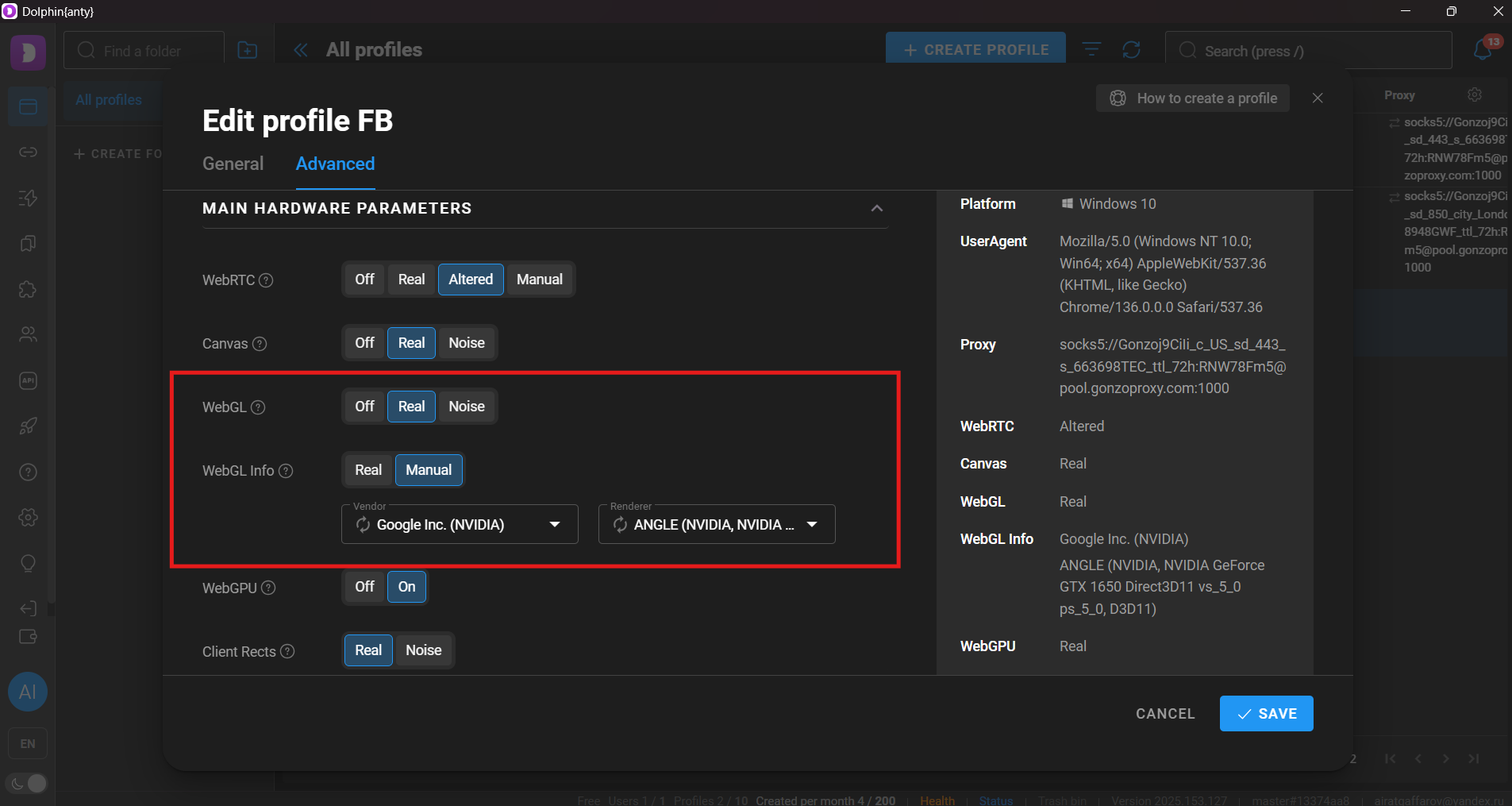
#### 3. WebGL + WebGL Metadata
* **WebGL:** Choose **Noise**—adds slight uniqueness but realistic.
* **WebGL Info:** Set to **Real**, matching your GPU data. Choose **Manual** only if you’re confident about your hardware setup.
→ Realistic graphics that avoid suspicion on platforms like Facebook, TikTok, etc.
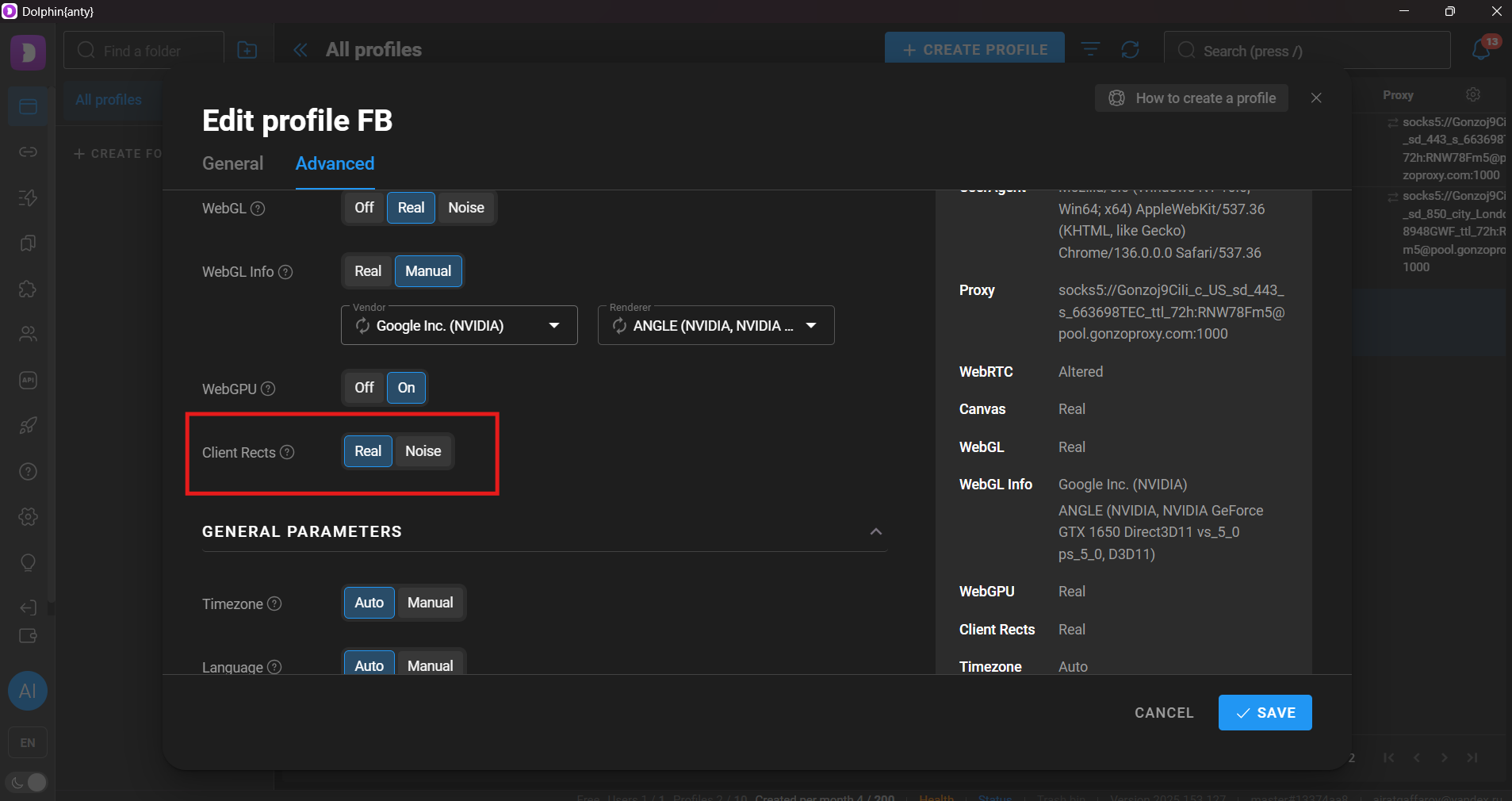
#### 4. ClientRects
* **Real**: If you’re working alone without transferring profiles.
* **Noise**: When profiles are used on multiple devices or by multiple people (e.g., Windows → Mac).
→ **Noise** helps prevent suspicion caused by differences in text rendering across OSes.
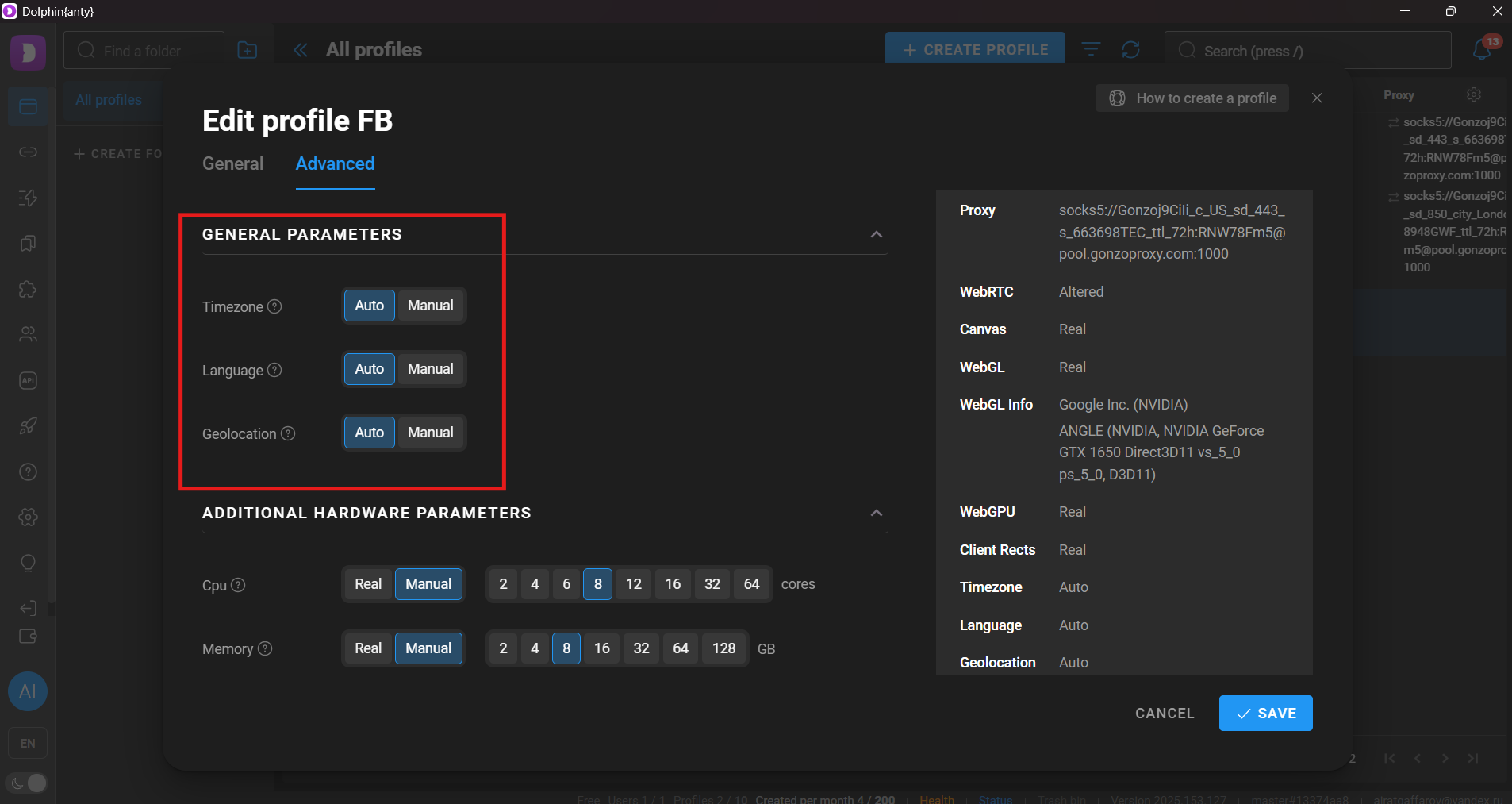
#### 5. Language, Timezone, and Geo
* Set to **Auto** when using GonzoProxy.
* Dolphin automatically sets correct timezone, language, and location.
* If you have a sticky IP, you can manually fix the location.
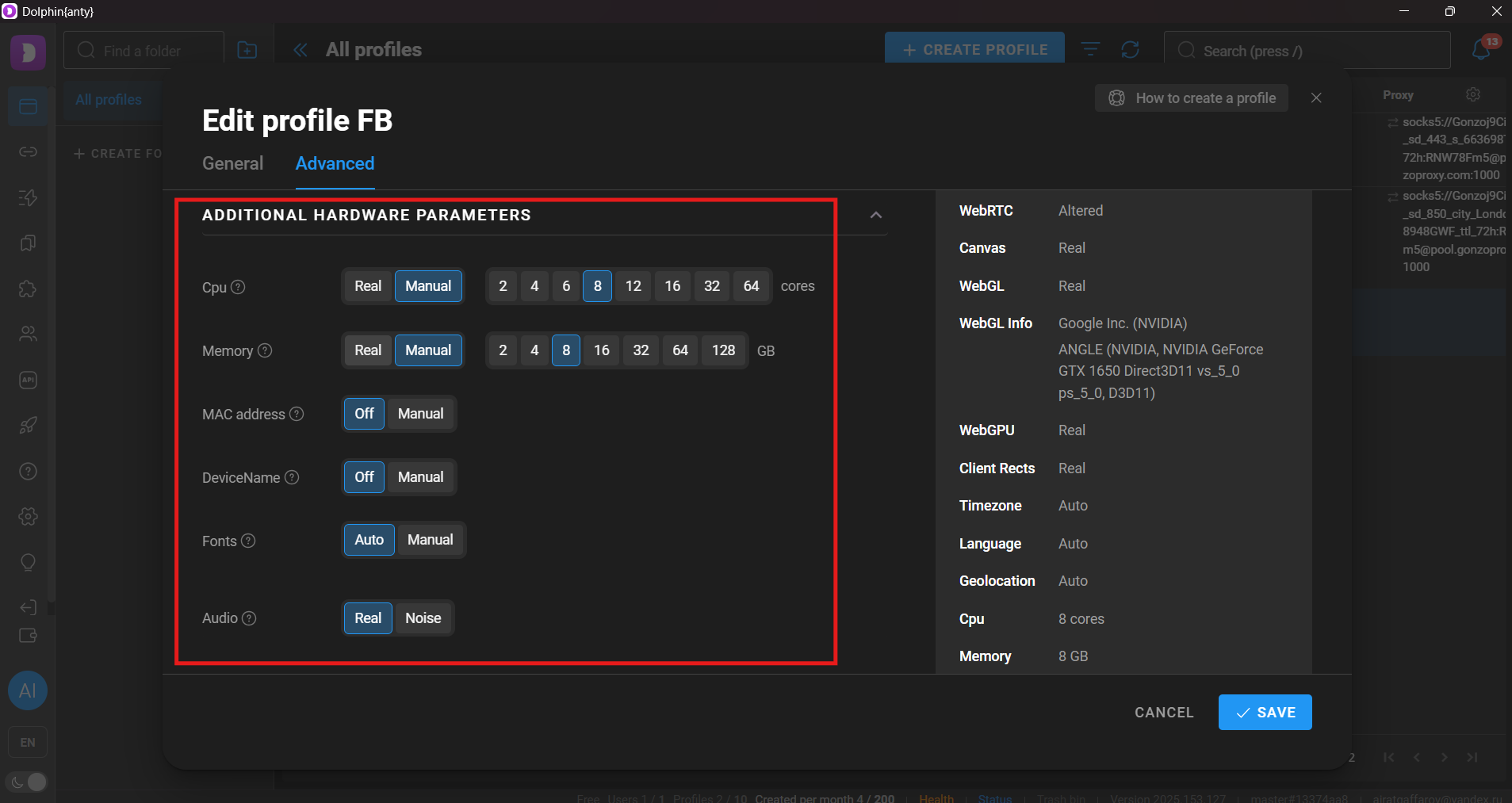
#### 6. Navigator (CPU, RAM, Fonts)
* Leave this default unless you know exactly what you’re doing.
* Facebook won't ban you for standard settings (like 2 cores, 8GB RAM), but mismatches (e.g., 1 core with Macbook M3 User-Agent) can raise flags.
### 🔌 Connecting proxies in Dolphin{anty}
* Go to **Proxies** (left sidebar).
* Click **Import proxies**.
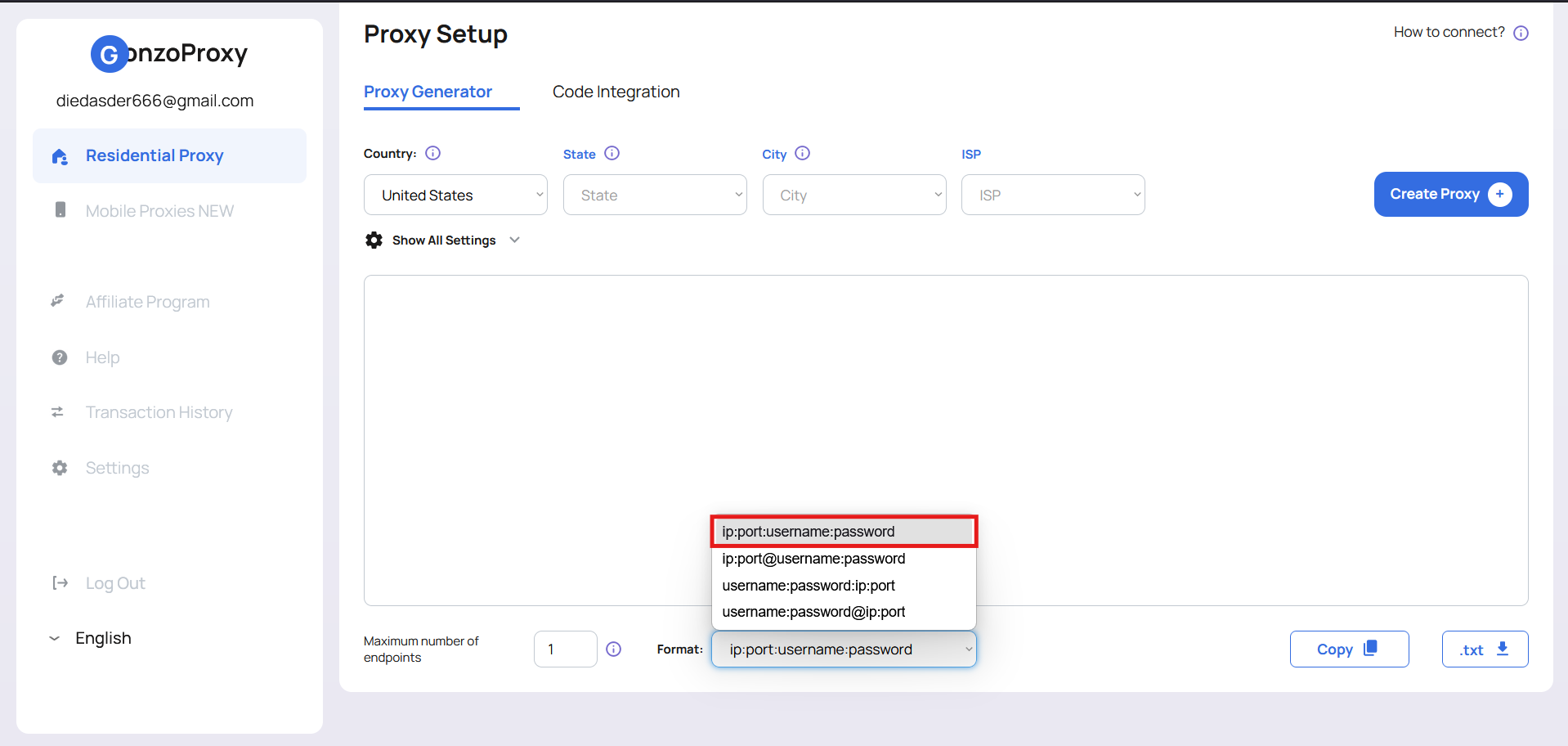
* Paste proxies in the format:
```
login:password@host:port
```
Example with GonzoProxy:
```
Gonzoj9CiIi_c_US_sd_443_s_663698TEC_ttl_72h:RNW78Fm5@pool.gonzoproxy.com:1000
```
You can paste up to 50 proxies at once (each on a new line).
* Click **Check** — Dolphin verifies proxies automatically. ✅ means ready to use.
#### 🔹 Where to insert proxies into your profile?
* When creating/editing your profile, open the **Proxy** tab.
* Choose the correct type: **SOCKS5** or **HTTP(S)**.
* Paste the full proxy string without breaking it up:
```
login:password@host:port
```
Dolphin parses automatically—just keep the format intact.
### 🧭 Sticky or Randomize IP?
GonzoProxy provides two types of IP rotation. Choose according to your needs:
* 🔒 **Sticky IP (fixed session)**\
Use for:
* Facebook, TikTok, Google Ads (farming, warming, regular usage)
* Crypto exchanges, wallets
* Manual tasks, long-term projects
***
* 🔄 **Randomize IP (new IP every request)**\
Ideal for:
* Mass account creation
* Parsing or automated software
* Aggressive CPA marketing
* Short-lived profiles
***
### ✅ Final Check—You’re All Set
* ✅ Proxies uploaded
* ✅ Connection tested
* ✅ Profiles configured optimally
***
📦 **GonzoProxy** is your reliable IP base.\
🐬 **Dolphin{anty}** is your interface.
Work fast, work clean, avoid bans—the rest are just details.
***
### 👾 Try it here: [GonzoProxy.com](https://GonzoProxy.com)
***
### 📱 Stay Connected
* [Telegram Channel](https://t.me/GonzoProxy)
* [Telegram Chat ](https://t.me/GonzoProxy_Chat)
* [Instagram](https://www.instagram.com/gonzoproxy)
* [24/7 Support](https://t.me/GonzoProxy_bot)
💬 Our team is always here for you! Reach out anytime — we’ll solve any issue within minutes.
# 🦑 Setup Octo Browser
If you're an affiliate marketer, media buyer, or advertising specialist, you've definitely run into account bans at some point. Platforms are constantly on the lookout for suspicious activity and will block your ad accounts at the slightest hint of trouble. To get around these bans and scale your operations safely, special tools like **anti-detect browsers** are used.
One of the most popular and effective options is [**Octo Browser**](https://octobrowser.net/).
In this guide, we'll take a detailed look at how to set up Octo Browser with [**GonzoProxy**](/) residential proxies to ensure maximum security and efficiency for your tasks.
***
For our readers, we have a special [**promo code GONZO30**](https://octobrowser.net/) — use it on your first Octo Browser subscription purchase to get a 30% discount.
***
## 📌 Key features of Octo Browser
### 1️⃣ Human-like typing simulation
The **"Paste as Human Typing"** feature lets you paste text character by character, simulating real typing. This greatly reduces the risk of raising red flags with anti-fraud systems.
**How to use it:**
* Copy the text you need to your clipboard.
* In Octo Browser, right-click in a text input field and select **"Type text from clipboard."**
* Or use the hotkey: **CTRL + SHIFT + E**.
* Octo will then automatically type out the text at variable speeds — just like a real person.
***
### 2️⃣ Installing extensions
Extensions are add-ons that expand the browser’s capabilities. You can easily install any Chrome extension in Octo Browser from the regular Chrome Web Store.
{% embed url="" %}
***
### 3️⃣ Trash bin
Accidentally deleted an important profile? No worries — Octo Browser has a **Trash Bin** where deleted profiles are stored for up to **48 hours** and can be restored.
{% hint style="info" %}
After 48 hours, profiles are permanently deleted and can’t be recovered.
{% endhint %}
{% embed url="" %}
***
### 4️⃣ Cookie robot
The **Cookie Robot** in Octo Browser automatically visits the URLs you provide and collects cookies and pixels. This helps your profile look more "real" and "warmed up" to anti-fraud systems.
**How it works:**
* The more URLs you load, the longer the robot will run.
* Once done, all collected cookies are saved to the profile.
* You can view the collected cookies here: `chrome://settings/content/all`.
{% embed url="" %}
***
### 5️⃣ Webcam stream replacement
This unique feature lets you **replace your webcam feed** with a pre-recorded video. (Available on Windows.)
**Video file requirements:**
* Formats: `.mp4` or `.mov`
* Codec: `h264`
* Max size: **50 MB**
{% embed url="" %}
***
### 6️⃣ Team collaboration
Octo Browser is perfect for teamwork:\
\
✅ Easily share profiles, cookies, and proxies\
✅ Fine-grained control over roles and access\
✅ Track activity history for each team member\
✅ Create tasks, assign team members, and set deadlines
{% embed url="" %}
***
### 7️⃣ Profile templates
**Templates** let you pre-configure profile settings, making it easy to quickly create new accounts:
* Proxies, extensions, tags, profile icons, start pages — all pre-set.
* You can edit all profile settings except the selected operating system.
* Templates are available with all subscription plans and can be password-protected.
{% embed url="" %}
***
### 🛠️ Creating 20 profiles with GonzoProxy residential proxies
### 📍 Step 1: Prepare proxies in [GonzoProxy](https://gonzoproxy.com/?utm_source=gitbook\&utm_medium=octobrowser\&utm_content=eng)
* Create **20 residential proxies** (for example, US-based).
* Your proxy format will look like this:
```
Gonzoj9CiIi_c_US_s_204976RWZ_ttl_72h:RNW78Fm5@pool.gonzoproxy.com:1000
```
* Add `socks5://` or `https://` before the proxy string:
```
socks5://Gonzoj9CiIi_c_US_s_204976RWZ_ttl_72h:RNW78Fm5@pool.gonzoproxy.com:1000
```
* Paste the proxies into Octo Browser.
***
### 📍 Step 2: Create and configure a profile template
* Set a profile name and choose an icon.
* Assign the 20 proxies from Step 1.
* Add tags, start pages, and bookmarks.
* Enable protection options (noise): **WebGL, Canvas, Audio, Client Rects**.
* Set language, timezone, and geolocation to **"Based on IP."**
* Install any required extensions.
***
### 📍 Step 3: Bulk profile creation
* Go to the **Bulk Profile Creation** mode.
* Set quantity: **20 profiles**. Click **"Add"** and save.
🎉 Done! You now have **20 unique and protected profiles** ready to go.
***
By using [**Octo Browser**](https://octobrowser.net/) together with **residential proxies from** [**GonzoProxy**](https://gonzoproxy.com/?utm_source=gitbook\&utm_medium=octobrowser\&utm_content=eng), you get a **powerful, safe, and proven setup** that helps you:\
\
✅ Avoid bans and account blocks\
✅ Scale your ad campaigns with confidence\
✅ Work efficiently as a team
Leverage this tool to its full potential — and may your work be smoother and more profitable!
***
### 👾 Try it here: [GonzoProxy.com](https://gonzoproxy.com/?utm_source=gitbook\&utm_medium=octobrowser\&utm_content=eng)
***
### 📱 Stay Connected
* [Telegram Channel](https://t.me/GonzoProxy)
* [Telegram Chat ](https://t.me/GonzoProxy_Chat)
* [Instagram](https://www.instagram.com/gonzoproxy)
* [24/7 Support](https://t.me/GonzoProxy_bot)
💬 Our team is always here for you! Reach out anytime — we’ll solve any issue within minutes.
# 🥸 Setup GoLogin
Want to create tons of accounts, avoid bans, and handle traffic like a pro?\
Then forget about "just a proxy" and "just a browser."\
You need a real combo: GoLogin + GonzoProxy — a proven duo for arbitrage, farming, and any task where anonymity is key.
***
### 🔧 Setting Up GoLogin with GonzoProxy
#### 1. Choose Your Proxy Type
**Mobile IPs (3G/4G):**
* Ideal for account registration
* Perfect for mobile apps and behavior emulation
**Residential IPs:**
Best for:
* Creating accounts without bans
* SEO promotion
* Ads (Google Ads, Facebook)
* Quick checkouts (sneakers, PS5, etc.)
* Software testing
***
#### 2. IP Rotation (for residential proxies)
* **Sticky IP** — one IP for 30 sec to 7 days\
Great for social media, crypto, warm-up sessions. Stability = trust.
* **Random IP** — new IP for every request\
Perfect for scraping, parsing, and automation.
***
### 📦 How to Add Proxies in GoLogin
Let’s say you bought US residential proxies from GonzoProxy and received this string:
`Gonzoj9CiIi_c_US_sd_443_s_663698TEC_ttl_72h:RNW78Fm5@pool.gonzoproxy.com:1000`
Here's what you use:
* Supports both protocols: HTTPS / SOCKS5
* Host: `pool.gonzoproxy.com`
* Port: `1000`
* Login: `Gonzoj9CiIi_c_US_sd_443_s_663698TEC_ttl_72h`
* Password: `RNW78Fm5`
Paste this data into your anti-detect browser.
Click **Check Proxy**.
✅ Proxy passed: United States • US • Fresno
***
### 🧠 Fine-Tune Your GoLogin Profile
#### 🌍 WebRTC
* Enable and spoof to proxy IP
* ❌ Do NOT disable completely — it’s a red flag
***
#### ⏰ Timezone
* Enable auto-detection by IP
***
#### 📍 Geolocation
* Allow when a site requests it
***
### 📋 "Other Settings" in GoLogin
| Setting | Recommended Value | Why It Matters |
| --------------------------------------------------- | ------------------------------------------------------------------ | ------------------------------------------------------------ |
| **User-Agent** | Match proxy (Android UA for mobile, Windows/macOS for residential) | Must reflect device and IP type |
| **Screen Resolution** | 360×740 (mobile) / 1920×1080 (desktop) | Mismatch can flag detection |
| **Languages** | Based on IP (e.g. `fr-FR, en-US`) | Language must match IP geo |
| **Platform** | Android, Win32, MacIntel | Based on selected OS |
| **CPU Threads** | Mobile: 4–8Desktop: 8–16 | Matches real-world devices |
| **RAM** | Mobile: 3–6 GBDesktop: 8–16 GB | Must be device-appropriate |
| **Fonts** | Enable font spoofingRoboto (mobile) / Segoe UI (desktop) | Missing fonts = obvious fake |
| **Media Device Masking** | Enable | Prevents exposure of real audio/video fingerprints |
| **Canvas** | Enable noise | Needs to differ, but not be broken |
| **ClientRects** | Enable noise | Uniform values = pattern detection |
| **AudioContext** | Enable noise | Widely used fingerprint |
| **WebGL Image** | Enable noise | Helps blur unique rendering signature |
| **WebGL Vendor** | Qualcomm (mobile) / Intel, NVIDIA (desktop) | Should align with proxy/device type |
| **WebGL Renderer** | Adreno 650, Mali-G78, Intel UHD, GT 1030, etc. | Don’t mismatch GPU and device |
| **Local Storage** | Enable | Required for realistic session behavior |
| **Extension Storage** | Enable | Especially if using custom extensions |
| **Vulnerable Browser Plugins** | Disable | Enabling opens you up to fingerprinting |
| **Block Active Sessions** | Enable | Prevents one profile running on multiple machines |
| **Enable Google Services** | Enable | Makes Chrome behavior more believable |
| **Save Bookmarks / History / Passwords / Sessions** | All enabled | Simulates natural browsing sessions |
| **System Extensions** | Disable | May reveal real OS if transferring profiles between machines |
***
### 🔌 Extensions
Install extensions in advance if your workflow requires them.
***
### 🚨 Anti-Ban Checklist: What NOT to Do
* ❌ One proxy ≠ multiple profiles. One IP = one profile, always.
* ❌ Don’t reuse Canvas or WebGL. It leaves a fingerprint trail.
* ❌ Timezone + Language + UA must match — or you're flagged.
* ❌ Never reuse IPs (especially for Facebook) — instant bans.
***
### ✅ Why GoLogin + GonzoProxy Works
* Clean, high-quality IP addresses
* Advanced fingerprint spoofing
* Full control over browser environment
Want to scale up safely, preserve your accounts, and work like a pro?\
This combo is for you.
🧠 Set it → Check it → Launch it → Keep it alive.\
Work like a pro.
***
### 👾 Try it here: [GonzoProxy.com](https://GonzoProxy.com)
***
### 📱 Stay Connected
* [Telegram Channel](https://t.me/GonzoProxy)
* [Telegram Chat ](https://t.me/GonzoProxy_Chat)
* [Instagram](https://www.instagram.com/gonzoproxy)
* [24/7 Support](https://t.me/GonzoProxy_bot)
💬 Our team is always here for you! Reach out anytime — we’ll solve any issue within minutes.
# ⚡️ Setup GeeLark
Scaling isn’t just about running more accounts. It’s about stability, invisibility, and accurately mimicking real user behavior. Today’s platforms look beyond the browser: into hardware, device behavior, networks, and environment. Emulators and anti-detect tools no longer cut it — too templated, too obvious.
**GeeLark** is a cloud-based Android that looks and works like a real smartphone. No anti-detect browser or emulator offers this level of realism. For apps and platforms, it’s a full-fledged physical device with all the technical specs.
***
### ⚙️ Setting up GeeLark with mobile proxies from GonzoProxy
#### Step 1: Choose your country and proxy type in the GonzoProxy dashboard
Copy:
* **IP** – `92.205.131.78`
* **Port** – `9037`
* **Login** – `31q6ug7d`
* **Password** – `usq15_w5h9`
#### Step 2: Create a new profile in GeeLark
Enter the proxy data you received from GonzoProxy and click **Check proxy**:
\
✅ Proxy works great
***
### Then configure your device parameters according to the proxy:
* **Operating System**: Android / iOS
* **OS Version**: Choose desired or current version
* **Location**: Auto-detect based on proxy IP
* **Device Brand**: Set to random
* **Device Model**: Random selection
* **Interface Language**: Auto-select based on IP
Once saved, the cloud device will be adapted to the proxy, and its parameters will closely mimic a real user from the selected region. This creates a clean digital footprint and reduces detection risk.
***
### 🔥 Extra features in GeeLark that speed up your workflow
#### 🔁 Synchronizer
It allows users to manage multiple cloud phones simultaneously. Actions performed in the main profile are automatically replicated across all connected profiles. This massively cuts down the time needed to perform the same task on multiple accounts.
*📌 Perfect for account warming and large-scale operations.*
***
### 🤖 Ready-made automation templates
GeeLark provides ready-to-use automation templates for popular apps like TikTok and Facebook. These templates can automate:
* Account login and setup
* Profile editing and configuration
* Content posting and scheduling
* Engagement actions (likes, follows, comments)
* Analytics tracking and reporting
* “Warming up” accounts to look natural
In **TikTok**, automation templates are especially powerful — supporting automatic login for multiple accounts, bulk profile editing (avatars, usernames, bios), video publishing schedules with batch editing, and human-like action emulation for natural warming.
***
### 🧠 GeeLark AI
GeeLark now features AI support powered by **DeepSeek**. This assistant helps with content creation and makes understanding and using GeeLark easier. Plus, feel free to ask the GeeLark AI anything else you need!
***
### 🧑🤝🧑 Features for Teams and Agencies
In GeeLark, you can create roles with different access levels for each team member and easily share profiles with any team participant, streamlining your workflow.
***
### ✅ Why this combo works❓
GeeLark gives you a real Android device.\
GonzoProxy gives you a real mobile IP.
* No overlap between accounts
* No leaks from geo, language, IP, or behavior
* No hacks or manual farming on dozens of phones
You work through a browser — but to the platform, it looks like a real phone user.\
Not just one, but dozens. And each one — clean.
**That’s what scaling without breaking looks like.**
***
### 👾 Try it here: [GonzoProxy.com](https://GonzoProxy.com)
***
### 📱 Stay Connected
* [Telegram Channel](https://t.me/GonzoProxy)
* [Telegram Chat ](https://t.me/GonzoProxy_Chat)
* [Instagram](https://www.instagram.com/gonzoproxy)
* [24/7 Support](https://t.me/GonzoProxy_bot)
💬 Our team is always here for you! Reach out anytime — we’ll solve any issue within minutes.
# 🕵️ Setup AntBrowser
If you work with multi-accounts, arbitrage, or SMM, then you know that an anti-detect browser is not a luxury, but a necessity.
\
**AntBrowser** is an anti-detect browser that allows you to create and manage multiple profiles, each of which simulates a separate device with unique parameters. This is especially useful for working with social networks, advertising platforms, and other services where it is important to avoid blocks and ensure anonymity.
***
### 🎯 Features of the AntBrowser anti-detect browser
Here is the rewritten section without changing the style and other text, with accurate consideration of the AntBrowser interface logic:
#### 1. Warm-up Tool
The **“Warm-up”** function in **AntBrowser** allows you to automatically visit specified websites, simulating the behavior of a real user. This helps to increase trust in accounts and reduce the risk of bans.
**How it works:**\
Go to the **Warm-up** section
Create a template — for example, `WarmUp_basic_set_1`
Specify:
* Template name
* Time range on site — for example, from 60 to 180 seconds
* List of URLs — for example:
* [https://www.bbc.com](https://www.bbc.com/)
* [https://www.reddit.com](https://www.reddit.com/)
* [https://www.imdb.com](https://www.imdb.com/)
* [https://www.quora.com](https://www.quora.com/)
* [https://www.wikipedia.org](https://www.wikipedia.org/)
* [https://www.nationalgeographic.com](https://www.nationalgeographic.com/)
* [https://www.medium.com](https://www.medium.com/)
* [https://www.amazon.com](https://www.amazon.com/)
* [https://www.booking.com](https://www.booking.com/)
* [https://www.deezer.com](https://www.deezer.com/)
**AntBrowser** will automatically go to these sites, behave like a normal user, and thereby warm up the account.
***
#### 2. Blocker
The **“Blocker”** in **AntBrowser** allows you to disable unwanted scripts and tracking elements on websites, increasing the level of anonymity. However, this feature should be used with caution, as excessive blocking may raise suspicion from anti-fraud systems.
***
#### 3. Journal
No more:\
“Ooops, accidentally deleted”\
“Where did the cookies go”\
“Who cleared the browser”
**AntBrowser** is the only anti-detect browser in the world with the ability to roll back a profile using **Time Machine** control points.
If you or your employee:
* accidentally cleared data
* saved an empty profile to the cloud
* made a bad edit
This is not the end.\
You can return to a specific point in time and restore the profile:\
**cookies**, **login history**, **local storage**, and other parameters.
📌 Change logs are stored for 7 days, so you always have time to roll back and continue working without losses.
***
#### 4. Teamwork
**AntBrowser** provides capabilities for effective teamwork:
* **Roles and access rights** — create roles with various access levels
* **Shared access to profiles** — share profiles without the need to transfer passwords
* **Data synchronization** — ensure synchronization of cookies, history, and other data between team members
These functions allow efficient account management, ensuring both **security** and **convenience**.
***
### 🌍 Adding 50 proxies from **GonzoProxy**
To make each profile look unique, you need to give it a unique IP. For this — create proxies in GonzoProxy.
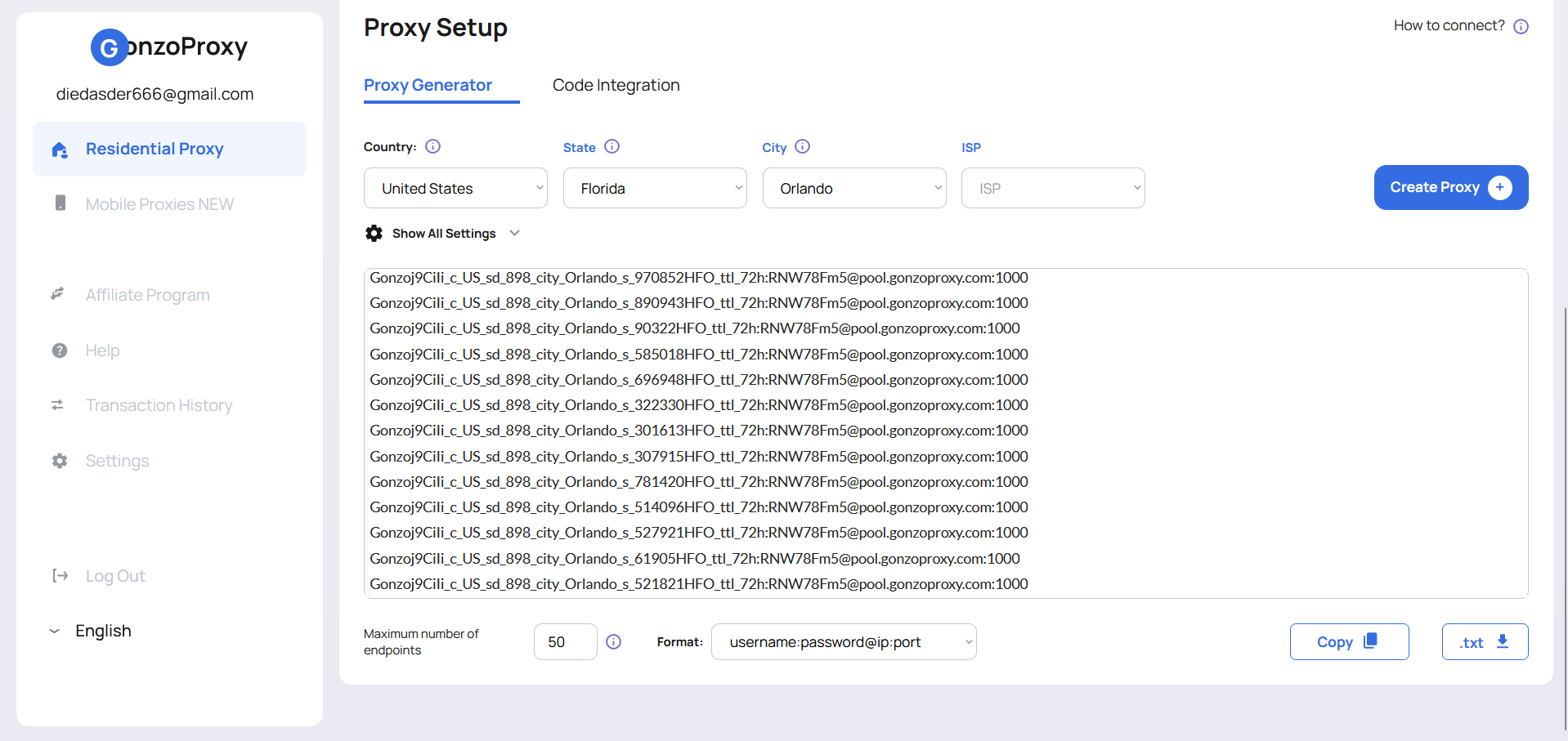
**How to upload 50 proxies:**\
Go to **Proxies → Add**
Paste the list in the format:
```
login:password@IP:port|socks5
```
**Example:**
```
Gonzoj9CiIi_c_US_sd_898_city_Orlando_s_970852HFO_ttl_72h:RNW78Fm5@pool.gonzoproxy.com:1000|socks5
```
Click **Add**, and the proxies will be automatically saved to the list.
***
### 📱 Profile configuration: from screen to microphone
**AntBrowser** allows you to configure absolutely everything — from profile color to media ports.
| Setting | What to specify |
| ---------------------- | --------------------------------------------- |
| Proxy | Select one from the list |
| Language & timezone | Auto — based on IP |
| Labels | Status, color, note — for navigation |
| User-Agent | Auto (or manually Android/iOS/Windows/macOS) |
| Screen resolution | 360x640 (mobile) / 1366x768 (desktop) |
| Canvas / WebGL / Audio | Spoofing — for fingerprint protection |
| WebRTC | Auto / Disabled — for mobile proxies |
| Geolocation | Auto |
| CPU | 2–4 cores (mobile) / 4–8 (desktop) |
| RAM | 4–8 GB (mobile) / 8–32 GB (desktop) |
| Media devices | Microphone: 1 / Audio: 1 / Webcam: 1 |
| Warm-up | Select ready-made template |
| Blocker | Select a pre-created filter |
| Autofill | Select needed services (VK, OLX, Avito, etc.) |
| Extensions | Install required extensions |
***
### ⚙️ Summary
You no longer need to keep dozens of phones nearby, manually warm up accounts, or be afraid of the wrong click.\
**Profiles behave like real people.**\
Everything looks **natural**: device, location, behavior.
***
> This is not just anonymity.\
> **This is naturalness.**\
> This is not just security.\
> **This is freedom to scale.**
And this is exactly why you should combine **AntBrowser** and **GonzoProxy** — so that you no longer play by someone else’s rules, but silently and precisely build your own system.
***
### 👾 Try it here: [GonzoProxy.com](https://GonzoProxy.com)
***
### 📱 Stay Connected
* [Telegram Channel](https://t.me/GonzoProxy)
* [Telegram Chat ](https://t.me/GonzoProxy_Chat)
* [Instagram](https://www.instagram.com/gonzoproxy)
* [24/7 Support](https://t.me/GonzoProxy_bot)
💬 Our team is always here for you! Reach out anytime — we’ll solve any issue within minutes.
# 🔐 Setup Undetectable
In today’s world of multitasking and multi-accounting, one of the biggest challenges is staying anonymous and protecting accounts from bans. Modern websites use powerful anti-fraud systems that can easily spot suspicious activity. That’s exactly where the [Undetectable anti-detect browser](https://undetectable.io/?utm_source=gonzoproxy\&utm_medium=affiliate) and high-quality residential proxies from GonzoProxy come to the rescue.
[**GonzoProxy residential proxies**](https://gonzoproxy.com/?utm_source=gitbook\&utm_medium=eng\&utm_content=undetectable) aren’t just ordinary proxy servers. They’re real IP addresses from real users’ devices, making them look completely natural to anti-fraud systems. Perfect for managing multiple accounts without getting caught.
***
## 🛠️ Undetectable features
### 🔄 Sync manager
This feature lets you control multiple browser profiles at the same time. When you hit the sync button, everything you do in the main window is repeated in the other profiles — typing, opening tabs, and more. A huge time-saver when handling many accounts.
***
### 📦 Bulk extension Install
The extension manager lets you add, remove, or disable browser extensions across all profiles in one go. Great for quickly changing setups when working with a lot of accounts.
***
### 🖥️ Browser fingerprints
Undetectable makes your work easier with built-in basic configurations (fingerprints) of the most popular systems. These are regularly updated with real browser and device data. You can fine-tune the fingerprint for your specific task to avoid any mismatches and bypass anti-fraud systems.
Fingerprints are masked at the browser core level, not just via JavaScript — this makes detection much harder.
***
### 🛒 Configuration store
Undetectable’s built-in config store lets you search by detailed parameters: User Agent, WebGL, CPU cores, RAM, screen resolution, and more. Perfect for finding the exact config for your task.
Each plan includes a limited number of free configs that are regularly refreshed. You can also buy additional ones for just $1, and they stay in your account forever. They’re personal, but you can share them with team members using API keys.
***
### 👥 Team collaboration
The Undetectable team made sure it’s super easy to work together:
* **User Roles**: Set up and manage roles with different permissions and access levels.
* **Profile Groups**: Organize profiles into groups and give access to only specific segments.
* **Cloud Web Panel**: Manage roles, groups, and profiles online — track profile statuses in real time.
{% hint style="info" %}
Go to **Account → Cloud Dash** to access team settings, assign roles, manage groups, and set restrictions.
{% endhint %}
***
### 🍪 Cookies Bot (profile warm-up)
The Cookies Bot automates the process of filling profiles with cookies by mimicking a real user’s natural online behavior. A built-in popular site generator creates resource lists based on the selected location.
**How to warm up profiles:**
1. Choose Chromium and your profile.
2. Turn on "random page order" mode.
3. Turn off (if enabled):
* Use link to change IP
* Don't load images
* Headless mode
4. Set a random number of tabs.
5. Set the timer to a random interval (30–90 seconds recommended for natural behavior).
6. Enable extra actions: "Scroll, move, and click the mouse".
7. Choose a proxy country, e.g. US residential proxy from GonzoProxy.
8. Set the number of warm-up sites and launch.
***
### ⚙️ General settings
| **Parameter** | **Value** |
| ------------------- | ---------------------------------------------------------------------------- |
| Name, Folder, Tag | for easy sorting |
| OS | Windows, macOS, Android, or iPhone (match your real system for best results) |
| Browser | Chrome |
| Config | Similar to your current system |
| User-Agent & Screen | Default |
| CPU | 2–4 cores (optimal for most tasks) |
| RAM | 2–4 GB to mimic a standard device |
| Languages | Default |
***
### 🌐 Proxies
Let’s say you bought US residential proxies from [GonzoProxy](https://gonzoproxy.com/?utm_source=gitbook\&utm_medium=eng\&utm_content=undetectable) and got this string:\
`Gonzoj9CiIi_c_US_sd_443_s_663698TEC_ttl_72h:RNW78Fm5@pool.gonzoproxy.com:1000`
**Connection parameters:**
* **Host**: `pool.gonzoproxy.com`
* **Port**: `1000`
* **Login**: `Gonzoj9CiIi_c_US_sd_443_s_663698TEC_ttl_72h`
* **Password**: `RNW78Fm5`
* **Supported protocols**: HTTPS and SOCKS5
***
### ⚡️ Extra settings
| Section | Parameter | Value |
| --------- | ---------------- | ------- |
| Location | WebRTC | auto |
| | Geolocation | auto |
| | Timezone | auto |
| Emulation | Media Devices | emulate |
| | WebGL Metadata | mask |
| | WebGPU | mask |
| | Window Size | emulate |
| | Fonts | emulate |
| | Speech Synthesis | emulate |
| Noise | Canvas | Noise |
| | AudioContext | Noise |
| | WebGL Image Hash | Noise |
| | ClientRects | Noise |
***
* **Tab 4**: Import/export cookie files.
***
* **Tab 5**: Manually add login/passwords or import/export account data.
***
### 🎯 Final Thoughts
[Undetectable ](https://undetectable.io/?utm_source=gonzoproxy\&utm_medium=affiliate)anti-detect browser, paired with [GonzoProxy](https://gonzoproxy.com/?utm_source=gitbook\&utm_medium=eng\&utm_content=undetectable) residential proxies, is a powerful toolkit for managing multiple accounts while staying secure and undetected. Use its full potential to boost your efficiency and success!
***
### 👾 Try it here: [GonzoProxy.com](https://gonzoproxy.com/?utm_source=gitbook\&utm_medium=eng\&utm_content=undetectable)
***
### 📱 Stay Connected
* [Telegram Channel](https://t.me/GonzoProxy)
* [Telegram Chat ](https://t.me/GonzoProxy_Chat)
* [Instagram](https://www.instagram.com/gonzoproxy)
* [24/7 Support](https://t.me/GonzoProxy_bot)
💬 Our team is always here for you! Reach out anytime — we’ll solve any issue within minutes.
# 🛡️ Setup Antik
[**Antik Browser**](https://antik-browser.com/) is a powerful antidetect browser designed for smooth and secure management of multiple accounts on Google Ads, social media platforms, online marketplaces, gambling sites, and crypto exchanges.
Thanks to its use of real device fingerprints and an advanced data spoofing system, your accounts stay "alive" much longer compared to other antidetect solutions.
In this guide, we’ll walk you through the key features of Antik Browser, show how to create 10 browser profiles using **residential proxies** from [**GonzoProxy**](https://gonzoproxy.com/?utm_source=gitbook\&utm_medium=eng\&utm_content=antik), and explain why high-quality proxies are critical for keeping your accounts safe.
***
## 🌟 Key benefits of Antik Browser
### 1️⃣ Teamwork with no limits
Antik Browser is perfect for teams working on multiple projects at the same time. Here’s why:
* Unlimited team members and teams.
* Clear permission management for profile and data access.
* Share profiles (proxies, fingerprints, notes, and tags) across your team.
* Automate routine tasks (login flows, web scraping, etc.), dramatically speeding up your workflow.
These features are especially useful for marketers, affiliate specialists, and SMM professionals who want to optimize their processes.
***
### 2️⃣ Smooth extension management
Antik Browser has a built-in extension manager for Chrome add-ons.\
Extensions are organized into groups for quick search and installation.
***
### 3️⃣ Restore deleted profiles
If you accidentally delete a profile — don’t worry!\
The "Trash" tab lets you easily restore any deleted profile or permanently clear unneeded data.
***
### 🚀 Creating profiles with GonzoProxy
To avoid account bans, it’s crucial to use proxies from real devices — residential or mobile proxies, not datacenter ones.\
[**GonzoProxy**](https://gonzoproxy.com/?utm_source=gitbook\&utm_medium=eng\&utm_content=antik) is ideal for this, offering maximum reliability and security.
#### 🔧 General Profile Settings in Antik Browser:
* **Profile Name**
* **Folder**
* **Operating System**: Windows or macOS
* **Label** (controls extensions and bookmarks):
Default, Facebook, Google, Tik-Tok, Crypto, SMM-Marketing, Matched Betting
Go to [GonzoProxy](https://gonzoproxy.com/?utm_source=gitbook\&utm_medium=eng\&utm_content=antik) and create your proxies — for example, choose **USA**.
#### Supported Proxy formats:
```
192.168.0.1:8000
socks5://login:password@192.168.0.1:8000
192.168.0.1:8000:login:password
login:password|192.168.0.22:8000
```
Paste the proxies into your profile.
\
You can also set a start page, add a note, and upload cookies.
***
#### ⚙️ Advanced Settings (recommended to enable):
| Parameter | Value / Mode |
| ------------- | ---------------------------------------------------- |
| User Agent | No change, or custom |
| Memory | 4 to 8 GB |
| CPU | 2 to 16 cores |
| WebGL | Enable noise |
| Client Rects | Enable noise |
| Web GPU | Enable |
| Canvas | Spoof |
| Battery | Spoof |
| WebGL Info | Manual |
| WebRTC | Spoof |
| Media Devices | Manual: VideoInput -1, AudioInput -1, AudioOutput -1 |
| Timezone | Spoof |
| Geolocation | Spoof |
***
### 📌 Create 10 profiles: Step-by-Step Guide
Let’s show how easy it is to create **10 profiles** with **GonzoProxy**:
#### ✅ Step 1: Configure Parameters
* Select number of profiles (10)
* Set names and folder for easy management
* User Agent, CPU, Memory — random settings
* Label for required extensions: Default, Facebook, Google, TikTok, Crypto, SMM-Marketing, Matched Betting
* Enable all advanced protection settings (Canvas, WebGL, WebRTC, etc.)
***
#### ✅ Step 2: Grab Proxies from [GonzoProxy](https://gonzoproxy.com/?utm_source=gitbook\&utm_medium=eng\&utm_content=antik)
On GonzoProxy, generate your proxies in this format:
```
login:password@ip:port
```
Example:
```
Gonzoj9CiIi_c_US_s_573228HPF_ttl_72h:RNW78Fm5@pool.gonzoproxy.com:1000
Gonzoj9CiIi_c_US_s_882282HPF_ttl_72h:RNW78Fm5@pool.gonzoproxy.com:1000
Gonzoj9CiIi_c_US_s_140456HPF_ttl_72h:RNW78Fm5@pool.gonzoproxy.com:1000
```
Paste them in bulk into Antik Browser like this:
```
socks5://Gonzoj9CiIi_c_US_s_573228HPF_ttl_72h:RNW78Fm5@pool.gonzoproxy.com:1000
socks5://Gonzoj9CiIi_c_US_s_882282HPF_ttl_72h:RNW78Fm5@pool.gonzoproxy.com:1000
socks5://Gonzoj9CiIi_c_US_s_140456HPF_ttl_72h:RNW78Fm5@pool.gonzoproxy.com:1000
```
Now click **Create** and test if all proxies are working.
#### ✅ Test Passed — All Proxies Work Perfectly!
***
### 🔥 Warming up Cookies: Why it matters
**Warming up cookies** is essential to make your profile appear natural to platforms.\
This lowers the risk of bans and improves platform trust in your accounts.
Antik Browser includes a **Cookie Bot** feature.\
Simply go to the profile settings, enable the Cookie Bot, and add websites for warming up.
#### 📍 Here are 10 US-based sites you can use:
```
google.com
youtube.com
amazon.com
reddit.com
twitter.com
facebook.com
cnn.com
espn.com
walmart.com
nytimes.com
```
➡️ Click **Start Cookie Robot**.
Great — your profile is now warmed up!\
Repeat the process for your other profiles.
***
### 🎯 Summary
By using **Antik Browser** with high-quality proxies from **GonzoProxy**, you get a **comprehensive and reliable solution** for managing multiple accounts with minimal risk of bans.
✅ [Antik Browser](https://antik-browser.com/) gives you advanced anonymity and easy profile management.\
✅ [GonzoProxy](https://gonzoproxy.com/?utm_source=gitbook\&utm_medium=eng\&utm_content=antik) provides trustworthy, real-device proxies that protect your accounts from suspicion and bans.
Choosing this combo means investing in **security, efficiency, and stability** for your business! 🚀
***
### 👾 Try it here: [GonzoProxy.com](https://gonzoproxy.com/?utm_source=gitbook\&utm_medium=eng\&utm_content=antik)
***
### 📱 Stay Connected
* [Telegram Channel](https://t.me/GonzoProxy)
* [Telegram Chat ](https://t.me/GonzoProxy_Chat)
* [Instagram](https://www.instagram.com/gonzoproxy)
* [24/7 Support](https://t.me/GonzoProxy_bot)
💬 Our team is always here for you! Reach out anytime — we’ll solve any issue within minutes.
# 🚀 Setup BitBrowser
If you’re working with **multiple accounts**, automating processes, or just want to stay **under the radar online**, a good anti-detect browser is a must. One of the top tools for that is [**BitBrowse**](https://www.bitbrowser.net/)**r**. And to make sure your traffic is as **secure and stable** as possible, pair it with proxy services from the trusted provider —[ **GonzoProxy**](https://gonzoproxy.com/?utm_source=gitbook\&utm_medium=bitbrowser\&utm_content=eng).
**BitBrowser** lets you create individual browser profiles with unique *fingerprints*, simulating different devices and environments. This makes tracking difficult and allows you to scale any web tasks safely.
***
## 📌 Features of BitBrowser
### 👥 Team collaboration
BitBrowser is great for **team-based work**. Each team member uses a separate profile with a unique fingerprint, and all sessions are completely isolated. Profiles can be shared using the built-in export/import tool, making it easier to launch new workstations or transfer profiles between team members.
It also features **centralized management** for profiles and scripts, plus a flexible **permission system** 🔐 — so you can define exactly who has access to what.
***
### ⚙️ API
BitBrowser supports **API interaction**, allowing you to connect it with external systems and **automate** essential processes. You can use the local API to control the app: open the browser, configure proxies, create and launch profiles, and more — all without manual input.
The API makes it easy to **build scripts** or connect with other platforms.
> Full documentation is available [here](https://doc.bitbrowser.net/api-docs/introduction).
***
### 🧩 Extensions
If the built-in features aren’t enough, BitBrowser is easily **extendable**.
You can install ready-made solutions from the **Extension Center**, or build your own custom modules. This is especially helpful for integration with third-party systems, solving CAPTCHAs automatically, or tweaking the browser's behavior.
> Full documentation is available [here](https://doc.bitbrowser.net/help1/extensions).
***
### 🤖 RPA: no-code automation
To handle repetitive tasks, BitBrowser includes a built-in **RPA tool**. You can record browser actions like filling forms, clicking through pages, entering data, and replay those actions within selected profiles.
Because RPA works with profiles, all automation happens in the correct environment — with the right fingerprints and network settings. That reduces errors and helps with **mass task execution**.
> Full documentation is available [here](https://doc.bitbrowser.net/rpa/rpa-usage-guide).
***
### 📋 Operation logs
While you're working, BitBrowser logs all activity: visited pages, interactions, requests, and automation steps.
These logs are useful for monitoring team progress, reviewing profile activity, or even **restoring profile states** if needed. It makes team collaboration more reliable and transparent.
***
### 📱 Cloud phone Integration
BitBrowser integrates with **Cloud Phone**, which allows you to work with **virtual mobile devices**. This is especially helpful for testing mobile versions of websites, verifying geo-specific flows, or managing accounts that require real mobile environments.
***
### 🔧 Setting up a mobile profile with GonzoProxy mobile proxies
#### Step 1: Proxy Setup
Pick a country and proxy type in the **Mobile Proxies** section of your [**GonzoProxy dashboard**](https://gonzoproxy.com/?utm_source=gitbook\&utm_medium=bitbrowser\&utm_content=eng)**.**
Copy the following details:
* **IP**: `92.205.131.78`
* **Port**: `9019`
* **Login**: `8520wbtx`
* **Password**: `9j8f181v8l`
#### Step 2: Create a mobile profile in BitBrowser
* Go to "New Profile" and choose **Mobile Device** as the type
* Set **Computing Power** to: *International B-15*
* Choose your **billing method**: Temporary or Monthly computing power
In the **basic settings**, fill out:
* Profile Name, Group, and optional notes
* Enter the proxy credentials (IP, port, login, password)
* Click **Check Proxy**
* Enable the **UDP** toggle
✅ **Proxies are working perfectly**
In fingerprint settings, enable toggles for: **Language**, **Time Zone**, and **Location**.
Your profile is now ready to run using a **real mobile proxy**.
***
### 🔄 Cloud phone sync tool
The sync tool lets you control **multiple Cloud Phone virtual devices** at once, syncing them with a main profile. Everything you do — mouse movements, keyboard input, app launches — is mirrored across all linked devices.
**Supports:**
* Synchronized text input (same or different)
* Bulk app install/removal
* Batch file upload and environment restarts
Switching between devices happens instantly — with **zero lag**.
> *👉 You need at least two environments with the **same computing power and billing model** to use the sync tool.*
>
> Full documentation is available [here](https://doc.bitbrowser.net/cloud-phone/synchronizer/graphic).
***
### 🛠️ How to properly set up a browser profile
| Parameter | Description |
| ---------------------------- | ----------------------------------------------------------------- |
| **Profile Name** | Name your profile |
| **Group** | Assign to a group for better organization |
| **Platform to log in** | Specify the platform (e.g., Facebook, Twitter, TikTok, Instagram) |
| **Account login & password** | Add credentials for auto-login |
| **Duplicate check** | Turn this OFF to avoid profile duplication checks |
| **Multitasking** | Enable to use the profile across multiple sessions |
| **2FA Key (if any)** | Insert two-factor authentication key for auto-login |
| **Notes or Cookies** | Add session notes or import cookies |
| **Startup Site** | Enter a URL the browser should open at launch |
***
#### 🔌 Setting up GonzoProxy proxy
Get your residential proxy in the [**GonzoProxy Dashboard**](https://gonzoproxy.com/?utm_source=gitbook\&utm_medium=bitbrowser\&utm_content=eng)
In BitBrowser, set the following:
* **Method** — Manual
* **Type** — Socks5
* **IP** — IPv4
* Enter the details (host, port, username, password).
* Click **Check Proxy**
✅ **Proxies work great**
*If a proxy test fails, go to settings and select **"Do not use system proxy settings"***
***
#### 🔧 Additional browser settings
* Homepage: *local*
* Image loading: *enabled*
* Sync tabs, cookies, and passwords: *enabled*
* Hardware acceleration: *enabled*
Other options can be left off by default.
***
#### 🛠️ Fine-tuning fingerprint settings
| Parameter | Value / Recommendation |
| ------------------------------ | ---------------------------- |
| **Browser** | BitBrowser |
| **Core** | Don’t change (e.g., 134) |
| **Device Type** | PC / Android / iPhone |
| **Operating System** | Windows 11 (or your version) |
| **User Agent** | Don’t change |
| **Language & Time Zone** | Enable |
| **WebRTC** | Mask |
| **Location** | Auto by IP |
| **Window Size** | 1280x720 |
| **Fonts, Canvas, WebGL, etc.** | Set randomly |
| **Port Scan Protection** | Enabled |
| **Other Options** | Leave disabled |
***
Use the [**BitBrowser**](https://www.bitbrowser.net/) **+** [**GonzoProxy**](https://gonzoproxy.com/?utm_source=gitbook\&utm_medium=bitbrowser\&utm_content=eng) combo to manage **hundreds of accounts**, automate processes, and stay **completely undetectable online**. It’s a powerful solution for business, marketing, traffic arbitrage, and any project where **privacy is essential**.
***
### 👾 Try it here: [GonzoProxy.com](https://gonzoproxy.com/?utm_source=gitbook\&utm_medium=bitbrowser\&utm_content=eng)
***
### 📱 Stay Connected
* [Telegram Channel](https://t.me/GonzoProxy)
* [Telegram Chat ](https://t.me/GonzoProxy_Chat)
* [Instagram](https://www.instagram.com/gonzoproxy)
* [24/7 Support](https://t.me/GonzoProxy_bot)
💬 Our team is always here for you! Reach out anytime — we’ll solve any issue within minutes.
# 😎 Setup Incogniton
Working with multiple accounts — in affiliate marketing, marketplaces, or ad platforms? Then you know: even with perfectly set up profiles and content, bans often happen in a couple of days. Why? 🤔\
Modern anti-fraud systems track not just your user-agent or cookies but your entire digital "fingerprint." 🕵️♂️
[**Incogniton**](https://incogniton.com/) isn’t just a browser — it’s a powerful engine for creating profiles that look like real users. It masks WebRTC, Canvas, AudioContext, WebGL, and allows fine-tuned behavior customization.
But without a solid IP 🌍 (such as **residential proxies from** [**GonzoProxy**](https://gonzoproxy.com/?utm_source=gitbook\&utm_medium=eng\&utm_content=incogniton)), no masking will save you.
> ⚠️ Bad proxy = fast ban. 🚫
***
## 📌 Key features of Incogniton
### ✏️ Emulate manual input (Paste as Human Typing)
You paste text into a form, and the site immediately triggers a "bot check"?\
Here’s why: websites can detect not just that text was pasted, but *how fast* it was entered. Instant pastes are a clear sign of a bot.
The **Paste as Human Typing** feature simulates keystrokes with delays between key presses — making it look like a human is typing.
**Usage:** Right-click → Paste as Human Typing.
{% embed url="" %}
***
### 🖼️ OCR — Copy text from images
Built-in **OCR** lets you quickly extract text from any image. Super handy for copying promo codes, instructions, or CAPTCHA text.
1️⃣ Right-click the image → Copy Text from Image\
2️⃣ Paste it where needed.
{% embed url="" %}
***
### ⚙️ Extensions
You can freely install any extensions in Incogniton. This is important because real users typically don’t browse with a blank browser.
{% embed url="" %}
***
### 🔁 Profile synchronizer
If you manage dozens of profiles, manually repeating settings is a nightmare.\
The **synchronizer** allows you to copy actions and parameters from one profile to others — saving tons of time.
{% embed url="" %}
***
### 👥 Team management
If you’re working in a team (affiliate marketing, agency, e-commerce), managing profiles becomes critical.
Since version **2.2.0.0**, Incogniton allows you to:
* Share profile groups
* Assign different access levels via roles
* Centrally manage all profiles
{% embed url="" %}
***
## How to set up Incogniton + GonzoProxy in practice
### 🚀 Step 1: Create a profile
* **Profile name:** any (e.g., US Ads Account)
* **Group:** optional
* **OS:** Windows / macOS / Linux
* **Browser core version:** default
* **Allow camera:** enabled
* **Set language based on IP:** enabled
***
### 🌍 Step 2: Connect residential proxy from GonzoProxy
Get a **residential proxy** (e.g., USA) in your [GonzoProxy dashboard](https://gonzoproxy.com/?utm_source=gitbook\&utm_medium=eng\&utm_content=incogniton). You’ll receive:
```
Gonzoj9CiIi_c_US_sd_443_s_663698TEC_ttl_72h:RNW78Fm5@pool.gonzoproxy.com:1000
```
Enter in Incogniton:
* **Host -** `pool.gonzoproxy.com`
* **Port -** `1000`
* **Login -** `Gonzoj9CiIi_c_US_sd_443_s_663698TEC_ttl_72h`
* **Password -** `RNW78Fm5`
✅ Enable **Rotating Proxy Server**.\
Test your proxy.
**Additional settings:**
* **Timezone:** by IP
* **WebRTC:** fake + WebRTC IP via proxy
* **Geolocation:** by proxy IP
***
### 🛠️ Step 3: Detailed settings
To make your profile "last" longer, here are some recommended parameters:
| Section | Setting | Status / Value |
| ------------- | ----------------------------------------- | -------------- |
| JS | Modifications | Default |
| Extensions | Needed | Add manually |
| Fonts | Font substitution | ✅ Enabled |
| Media devices | Video output / Audio output / Audio input | 1:1:1 |
| Hardware | Canvas / AudioContext / WebGL | Masked |
| DNS | DNS | Don’t touch |
**Additional settings:**
| Parameter | Status / Value |
| ---------------------------- | -------------- |
| Block active session | ✅ Enabled |
| Show profile name in browser | ❌ Disabled |
| Change browser language | ✅ Enabled |
| Chrome startup arguments | ✅ Enabled |
| Use webcam | ✅ Enabled |
| IPhey check | ❌ Disabled |
| Hide Chrome settings | ❌ Disabled |
***
### 🍪 Step 4: Import cookies
Don’t forget: **importing cookies** helps speed up profile warm-up and bypass some checks.\
Incogniton allows quick cookie imports for any required sites.
{% embed url="" %}
***
## Summary
[**Incogniton**](https://incogniton.com/) **+** [**GonzoProxy**](https://gonzoproxy.com/?utm_source=gitbook\&utm_medium=eng\&utm_content=incogniton) is a combo that really works.
Even the best antidetect won’t save you if you have a bad proxy. But when you combine:
* IP from a real device
* Proper fingerprint setup
* "Human-like" profile behavior
— your accounts get a real shot at long-term survival.
In today’s anti-fraud landscape, masking without a proxy is a ticking time bomb.\
**Never skimp on IPs** — they’re what sites use to "see" you.
***
### 👾 Try it here: [GonzoProxy.com](https://gonzoproxy.com/?utm_source=gitbook\&utm_medium=eng\&utm_content=incogniton)
***
### 📱 Stay Connected
* [Telegram Channel](https://t.me/GonzoProxy)
* [Telegram Chat ](https://t.me/GonzoProxy_Chat)
* [Instagram](https://www.instagram.com/gonzoproxy)
* [24/7 Support](https://t.me/GonzoProxy_bot)
💬 Our team is always here for you! Reach out anytime — we’ll solve any issue within minutes.
# 🧐 Setup MoreLogin
In today's digital world, anonymity and security are key factors for successful online activity. This article will detail how to use the MoreLogin platform as effectively as possible, along with real-device residential proxies from [GonzoProxy](https://gonzoproxy.com/?utm_source=gitbook\&utm_medium=eng\&utm_content=morelogin).
\
[MoreLogin](https://www.morelogin.com/register/?from=GONZO20) is a powerful tool for managing multiple browser profiles, each of which appears as a unique physical device. This makes it indispensable for professionals in digital marketing, traffic arbitrage, e-commerce, and SMM.
***
## 🌟 MoreLogin features
### 🔧 Browser extensions
MoreLogin allows you to bulk-add browser extensions and assign them to specific profiles, while easily managing the status of each extension.
> Full documentation is available [here](https://support.morelogin.com/en/articles/10137583-browser-extension).
***
### 📱 Cloud phone app
If you want necessary apps to automatically install on each new cloud phone, configure them once in advance. This saves time on repeated downloads and speeds up your workflow.
> Full documentation is available [here](https://support.morelogin.com/en/articles/10204340-cloud-phone-app).
***
### 🔄 Synchronizer
Synchronize and manage multiple browser profiles simultaneously.
\
In the cloud phone – bulk operations, text input, and file uploads are available only for Model X.
{% embed url="" %}
> Full documentation is available [here](https://support.morelogin.com/en/articles/10137626-browser-synchronizer).
***
### 📹 Automated video publishing
Automatically schedule video posts to TikTok, Instagram, Facebook Video, Facebook Reels, and YouTube. Configuring captions and publishing details saves significant time.
> Full documentation is available [here](https://support.morelogin.com/en/articles/10326957-automated-video-publishing).
***
### 👥 Team management
The team collaboration feature allows you to safely add members by assigning them different roles:
| Role | Functional privileges | Data privileges |
| ------------------------ | ------------------------------------------------------------------------------------------------------------------- | -------------------------------------------------------- |
| Super Administrator | Full access to all features and roles | All data |
| Super Administrator (RU) | Deleting data, creating and editing profiles, managing proxies, main profile settings, transferring profiles | Authorization profiles, proxies, members, and other data |
| Manager | Creating and editing profiles, managing proxies, team assignments, subscription settings (without profile deletion) | Authorization profiles, proxies, members, and other data |
| Member | Access to authorized profiles only | Authorization profiles, proxies, members |
> Full documentation is available [here](https://support.morelogin.com/en/articles/10137638-team-management).
***
## 🛠️ Creating a profile and connecting GonzoProxy
### 👉 Go to advanced profile creation
**Basic settings:**\
– Enter profile name\
– Select Chrome browser\
– Select operating system (Windows/macOS/Android/iOS)\
– Leave the UA field unchanged\
– Enable end-to-end encryption if desired\
– Enable Canvas fingerprinting technology
***
### 🌐 Proxy configuration
**–** Get residential proxies from [**GonzoProxy**](https://gonzoproxy.com/?utm_source=gitbook\&utm_medium=eng\&utm_content=morelogin), for example — USA. You will receive a string:
`Gonzoj9CiIi_c_US_sd_443_s_663698TEC_ttl_72h:RNW78Fm5@pool.gonzoproxy.com:1000`
\
– Enter the proxy credentials and test functionality
**✅ Proxies successfully passed the test**
***
### 🔐 Authorization and cookies
– Enter login credentials for accounts (Facebook, Google, eBay, Telegram, etc.)\
– Import cookies if needed
***
### 🌍 Start page
After enabling, choose “Continue browsing last opened page”\
Enable:\
– Open the platform page with a configured account simultaneously\
– Stay on the detection page after loading
***
### ⚙️ Additional setting
| Parameter | Setting |
| ------------------------- | -------------------- |
| Time zone | Depends on IP |
| WebRTC | Replacement |
| Geolocation | Ask |
| Use IP-based geolocation | Enabled |
| Language | Depends on IP |
| Resolution | Real |
| Font | Custom |
| Canvas | Noise |
| WebGL image | Noise |
| WebGL metadata | Custom |
| WebGPU | WebGL-based matching |
| AudioContext | Noise |
| Media device | Noise |
| ClientRects | Noise |
| SpeechVoices | Private |
| Device name | Custom |
| MAC address | Custom |
| Do Not Track | Disabled |
| Bluetooth | Private |
| Battery | Private |
| Port detection protection | Enabled |
| Disable TLS protocol | Default |
### ❌ Disable the following toggles
– Disable sound playback\
– Disable video loading\
– Block uploading more than one file at a time
***
## 📌 Summary
By configuring your profile using the [MoreLogin](https://www.morelogin.com/register/?from=GONZO20) platform and real-device residential proxies from [GonzoProxy](https://gonzoproxy.com/?utm_source=gitbook\&utm_medium=eng\&utm_content=morelogin), you ensure:
✅ Reliable protection and anonymity for your accounts\
✅ Minimization of bans and blocking risks\
✅ Ease in managing multiple profiles\
✅ Significant acceleration of routine tasks and processes
**Your accounts are securely protected and ready for effective online work! 🚀**
***
### 👾 Try it here: [GonzoProxy.com](https://gonzoproxy.com/?utm_source=gitbook\&utm_medium=eng\&utm_content=morelogin)
***
### 📱 Stay Connected
* [Telegram Channel](https://t.me/GonzoProxy)
* [Telegram Chat ](https://t.me/GonzoProxy_Chat)
* [Instagram](https://www.instagram.com/gonzoproxy)
* [24/7 Support](https://t.me/GonzoProxy_bot)
💬 Our team is always here for you! Reach out anytime — we’ll solve any issue within minutes.
# 👾 Setup Indigo X
With the upgrade from Indigo 6 to the new Indigo X, the anti-detect browser has received a major overhaul—making it more flexible, feature-rich, and ready for professional use. Indigo X helps you create unique browser profiles, bypass anti-fraud systems, and work with dozens or even hundreds of accounts without risking bans.
Indigo X works especially well when paired with GonzoProxy residential proxies, delivering top-level anonymity, a realistic digital fingerprint, and stable access to the sites you need.
***
## 📊 Indigo X features
### ♻️ 1. Profile storage types
In Indigo X, you can choose between **cloud** and **local** profile storage. This affects speed, sync, and teamwork capabilities.
| Feature | 🌐 Cloud Profiles | 💻 Local Profiles |
| ------------ | -------------------------------------------------------- | --------------------------------------------------- |
| How it works | Load once, then run from cache. Sync needed for changes. | Downloaded on first launch, works locally. |
| Data Storage | All data in AWS cloud | Cookies & extensions locally, metadata in AWS cloud |
| Benefits | Sync between devices, team-friendly | Instant launch anytime |
You can use a selector in the profile list to filter by storage type.
***
### 📱 2. Support for mobile Android profiles
Indigo X supports mobile profiles to mimic smartphone behavior. This is great for:
* Testing mobile UIs
* Working with device-sensitive apps and websites
* Stronger fingerprint masking and "natural" behavior
The browser pretends to be an Android device, masking its behavior like a real mobile user.
***
### ⚙️ 3. Android profile settings
Some settings are locked for stability and can't be changed. Here's what’s preset and what’s recommended for max masking:
**🔒 Default fixed settings**
| Setting | Default Value | Notes |
| ----------------------- | ------------- | --------------------- |
| Font Data | Mask | Needed for stability |
| WebGL + WebGPU Metadata | Mask | Cannot be set to Real |
| Media Devices | Mask | For performance |
| Navigator | Mask | System requirement |
| Screen Resolution | Mask | Must be configured |
**📈 Recommended for Best Masking**
| Setting | Recommended Value |
| ----------------------- | ----------------- |
| Screen Resolution | Mask |
| Media Devices | Mask |
| WebGL + WebGPU Metadata | Mask |
| WebGL Graphics | Noise |
| Canvas Graphics | Real |
| AudioContext | Noise |
| Font Data | Mask |
***
### 📅 4. Role & Access system
Indigo X is great for teams, thanks to a flexible role system. Each role has specific access levels:
The main role is the **Owner** of the account, with full access. Additionally, you can assign:
* **Manager**
* **User**
* **Operator**
| Feature | 👨🏢 Manager | 👤 User | 🙇 Operator |
| ------------------ | ----------------- | ----------------- | ------------- |
| Group Access | All groups | Assigned only | Assigned only |
| Profile Management | Create, run, edit | Create, run, edit | Run only |
| Group Management | Yes | No | No |
| Notes | Yes | Yes | No |
| Trash Bin | Yes | Yes | No |
| Member Management | Yes | No | No |
***
### 🔧 5. Indigo X browsers
Indigo X has two browser engines to choose from, depending on your tasks:
| Browser | ✨ Features |
| ---------------- | ------------------------------------------------------------------------- |
| **Mimic X** | Based on Chromium. Imitates real-user behavior. Versatile. |
| **Stealthfox X** | Based on Firefox. Stronger detection resistance. Ideal for sensitive ops. |
***
### 🧠 Using Indigo X Agent
Indigo X Agent is a helper app that runs in the background and handles launching browser profiles.
ℹ️ Without the agent, you can create, edit, and move profiles—but not launch them.
#### 🔌 Connecting the Agent
1. **Download the agent** for your OS:
* Windows
* macOS:
* M-series (M1, M2, M3 chips)
* Intel (classic models)
* Linux
2. **Install it**:
* **Windows**: Right-click the file and choose “Run as administrator”
* **macOS/Linux**: Follow your OS’s standard install procedure
3. In Indigo X, click **“Connect Agent”**
4. Wait for the components to load and sync. The agent will handle the rest.
***
### 🌐 Using GonzoProxy residential proxies with Indigo X
1. Say you bought US residential proxies from GonzoProxy and received this line:
```
pool.gonzoproxy.com:1000:Gonzoj9CiIi_c_US_sd_596_city_Denver_s_30410TGX_ttl_72h:RNW78Fm5
```
Make sure the format is: `ip:port:username:password`
#### 2. In Indigo X, click “Create Profile” and enter:
| Field | Recommended Value |
| ----------------------- | --------------------------------- |
| Profile Name | Any friendly name |
| Proxy | Paste the GonzoProxy string |
| Protocol | SOCKS5 or HTTPS |
| OS | MacOS / Windows / Linux / Android |
| Browser | Mimic X or Stealthfox X |
| Storage | Cloud or Local |
| Timezone | Mask |
| Browser Language | Mask |
| Start Page | `https://whoerip.com/indigo/` |
| WebRTC | Mask |
| Geolocation | Ask / Mask |
| Screen Resolution | Mask |
| Media Devices | Mask |
| WebGL + WebGPU Metadata | Mask |
| WebGL Graphics | Noise |
| Canvas Graphics | Noise |
| AudioContext | Noise |
| Navigator | Mask |
| Port Scanning | Mask |
| Font Data | Mask |
#### After setup, you get:
* A **unique**, realistic browser profile
* **Stable access** to your target sites
* **Complete fingerprint masking** and real geo-IP
* **Strong protection** against anti-fraud systems
***
### 📆 Final thoughts
**Indigo X + GonzoProxy = 🔒 a powerful anti-detect solution** for secure, stable, and flexible online work.
Whether you’re into arbitrage, automation, marketing, or multi-accounting — this combo gives you:
* **Effective fingerprint masking**
* **Customizable profiles for any job**
* **An uncompromising IP solution**
**Start working safely today with Indigo X and GonzoProxy!**
***
### 👾 Try it here: [GonzoProxy.com](https://GonzoProxy.com)
***
### 📱 Stay Connected
* [Telegram Channel](https://t.me/GonzoProxy)
* [Telegram Chat ](https://t.me/GonzoProxy_Chat)
* [Instagram](https://www.instagram.com/gonzoproxy)
* [24/7 Support](https://t.me/GonzoProxy_bot)
💬 Our team is always here for you! Reach out anytime — we’ll solve any issue within minutes.
# 🛡️ Setup Multilogin X
You’ve probably run into situations where your accounts on platforms like Google, Facebook, or Amazon get mass-banned due to matching fingerprints or suspicious IP addresses. To avoid such bans, it's more important than ever to use **real IP addresses from real devices**, such as residential or mobile proxies from [**GonzoProxy**](https://gonzoproxy.com/?utm_source=gitbook\&utm_medium=eng\&utm_content=multilogin), combined with the powerful anti-detect browser **Multilogin X**, which completely hides your digital footprint and makes multi-accounting secure and stable.
[**Multilogin X**](https://multilogin.com/) is a complete solution that creates unique and isolated digital environments for each account. Its purpose is to protect you from bans and provide full digital anonymity.
It not only masks digital fingerprints but also allows you to work with hundreds of accounts simultaneously without risking bans. Multilogin simulates real devices, keeping you invisible online. It supports team collaboration, automates routine tasks, and easily scales with your needs.
> 🔍 Let’s take a closer look at why **Multilogin X** is worth your attention.
***
## ✨ What makes Multilogin X stand out?
### 1. Simple team management 👥
When you're working with multiple people on a project, clearly assigning roles is essential. Multilogin makes this simple and intuitive. There are four access levels: Owner, Manager, Operator, and Starter.
**Access Overview**
| Feature | Manager | Operator | Starter |
| ------------------------------- | ------- | -------- | -------- |
| Folder access | All | Assigned | Assigned |
| Create profiles | ✅ | ✅ | 🚫 |
| Edit profiles | ✅ | ✅ | 🚫 |
| Launch profiles | ✅ | ✅ | ✅ |
| Move profiles between folders | ✅ | ✅ | 🚫 |
| Work with notes | ✅ | ✅ | 🚫 |
| Trash (delete/restore profiles) | ✅ | ✅ | 🚫 |
| Manage users | ✅ | 🚫 | 🚫 |
Everyone now knows exactly what they can and cannot do — no confusion, no chaos.
***
### 2. AI commands — automate tasks in seconds 🤖
Ever wished managing hundreds of accounts could be easier? Multilogin X integrates AI tools that let you run up to 10 tasks from a single text prompt!
{% embed url="" %}
✅ **What you can automate:**
* **Profile launch** — instantly start any number of profiles.
* **Proxy management** — assign, change, or delete proxies with a simple command.
* **Profile grouping** — move profiles between folders without clicking through menus.
This saves hours of manual work.
***
### 3. Cloud and local storage options 📦
Multilogin X offers two data storage modes:
| **Feature** | **Cloud Profiles** | **Local Profiles** |
| ---------------- | ---------------------------------------------------------------------------------------------------------------------------------------------------------------- | --------------------------------------------------------------------------------------------------------------- |
| **How It Works** | Profiles are downloaded once and then quickly launched from cache. If any profile data changes after launch, it will need to sync again before the next session. | Profiles are downloaded to your device at first launch and then run from your local storage. |
| **Storage** | Both metadata and profile data are securely stored in AWS cloud, ensuring availability and safety at any time. | Profile data (cookies, extensions, etc.) is stored locally on your device. Metadata is stored in the AWS cloud. |
| **Advantages** | Profiles are always synchronized. Ideal for team collaboration and multi-device access. | Profiles launch instantly every time. Best suited for solo users working on a single device. |
You get to choose what fits your workflow best
***
### 4. Paste as Human — realistic text input ✍️
Platforms like Gmail can detect when you're pasting text instead of typing it. Multilogin X has thought of that. The **Paste as Human** feature makes pasted text appear as if it’s being typed manually — helping you stay undetected. Just right-click and choose **Paste as Human**.
***
### 5. API Integration with Selenium and Puppeteer 🧰
If you work with large-scale automation or manage many accounts, you’ll appreciate Multilogin X's robust API support — fully compatible with **Selenium** and **Puppeteer**.
{% hint style="info" %}
📚 Detailed documentation available via [link](https://multilogin.com/help/en_US/api).
{% endhint %}
***
### 🧩 How to set up a profile and connect a GonzoProxy proxy in Multilogin X
Now for the fun part! Here’s a step-by-step guide to setting up a profile with a **GonzoProxy** proxy to ensure your accounts stay safe:
* **Profile name**: Choose a clear, descriptive name.
* **Load cookies**: Upload your cookies if you have them.
#### ⚙️ Proxy Setup:
* Go to your [**GonzoProxy dashboard**](https://gonzoproxy.com/?utm_source=gitbook\&utm_medium=eng\&utm_content=multilogin)
* Create a proxy in the format: `ip:port:login:password`
* You’ll get a string like this:\
`pool.gonzoproxy.com:1000:Gonzoj9CiIi_c_US_s_449664AHN_ttl_72h:RNW78Fm5`
* When setting up a profile in Multilogin, go to the **“My Proxies”** section
* Select the type: **http** or **socks5** *(GonzoProxy proxies support both protocols by default)*
* Enter the proxy details in the provided
### 📋 Multilogin X profile configuration table
| **Parameter** | **Recommended Setting** |
| ------------------------ | ------------------------------------------ |
| Tags or Notes | Optional |
| Browser | MimicX |
| Storage | Cloud — for team use Local — for solo work |
| Timezone | Mask |
| Browser Language | Mask |
| WebRTC | Mask |
| Screen Resolution | Mask |
| Geolocation Access | Allow |
| Geolocation Data | Mask |
| Media Devices | Mask |
| WebGL/WebGPU Metadata | Mask |
| WebGL Graphics | Mask |
| Canvas Graphics | Noise |
| AudioContext | Noise |
| Navigator | Mask |
| Port Scanning Protection | Mask |
| Font Data | Mask |
🎉 You’re now fully protected and ready to work with peace of mind! 🎉
***
### ✅ Conclusion
By using [**Multilogin X**](https://multilogin.com/) together with high-quality proxy services like [**GonzoProxy**](https://gonzoproxy.com/?utm_source=gitbook\&utm_medium=eng\&utm_content=multilogin), you eliminate account bans, streamline your workflows, and become virtually invisible online.
Managing multiple accounts is no longer a problem — it's a safe and convenient reality. Try it yourself and see the difference! ✨
***
### 👾 Try it here: [GonzoProxy.com](https://gonzoproxy.com/?utm_source=gitbook\&utm_medium=eng\&utm_content=multilogin)
***
### 📱 Stay Connected
* [Telegram Channel](https://t.me/GonzoProxy)
* [Telegram Chat ](https://t.me/GonzoProxy_Chat)
* [Instagram](https://www.instagram.com/gonzoproxy)
* [24/7 Support](https://t.me/GonzoProxy_bot)
💬 Our team is always here for you! Reach out anytime — we’ll solve any issue within minutes.
# 🔘 Setup Linken Sphere 2
If you’ve been working with traffic for a few years, you’ve surely heard of Linken Sphere — it was one of the first anti-detect browsers on the market that allowed comfortable management of dozens of accounts and successfully hid users' digital fingerprints.
However, Linken Sphere hadn’t received significant updates for a long time and started to fall behind more modern competitors. The situation changed dramatically with the release of Linken Sphere Evolution a little over a year ago. The developers took customer feedback into account, updated the browser, and returned it to the level of leading solutions.
But the Sphere team didn’t stop there — just recently, [Linken Sphere 2](https://ls2.app/) was introduced. This isn’t just another update — it’s a completely reimagined browser that combines everything great from previous versions and incorporates the wishes of experienced users.
📌 **Important**: stable multi-accounting work is impossible without high-quality proxies. The best ones today are residential and mobile proxies from [**GonzoProxy**](https://gonzoproxy.com/?utm_source=gitbook\&utm_medium=eng\&utm_content=linkensphere) — they protect accounts from bans and suspicion.
***
### ⚙️ Main advantages of Linken Sphere 2
#### 🤖 Automatic account warming
Forget about manually generating cookies. With the new “Warming Tool,” the browser performs actions that closely resemble those of a real user, thereby creating high-quality cookies for your sessions.
➡️ To start warming, simply select the desired profile, click **“Actions” → “Warm Up”**.
***
#### 👥 Convenient team collaboration
Linken Sphere 2 makes team collaboration as convenient as possible. Configure roles, permissions, and access directly in the browser interface. Creating teams now takes just a few seconds — simply click the anti-icon in the upper-left corner of the screen.
***
### 🛠️ Additional features for comfortable work
#### 📱 Mobile device emulation
Linken Sphere 2 allows you to emulate mobile devices — a fairly rare feature even among anti-detect browsers. To enable this mode, select **“Mobile Preset”** from the dropdown on the homepage.
Then, when creating a new session, you can choose the desired version of Android or iOS, as well as the type of mobile browser. This allows seamless work with platforms that require mobile fingerprints, such as **Instagram** or **TikTok**.
***
#### 🖥️ Desktops
If you work with many accounts, the **“Desktops”** feature helps organize the process. In Linken Sphere 2, you can create an unlimited number of desktops, each isolated: profiles created on one desktop are not visible on others. This is convenient for separating projects, teams, or traffic directions.
***
#### 🧩 Profile templates (Presets)
You can pre-create profile templates for quick session launches. To do this, click the **“Desktop Preset”** button and select **“Create Preset.”** In the template, you configure cookies, fingerprints, extensions, and other parameters. Later, you can launch new accounts in just a few clicks, saving time on routine.
***
### 🧾 How to create and configure a profile with GonzoProxy?
1. Disable **“Quick Mode”**.
2. We choose Desktop or Mobile preset (in our case, Desktop)
3. Give the profile a convenient name and assign tags.
4. Connect the proxy:
* Log in to your [**GonzoProxy**](https://gonzoproxy.com/?utm_source=gitbook\&utm_medium=eng\&utm_content=linkensphere) personal account.
* Select **residential proxies**.
* Set the format: `ip:port@login:password`.
* Click **Create Proxy** and receive it in that format: `pool.gonzoproxy.com:1000@Gonzoj9CiIi_c_US_s_3083DDV_ttl_72h:RNW78Fm5`
5. Paste the proxy into **Linken Sphere 2** → click **“Check”**.
6. Proxies work perfectly! Don’t forget to enable **auto geolocation detection**.
7. Add cookies, extensions, or connect **cloud sync** for teamwork.
### 🔒 Profile fingerprint settings
| Fingerprint | Setting |
| ------------ | -------- |
| Profile Type | Desktop |
| Canvas | Enabled |
| WebGL | Noise |
| ClientRects | Noise |
| Audio | Disabled |
| WebGPU | Fake |
| MediaDevices | Fake |
8. Leave other settings unchanged.
The profile is ready for secure and efficient work.
***
### ✅ Conclusion: Why choose Linken Sphere 2 and GonzoProxy?
[**Linken Sphere 2**](https://ls2.app/) is not just an improvement — it’s a quality leap in multi-accounting. Simplicity, stability, and security are achieved through smart automation, team functionality, and advanced masking technologies.
But even the best browser can’t perform without reliable proxies. [**GonzoProxy**](https://gonzoproxy.com/?utm_source=gitbook\&utm_medium=eng\&utm_content=linkensphere) provides stability, reduces blocking risks, and increases account trust.
If you're serious and long-term about traffic work — the **Linken Sphere 2 + GonzoProxy** combo will be your key to results. It’s the choice of those who lead, not follow.
***
### 👾 Try it here: [GonzoProxy.com](https://gonzoproxy.com/?utm_source=gitbook\&utm_medium=eng\&utm_content=linkensphere)
***
### 📱 Stay Connected
* [Telegram Channel](https://t.me/GonzoProxy)
* [Telegram Chat ](https://t.me/GonzoProxy_Chat)
* [Instagram](https://www.instagram.com/gonzoproxy)
* [24/7 Support](https://t.me/GonzoProxy_bot)
💬 Our team is always here for you! Reach out anytime — we’ll solve any issue within minutes.
# 🔑 How to activate a promo code on GonzoProxy
1. Go to your account: [gonzoproxy.com](https://gonzoproxy.com/?utm_source=gitbook\&utm_medium=eng\&utm_content=promocode)
2. Navigate to the **Residential Proxies** section
3. Click the **down arrow**
4. Enter your **promo code** in the input field
5. Confirm — and enjoy your benefits! 🎉
***
### 👾 Try it here: [GonzoProxy.com](https://gonzoproxy.com/?utm_source=gitbook\&utm_medium=eng\&utm_content=promocode)
***
### 📱 Stay Connected
* [Telegram Channel](https://t.me/GonzoProxy)
* [Telegram Chat ](https://t.me/GonzoProxy_Chat)
* [Instagram](https://www.instagram.com/gonzoproxy)
* [24/7 Support](https://t.me/GonzoProxy_bot)
💬 Our team is always here for you! Reach out anytime — we’ll solve any issue within minutes.
# 🔄 IP Rotation
## 🔁 What is IP rotation?
**Rotation** is the frequency at which the IP address on your proxy changes.\
**GonzoProxy** offers two types of rotation, each suited for different tasks.
***
### 1️⃣ Sticky IP (Sticky Session)
🔒 The IP remains stable for a set period — from 30 seconds to 7 days.
#### ✅ Ideal for:
* 👥 Working with social media accounts
* 💰 Cryptocurrency-related tasks
* ⚙️ Software usage where a stable session is important
📌 This type of rotation helps avoid suspicious activity\
and appears natural to websites.
***
### 2️⃣ Randomize IP (New IP for each request)
🔄 The IP address changes **with every connection**.
#### ✅ Perfect for:
* 🤖 Scrapers
* 🧾 Mass account registration
* ⚙️ Automated systems and scripts
📌 If you need to **change the IP as often as possible**, this is your choice.
***
### ❓ Why isn’t the IP static and may change on its own?
All **GonzoProxy residential proxies** work through real IP addresses from live users.\
📱 When a device disconnects or goes offline, the system automatically\
assigns you a **new IP** to keep the connection active.
This is **natural behavior**, which provides:
* High anonymity
* Realism in the eyes of websites
* Protection against blocks
***
### 👾 Try it here: [GonzoProxy.com](https://GonzoProxy.com)
***
### 📱 Stay Connected
* [Telegram Channel](https://t.me/GonzoProxy)
* [Telegram Chat ](https://t.me/GonzoProxy_Chat)
* [Instagram](https://www.instagram.com/gonzoproxy)
* [24/7 Support](https://t.me/GonzoProxy_bot)
💬 Our team is always here for you! Reach out anytime — we’ll solve any issue within minutes.
# 💸 Pricing in GonzoProxy
Choose the proxy type you need and pay **only for what you use**.\
Simple and transparent pricing — **no hidden fees or small print**. 📊
***
### 🌍 Residential Proxies
These are IP addresses of regular users from around the world.\
You **pay only for traffic**, not for the number of proxies created.
#### 🔹 How it works:
**1️⃣ Buy traffic (in gigabytes)**
📉 The larger the volume, the lower the price:
```
• 1–24 GB — $6.5 / GB
• 25–49 GB — $5.5 / GB
• 50–99 GB — $4.5 / GB
• 100–249 GB — $3.9 / GB
• 250–499 GB — $3.2 / GB
• 500–999 GB — $2.75 / GB
• 1000–1499 GB — $2.5 / GB
• 1500–1999 GB — $2.4 / GB
• 2000–2499 GB — $2.3 / GB
• 2500–2999 GB — $2.2 / GB
• 3000–4999 GB — $2.1 / GB
• 5000+ GB — $2.0 / GB
```
**2️⃣ Use proxies as much as you need**
* You can create an **unlimited number of proxies** — whether it's 10 or 1000.
* Payment is **only for traffic**.
**3️⃣ Traffic validity — unlimited**
* Gigabytes **don't expire**.
* You can use them anytime ⏳.
***
### 📱 Mobile Proxies
These proxies come with **mobile operator IPs**.\
You pay **for the number of days**, and the traffic is **unlimited**.
📌 Perfect for tasks where **maximum realism in behavior** is crucial.
#### 💰 Available Plans:
* 3 days — $7
* 7 days — $15
* 30 days — $45
❗ Proxies work **for the entire paid period** with no traffic limits.
***
### 👾 Try it here: [GonzoProxy.com](https://GonzoProxy.com)
***
### 📱 Stay Connected
* [Telegram Channel](https://t.me/GonzoProxy)
* [Telegram Chat ](https://t.me/GonzoProxy_Chat)
* [Instagram](https://www.instagram.com/gonzoproxy)
* [24/7 Support](https://t.me/GonzoProxy_bot)
💬 Our team is always here for you! Reach out anytime — we’ll solve any issue within minutes.
# 👥 Sub Users
**Sub Users** are additional accounts within your main GonzoProxy account. This feature lets you share traffic with team members, track each user's usage, and control access to your shared balance. You can also use Sub Users for personal purposes by creating separate accounts for different tasks or use cases under a single main account.
***
#### 1. How to create a sub account
**Step 1.** Go to the **Sub Users** tab in the dashboard menu.
**Step 2.** Click the **Add User** button.
**Step 3.** Enter the amount of GB you want to allocate to this account, specify the account name and the email address that will be used to sign in to the sub-account, then click **Save**.
{% hint style="info" %}
Login details for the new GonzoProxy sub-user will be sent to the specified email address. Once received, the user can log in to the dashboard and use the sub-user account independently under the main account.
{% endhint %}
The system will create the account automatically.
***
#### Table fields explained
| Field | Description |
| -------- | --------------------------------------------- |
| Username | Username of the sub account |
| Login | Login of the sub account |
| Password | Proxy password for this account |
| Limit | Allocated traffic limit (GB) |
| Used | How many GB have been used |
| Status | Current account status (active / deactivated) |
| Actions | Account management |
***
#### 2. Account management
In the **Actions** column next to each sub-account, the following options are available:
* Deactivate the account
* Change the name of the sub-account
* Changing email address
* Modify the traffic limit
* **Deactivation** instantly stops the account and all proxies running on it. This is the first step when offboarding a team member — the employee loses access immediately.
* Changing the sub-account name allows you to rename the account at any time for easier management and identification within the team.
* **Change Email** allows you to assign a new email address to a sub-account. Once updated, the owner of the specified email address will be able to use it to sign in to that sub-account.
* **Editing the limit** allows you to increase or decrease the GB on a specific account at any time. This is how a team lead manually reclaims unused traffic from an offboarded employee: set the limit to zero, then redistribute the freed-up GB to other team members.
The **Actions** field also includes the option to delete a sub-account.
***
#### 3. How to create proxies for a sub account
**Step 1.** Once the account is created, go to the **proxy generator** and select the relevant sub account from the dropdown.
**Step 2.** Configure the parameters: choose country, city or ISP, and set the rotation mode.
**Step 3.** Click **Create Proxy** — the proxies will appear in the list and will operate within the selected account's traffic limit.
***
{% hint style="info" %}
💡 Tip: Sub Users are ideal for teams where multiple employees work with proxies independently. Each account draws only from its own allocated limit — the main balance stays protected.
{% endhint %}
***
### 👾 Try it here: [GonzoProxy.com](https://GonzoProxy.com)
***
### 📱 Stay Connected
* [Telegram Channel](https://t.me/GonzoProxy)
* [Telegram Chat ](https://t.me/GonzoProxy_Chat)
* [Instagram](https://www.instagram.com/gonzoproxy)
* [24/7 Support](https://t.me/GonzoProxy_bot)
💬 Our team is always here for you! Reach out anytime — we’ll solve any issue within minutes.
# 💰 GonzoProxy Referral Program
Want to earn with us?\
Share your referral link and **earn 10%** from all purchases made by users you invite! 🔥
It's a simple and convenient way to earn bonuses by recommending the service to your friends, colleagues, or audience.
***
### 🧩 How does it work?
#### 1️⃣ Copy the link
Go to the **"Referral Program"** section in your account and copy your **unique link**. 🔗
#### 2️⃣ Share the link
Send it to friends, acquaintances, or post it on social media, channels, forums — anywhere your audience is. 👥
#### 3️⃣ Earn 10% from their purchases
Every time users you invite make a purchase, **you automatically earn 10%** of their total. 📈
***
### 💼 How to use your earnings?
You can **transfer your bonuses to your main balance** and use them to purchase traffic.
Just click the **"Transfer to balance"** button in the referral program section.
> The minimum transfer amount is **$5**.
***
### 👾 Try it here: [GonzoProxy.com](https://GonzoProxy.com)
***
### 📱 Stay Connected
* [Telegram Channel](https://t.me/GonzoProxy)
* [Telegram Chat ](https://t.me/GonzoProxy_Chat)
* [Instagram](https://www.instagram.com/gonzoproxy)
* [24/7 Support](https://t.me/GonzoProxy_bot)
💬 Our team is always here for you! Reach out anytime — we’ll solve any issue within minutes.
# 🔧 GonzoProxy API Documentation
Client documentation
**Version:** 1.2 **Status:** Production
This documentation combines two API sections:
* **A. Proxy generation and reference lists** — base URL `https://api.gonzoproxy.app/functions/v1/proxy-api`
* **B. Sub-account management** — base URL `https://api.gonzoproxy.app/functions/v1`
***
### Authentication
All requests to the API (both sections) require an `x-api-key` header.
```http
x-api-key:
Content-Type: application/json
```
**How to get an API key:**
1. Open your GonzoProxy dashboard.
2. Go to `Settings → API Keys`.
3. Create a new key.
4. Use it in all API requests.
Do not pass the API key in the URL or as a query parameter. Use the HTTP header only.
### Units
All traffic values are sent and returned in **bytes**.
| Value | Bytes |
| ------- | ------------: |
| `1 GB` | `1000000000` |
| `5 GB` | `5000000000` |
| `10 GB` | `10000000000` |
***
## A. Proxy generation and reference lists
Base URL:
```
https://api.gonzoproxy.app/functions/v1/proxy-api
```
### A.1 Generate proxy
**Method:** `POST` **Path:** `/generate`
#### Request parameters
Passed in the JSON request body.
**Required parameter**
| Parameter | Type | Description |
| --------- | -------- | ------------------------------------------------------ |
| `country` | `string` | ISO country code (`US`) or full name (`United States`) |
**Optional parameters**
| Parameter | Type | Description |
| -------------- | --------- | ----------------------------------- |
| `state` | `string` | State or region |
| `city` | `string` | City |
| `zip` | `string` | ZIP code |
| `isp` | `string` | Internet service provider name |
| `sd_code` | `number` | Subdivision code |
| `count` | `number` | Number of proxies to generate |
| `rotation` | `boolean` | IP rotation type |
| `ttl` | `number` | Session lifetime |
| `ttl_unit` | `string` | TTL unit of measurement |
| `format` | `string` | Proxy string format in the response |
| `login` | `string` | Custom login |
| `password` | `string` | Custom password |
| `rg_id` | `string` | Additional sticky-session parameter |
| `session_rand` | `string` | Random seed for sticky sessions |
### A.2 Reference lists for filters
The API lets you retrieve available countries, regions, cities, ZIP codes, and internet service providers.
#### A.2.1 List of countries
**Method:** `GET` **Path:** `/countries`
#### A.2.2 States / regions
**Method:** `GET` **Path:** `/states` **Required parameter:** `country`
#### A.2.3 List of cities
**Method:** `GET` **Path:** `/cities` **Required parameter:** `country` **Optional parameter:** `state`
#### A.2.4 ZIP codes
**Method:** `GET` **Path:** `/zips` **Required parameter:** `country` **Optional parameters:** `state`, `city`
Example response:
```json
{
"zips": ["10001", "10002"]
}
```
#### A.2.5 Internet service providers (ISP)
**Method:** `GET` **Path:** `/isps` **Required parameter:** `country` **Optional parameters:** `state`, `city`
Example requests:
```
/isps?country=US
/isps?country=US&state=New York&city=New York
```
Example response:
```json
{
"isps": ["Comcast", "Verizon"],
"isps_detailed": [
{ "isp_name": "Comcast", "isp_code": 1783 },
{ "isp_name": "Verizon", "isp_code": 1902 }
]
}
```
***
## B. Sub-account management
Base URL:
```
https://api.gonzoproxy.app/functions/v1
```
### B.1 List sub-accounts
Returns the sub-accounts linked to your main account.
```http
POST /list-sub-accounts
```
#### Request
```json
{}
```
#### Curl
```bash
curl -sS -X POST "https://api.gonzoproxy.app/functions/v1/list-sub-accounts" \
-H "Content-Type: application/json" \
-H "x-api-key: " \
-d '{}'
```
#### Response
```json
{
"success": true,
"data": {
"sub_accounts": [
{
"proxy_login": "GonzoLoginTest",
"sub_account_name": "Team 1",
"is_active": true,
"traffic_remaining": 2000000000,
"traffic_total": 2000000000
}
]
}
}
```
#### Response fields
| Field | Type | Description |
| ------------------- | ---------------- | --------------------------------- |
| `proxy_login` | `string \| null` | Sub-account proxy login |
| `sub_account_name` | `string \| null` | Sub-account name |
| `is_active` | `boolean` | Whether the sub-account is active |
| `traffic_remaining` | `number` | Remaining traffic in bytes |
| `traffic_total` | `number \| null` | Total traffic limit in bytes |
### B.2 Sub-account traffic statistics
Returns traffic usage statistics for a specific sub-account.
```http
POST /get-sub-account-traffic-stats
```
#### Parameters
| Field | Type | Required | Description |
| ------------- | -------- | ------------ | ------------------------------------------------- |
| `proxy_login` | `string` | Yes | Sub-account proxy login |
| `period` | `string` | No | Statistics period. Defaults to `day` |
| `date` | `string` | No | Period date, e.g. `2026-05-19`, `2026-05`, `2026` |
| `start_date` | `string` | For `custom` | Period start date in `YYYY-MM-DD` format |
| `end_date` | `string` | For `custom` | Period end date in `YYYY-MM-DD` format |
| `group_by` | `string` | No | Grouping for `custom`: `day` or `month` |
Available `period` values: `day`, `week`, `month`, `year`, `custom`
#### Curl: daily statistics
```bash
curl -sS -X POST "https://api.gonzoproxy.app/functions/v1/get-sub-account-traffic-stats" \
-H "Content-Type: application/json" \
-H "x-api-key: " \
-d '{
"proxy_login": "GonzoLoginTest",
"period": "day"
}'
```
#### Curl: custom period
```bash
curl -sS -X POST "https://api.gonzoproxy.app/functions/v1/get-sub-account-traffic-stats" \
-H "Content-Type: application/json" \
-H "x-api-key: " \
-d '{
"proxy_login": "GonzoLoginTest",
"period": "custom",
"start_date": "2026-05-01",
"end_date": "2026-05-19",
"group_by": "day"
}'
```
#### Response
```json
{
"success": true,
"data": {
"points": [
{
"time": "2026-05-19T00:00:00.000Z",
"bytes": 125000000,
"traffic_remaining": 1875000000
}
],
"total_bytes": 125000000,
"period": "day",
"date": "2026-05-19",
"timezone": "UTC",
"traffic_remaining": 1875000000,
"proxy_login": "GonzoLoginTest",
"sub_account_name": "Team 1",
"is_active": true
}
}
```
#### `points[]` fields
| Field | Type | Description |
| ------------------- | ---------------- | --------------------------------------------- |
| `time` | `string` | Point time in UTC |
| `bytes` | `number` | Traffic used during the interval |
| `traffic_remaining` | `number \| null` | Remaining traffic at this point, if available |
### B.3 Adjust sub-account traffic or status
Changes a sub-account's total traffic balance or active status.
```http
POST /sub-account-adjust
```
Supported operations: `set_traffic`, `activate`, `deactivate`
#### B.3.1 Set sub-account traffic
`target_traffic_bytes` is the sub-account's final traffic balance, not the amount to add.
If a sub-account currently has `1 GB` and you want it to have `5 GB`, pass `5000000000`.
```json
{
"proxy_login": "GonzoLoginTest",
"operation": "set_traffic",
"target_traffic_bytes": 5000000000
}
```
Curl:
```bash
curl -sS -X POST "https://api.gonzoproxy.app/functions/v1/sub-account-adjust" \
-H "Content-Type: application/json" \
-H "x-api-key: " \
-d '{
"proxy_login": "GonzoLoginTest",
"operation": "set_traffic",
"target_traffic_bytes": 5000000000
}'
```
#### B.3.2 Activate sub-account
```json
{
"proxy_login": "GonzoLoginTest",
"operation": "activate"
}
```
Curl:
```bash
curl -sS -X POST "https://api.gonzoproxy.app/functions/v1/sub-account-adjust" \
-H "Content-Type: application/json" \
-H "x-api-key: " \
-d '{
"proxy_login": "GonzoLoginTest",
"operation": "activate"
}'
```
#### B.3.3 Deactivate sub-account
When deactivated, the sub-account's remaining traffic is returned to the main account.
```json
{
"proxy_login": "GonzoLoginTest",
"operation": "deactivate"
}
```
Curl:
```bash
curl -sS -X POST "https://api.gonzoproxy.app/functions/v1/sub-account-adjust" \
-H "Content-Type: application/json" \
-H "x-api-key: " \
-d '{
"proxy_login": "GonzoLoginTest",
"operation": "deactivate"
}'
```
#### Response (for all `sub-account-adjust` operations)
```json
{
"success": true,
"data": {
"proxy_login": "GonzoLoginTest",
"sub_account_name": "Team 1",
"operation": "set_traffic",
"target_traffic_bytes": 5000000000,
"previous_sub_traffic_bytes": 2000000000,
"delta_bytes": 3000000000,
"parent_traffic_after": 7000000000,
"sub_traffic_after": 5000000000,
"is_active": true,
"changed": true
}
}
```
#### Response fields
| Field | Type | Description |
| ---------------------------- | ---------------- | ---------------------------------------------------- |
| `proxy_login` | `string \| null` | Sub-account proxy login |
| `sub_account_name` | `string \| null` | Sub-account name |
| `operation` | `string` | Operation performed |
| `target_traffic_bytes` | `number` | Sub-account's final traffic |
| `previous_sub_traffic_bytes` | `number` | Sub-account's traffic before the operation |
| `delta_bytes` | `number` | Difference between the old and new value |
| `parent_traffic_after` | `number` | Main account's remaining traffic after the operation |
| `sub_traffic_after` | `number` | Sub-account's remaining traffic after the operation |
| `is_active` | `boolean` | Final sub-account status |
| `changed` | `boolean` | Whether an actual change occurred |
***
## API response codes
### General codes (section A)
| Code | Description |
| ----- | ---------------------------- |
| `200` | Successful request |
| `400` | Request parameter error |
| `401` | Missing or empty `x-api-key` |
| `403` | Invalid or disabled API key |
| `404` | Invalid request address |
| `429` | Rate limit exceeded |
| `500` | Internal service error |
Error format:
```json
{
"error": "Error description"
}
```
### Common errors (section B — sub-accounts)
| HTTP | Error | Description |
| ----- | -------------------------------------------------------- | --------------------------------------------------------------------- |
| `400` | `Invalid JSON body` | Malformed JSON |
| `400` | `proxy_login is required` | `proxy_login` not provided |
| `400` | `operation must be set_traffic, activate, or deactivate` | Invalid operation |
| `400` | `target_traffic_bytes is required` | `target_traffic_bytes` not provided for `set_traffic` |
| `401` | `Missing x-api-key header` | API key not provided |
| `403` | `Forbidden` | Sub-account does not belong to your account |
| `404` | `parent_not_found` | API key not found |
| `404` | `sub_account_not_found` | Sub-account not found |
| `409` | `sub_inactive` | Cannot change traffic on a disabled sub-account. Run `activate` first |
| `409` | `insufficient_parent_traffic` | Insufficient traffic on the main account |
***
## Rate limiting
Rate limiting applies to `POST /generate`.
**Current limit:** 100 requests per minute per API key.
***
## Compatibility
This documentation matches the current API version: **1.2**. The API may receive updates without changing the core structure.
# ВВЕДЕНИЕ
## 🔍 Что такое Gonzo Proxy?
**GonzoProxy** — это современная прокси-платформа, использующая уникальную P2P-сеть из **20+ миллионов реальных устройств** по всему миру.
Мы предоставляем **IP-адреса с естественной историей использования**, что делает вас **неотличимым от обычного пользователя** в глазах любых онлайн-сервисов.
***
### 🌍 Наш источник IP-адресов
Наши IP поступают от **реальных пользователей**, которые **добровольно и на законных основаниях** устанавливают специальное приложение на свои компьютеры и мобильные устройства.
Пользователи делятся частью своего интернет-соединения и **получают за это вознаграждение**.
✅ Это обеспечивает:
* **100% легальность** нашей сети
* **Естественный "цифровой след"** каждого IP-адреса
***
### 🧠 Реальные устройства = реальное доверие
Когда вы подключаетесь через нашу сеть, вы буквально **«становитесь» реальным человеком** в глазах платформ.
#### Что это значит:
* **Чистая история использования**
* IP-адреса от **домашних и мобильных провайдеров**
* **Стабильная геолокация** и **цифровой отпечаток**
👉 Например, при проверке через Facebook или Google ваш IP выглядит как **обычный пользователь**, а не подозрительный бот.
***
### 💡 Преимущества GonzoProxy
* 🔄 **Трафик не сгорает** — Используйте оплаченные гигабайты когда угодно
* ♾️ **Неограниченное количество прокси** — Создавайте сколько угодно, бесплатно
* 🔐 **Без KYC** — Доступ к 95% сайтов без подтверждения личности
* 🎯 **Точный таргетинг** — Страна, город и провайдер без доплат
* 📞 **Поддержка в Telegram 24/7** — Мгновенная помощь в любое время
* 🏢 **Официальная компания** — 3 года на рынке, регистрация в UK
***
### 🚀 Начните использовать GonzoProxy сегодня
Перестаньте беспокоиться о блокировках ваших аккаунтов и кампаний.\
**Используйте реальные IP, которым доверяют платформы.**
***
### 📱 Мы на связи
* [Telegram-канал ](https://t.me/GonzoProxy)
* [Telegram-чат ](https://t.me/GonzoProxy_Chat)
* [Instagram]()
* [Поддержка 24/7 ](https://t.me/GonzoProxy_bot)
💬 Наша команда всегда на связи! Обращайтесь в любое время суток — решим любой вопрос в течение нескольких минут.
# 🌐 Что такое прокси?
**Прокси** (от англ. *proxy* — «заместитель») — это сервер, который находится **между вами и сайтом**. Он отправляет запрос от вашего имени и возвращает результат обратно.
#### Простая аналогия:
* **Вы** — это клиент 🍔
* **Прокси** — это курьер 🛵
Вы даёте курьеру адрес и поручение. Курьер идёт вместо вас, получает нужную информацию, возвращается и отдаёт вам. При этом тот, кто дал информацию, не знает, кто настоящий заказчик — он видит **только курьера**.
***
## 💡 Что умеют прокси?
* 🕵️♂️ **Скрывать ваш IP-адрес** — сайты видят IP прокси, а не ваш реальный
* 🚫 **Обходить блокировки** — полезно, если сайт недоступен в вашей стране
* 🧙♂️ **Маскировать активность** — сайты не могут точно определить, кто вы
* 🤖 **Автоматизировать действия** — массовый парсинг, регистрация аккаунтов, автопостинг и другие задачи
***
### ✅ Примеры задач и как GonzoProxy решает их
#### 📢 Рекламные кампании
* Реальные IP снижают риск блокировок до **90%**
* Меньше **чекпоинтов и селфи-верификаций** в Facebook и Google Ads
* **Стабильная работа рекламных кабинетов**, даже в "рискованных" нишах
#### 👥 Фарм и валидация аккаунтов
* Каждый аккаунт получает **уникальный IP из нужного региона**
* Нет **перекрёстных блокировок** при массовой регистрации
* Профили живут долго без подозрительных флагов
#### 🕷️ Парсинг и краулинг
* Отсутствие блокировок даже при **высоких нагрузках**
* **Автоматическая смена IP** при признаках ограничения
* Доступ к **данным, закрытым для дата-центр прокси**
#### 🤖 Автоматизация
* **Прямое подключение** к ботам и скриптам
* **Стабильное соединение** без разрывов
* Поддержка **anti-detect браузеров** для полной эмуляции реального пользователя
#### 🔄 Мультиаккаунтинг
* **Безопасное управление** десятками и сотнями профилей в соцсетях
* Защита от **взаимных блокировок аккаунтов**
* **Надёжная работа с Facebook, Twitter, Instagram, OnlyFans** и др. без банов
***
## 👾 Попробовать Gonzo Proxy
🔗 [Перейти на сайт GonzoProxy.com](https://GonzoProxy.com)
***
### 📱 Мы на связи
* [Telegram-канал ](https://t.me/GonzoProxy)
* [Telegram-чат ](https://t.me/GonzoProxy_Chat)
* [Instagram]()
* [Поддержка 24/7 ](https://t.me/GonzoProxy_bot)
💬 Наша команда всегда на связи! Обращайтесь в любое время суток — решим любой вопрос в течение нескольких минут.
# 🌍 Виды прокси в Gonzo Proxy
В нашем сервисе доступны два основных типа прокси, которые обеспечивают **надёжную и реалистичную работу в сети**:
***
### 1️⃣ Динамические резидентские прокси 🏠
**Что это:** IP-адреса из нашей уникальной P2P-сети, состоящей из **20+ миллионов реальных устройств** обычных пользователей интернета.
#### 🔧 Принцип работы:
* Используется механизм **«липкой сессии»** — прокси удерживает один IP до **72 часов**
* При отключении устройства-донора система **автоматически подбирает новый IP** в соответствии с вашими настройками
* Каждый прокси получает **уникальный адрес** — рекомендуем схему **«1 прокси = 1 аккаунт»**
* **Неограниченное создание прокси** — вы платите **только за потреблённый трафик**
#### ✅ Ключевые преимущества:
* **Оплаченный трафик не сгорает** — используйте гигабайты в любое время
* **Точная геолокация** (страна, город, провайдер) без доплат
* **Максимальное доверие от антифрод-систем** — выглядят как реальные пользователи
* Идеальны для **долгосрочной работы с рекламными аккаунтами** и платформами с жёсткой модерацией
💡 **Экспертный совет:** Для максимальной стабильности аккаунтов выбирайте таргетинг либо **по городу**, либо **по провайдеру** — это повысит шанс получения схожих IP при их автоматической замене.
***
### 2️⃣ Мобильные безлимитные прокси 📱
**Что это:** IP-адреса мобильных операторов (3G/4G/5G) с **полностью безлимитным трафиком**.
#### 🔧 Принцип работы:
* Один мобильный прокси можно использовать **для множества аккаунтов**
* Для каждого нового аккаунта просто **смените IP** в панели одним кликом
* Система выдаёт **новый уникальный мобильный IP**, полностью независимый от предыдущего
* **Неограниченное количество смен IP** — без дополнительной оплаты
#### ✅ Ключевые преимущества:
* **Безлимитный трафик** по фиксированной цене — **$45 в месяц**
* **Максимальное доверие** со стороны соцсетей и финансовых сервисов
* **Экономия бюджета** — один мобильный прокси заменяет десятки обычных
* **Гибкие тарифы:** на 7 или 30 дней, **без автопродления**
#### ⚠️ Особенности:
* В настоящее время доступны **только для Украины и Польши** (другие страны скоро будут добавлены)
* **Нет выбора города и оператора**
* Подходят для задач, где важнее **качество IP**, а не точная геолокация
💡 **Экспертный совет:** Мобильные прокси особенно эффективны для **соцсетей, финансовых сервисов и криптопроектов**, где обычные прокси часто блокируются.
***
## 👾 Попробовать Gonzo Proxy
🔗 [Перейти на сайт GonzoProxy.com](https://GonzoProxy.com)
***
### 📱 Мы на связи
* [Telegram-канал ](https://t.me/GonzoProxy)
* [Telegram-чат ](https://t.me/GonzoProxy_Chat)
* [Instagram]()
* [Поддержка 24/7 ](https://t.me/GonzoProxy_bot)
💬 Наша команда всегда на связи! Обращайтесь в любое время суток — решим любой вопрос в течение нескольких минут.
# 💻 Резидентские прокси GonzoProxy
## 🏠 Что такое резиденсткие прокси?
**Резидентские прокси** — это IP-адреса из масштабной **P2P-сети**, объединяющей более **20 миллионов реальных устройств** обычных интернет-пользователей по всему миру.
В отличие от **дата-центр прокси**, которые легко распознаются системами безопасности, резидентские прокси **неотличимы от настоящих пользователей**. Это позволяет им **эффективно обходить блокировки**, антифрод-системы и другие ограничения.
***
### ⚙️ Технология и «чистота» IP-адресов
#### 🔌 Принцип работы нашей сети:
* **Уникальная P2P-технология** — пользователи добровольно устанавливают наше SDK-приложение на свои компьютеры и мобильные устройства
* **Взаимовыгодное сотрудничество** — владельцы устройств делятся частью своего интернет-канала и получают вознаграждение
* **Прямое подключение** — вы подключаетесь через реальные устройства и **наследуете их репутацию и статус**
***
#### ✅ Почему наши IP-адреса считаются «чистыми» и надёжными:
* **Реальная цифровая история** — каждый IP имеет естественный паттерн использования и репутацию обычного пользователя
* **Только домашние и мобильные подключения** — мы не используем серверные IP
* **Многоступенчатая фильтрация** — система автоматически отсеивает IP с блокировками и плохой историей
* **Постоянное обновление пула** — регулярно добавляются новые IP и исключаются подозрительные адреса
* **До 90% чистоты IP** — подавляющее большинство адресов имеют **низкий фрод-скор** в системах защиты
***
### ✅ Резидентские прокси помогают:
* создавать аккаунты без блокировок
* продвигать SEO
* работать с рекламными кабинетами
* покупать лимитированные вещи быстрее всех
* разрабатывать и тестировать софт
***
## 💰 Как начать пользоваться резидентскими прокси?
### 🔹 Шаг 1. Покупка трафика
* Покупаем трафик в гигабайтах
* У него **нет срока годности**
* Тарификация — только за **потраченный трафик**
💲 Цена за 1 ГБ зависит от объёма покупки: **от $6,5 до $2**
#### 🔸 Способы оплаты
* 💳 **Банковская карта** (мгновенное зачисление)
* 💰 **Криптовалюта** (поддерживаем 20+ валют)
💡 После оплаты купленный трафик появится **в правом верхнем углу** личного кабинета.
## 🧩 Шаг 2. Настройка прокси
В окне **Proxy Setup** вы можете сгенерировать прокси с нужными параметрами для любых задач.
***
### 🌍 Country — Страна
Выберите страну, из которой будут IP-адреса.\
**Доступно более 150 стран.**
***
### 🏙️ City / State / ISP — Город / Регион / Провайдер
Тонкая геонастройка по городу, региону или интернет-провайдеру.
* **ISP (интернет-провайдер)** — это компания, предоставляющая доступ в интернет (например, *Comcast, AT\&T, Vodafone*)
* **Рекомендация:** при работе с аккаунтами выбирайте **либо город**, **либо провайдера**, а не оба — это обеспечит стабильную смену IP с сохранением "цифрового следа"
***
### 🔄 Rotation — Режим смены IP
Выберите, как часто будет меняться IP-адрес:
#### • **Sticky (липкая сессия)**
* IP сохраняется до **72 часов** или до отключения устройства
* **Идеально для:** аккаунтов, рекламных кабинетов, длительных сессий
* **Как работает:** система закрепляет за вами один IP и удерживает его максимально долго
#### • **Randomize IP**
* Каждый запрос будет выполняться с **новым IP**
* **Идеально для:** парсинга, скрапинга, автоматизации, анонимного серфинга
* **Как работает:** на каждый запрос вы получаете случайный IP из выбранного пула
***
### 🔧 Protocol — Протокол подключения
Выберите протокол, который будет использоваться:
* **HTTPS**
* **SOCKS5**\
Все резидентские прокси GonzoProxy поддерживают оба варианта.
***
### ⏳ Limit Session — Ограничение времени сессии
Устанавливает, сколько времени один IP будет закреплён за вами.
* После истечения времени IP **автоматически меняется**
* **Рекомендованные значения:**
* 24–72 ч — стабильная работа с аккаунтами
* 5–30 мин — периодическая смена IP
* 1–2 ч — стандартные задачи
***
### 🖥️ Server — Регион прокси-сервера
Влияет только на **скорость соединения**, не на сам IP.
* **Стандартный** — автоопределение оптимального сервера
* **Европа / Азия / США** — выберите ближайший регион для лучшей скорости
#### 🔧 Пример настройки:
**Цель:** создать прокси с IP из Армении, с лимитом сессии 72 часа.\
**Результат:** система будет удерживать один IP как можно дольше, а затем заменит его на максимально похожий IP из того же региона.
***
### 🌐 Шаг 3. Используем прокси в антидетект-браузере
* Загружаем созданные прокси в анти-детект браузер (например, **Dolphin Anty**)
* Создаём **новый профиль** и указываем наш прокси
* Проверяем прокси на работоспособность
### 🔎 Шаг 4. Тестируем работу
Проверяем доступ к популярным сайтам:
* 📩 Gmail
* 📘 Facebook
* 💰 Binance
* 📸 Instagram
📍 Дополнительно проверяем IP и страну на **whoer.net** — всё корректно 🎯
### 🎉 Готово!
Теперь вы можете пользоваться резидентскими прокси без каких-либо проблем.
***
## 🧠 Экспертные советы для профессионалов
Полезные рекомендации для более безопасной, быстрой и эффективной работы с резидентскими прокси.
***
### 🔐 Максимизация безопасности
* **Золотое правило:**\
**1 прокси = 1 аккаунт** — никогда не используйте один IP-адрес для нескольких аккаунтов в одном сервисе
* **Умный таргетинг:**\
Выбирайте **либо город**, либо **провайдера** (не оба одновременно) — это повышает стабильность при смене IP
* **Стратегия ротации:**\
Для критически важных аккаунтов рекомендуется устанавливать **лимит сессии 24–48 часов**, а не максимальные 72
***
### ⚙️ Оптимизация производительности
* **Экономия трафика:**\
Отключите загрузку изображений, видео и тяжёлых скриптов — это сэкономит до **40% трафика**
* **Ускорение парсинга:**\
При масштабном скрапинге используйте **несколько прокси одновременно**, равномерно распределяя нагрузку
* **Снижение задержек:**\
Выбирайте **сервер, географически ближайший** к вам — это уменьшит пинг и увеличит скорость отклика
***
### 🎯 Советы для конкретных задач
* **Рекламные аккаунты:**\
Используйте IP-адреса из **того же региона**, где расположена ваша целевая аудитория
* **Социальные сети:**\
Поддерживайте **постоянные параметры подключения** (один и тот же IP/локаль) для каждого аккаунта
* **E-commerce / дропы:**\
При покупке лимитированных товаров используйте **разные IP из одного города** для создания естественного поведения
***
### 🛠️ Технические особенности
* При отключении устройства-донора, система **автоматически подберёт аналогичный IP** на основе заданных параметров
* Создание **неограниченного количества прокси** — вы платите **только за использованный трафик**
* **Полная совместимость** со всеми популярными инструментами, парсерами и платформами
* **Поддержка 24/7** в Telegram: [@gonzoproxy\_bot](https://t.me/gonzoproxy_bot) — ответ в течение нескольких минут
***
### 🚀 Начните сегодня
Используйте преимущества резидентских прокси **GonzoProxy** и **забудьте о блокировках, антифроде и ограничениях**.
***
### 👾 Попробовать можно здесь: [GonzoProxy.com](https://GonzoProxy.com)
***
### 📱 Мы на связи
* [Telegram-канал ](https://t.me/GonzoProxy)
* [Telegram-чат ](https://t.me/GonzoProxy_Chat)
* [Instagram]()
* [Поддержка 24/7 ](https://t.me/GonzoProxy_bot)
💬 Наша команда всегда на связи! Обращайтесь в любое время суток — решим любой вопрос в течение нескольких минут.
# 📱 Мобильные прокси GonzoProxy
### 📱 Что такое мобильные прокси?
Мобильные прокси работают через **реальные смартфоны с мобильным интернетом**.\
Сайты видят вас как обычного пользователя с телефона — никакого подозрения.
### ✅ Идеально подходят для:
* регистрации аккаунтов
* работы с мобильными приложениями и платформами
📌 **Важный плюс** – у всех мобильных прокси **безлимитный трафик**, вы платите **только за дни использования.**
***
### 💰 Как купить мобильный прокси?
#### 🌍 Шаг 1. Выберите параметры
* Страна, из которой нужен IP
* Тип прокси: **HTTP** или **SOCKS5**
#### 🔸 Шаг 2. Выберите тариф
* **$7** — 3 дня
* **$15** — 7 дней
* **$45** — 30 дней
#### 💳 Шаг 3. Оплатите удобным способом
* 🔹 С баланса аккаунта
* 💳 Банковская карта (мгновенное зачисление)
* 💰 Криптовалюта (поддерживаем 20+ валют)
#### ✅ Шаг 4. Проверяем мобильный прокси
* Загружаем прокси в анти-детект браузер (например, **Dolphin Anty**)
* Создаём новый профиль и указываем прокси
* Проверяем работоспособность
### 🔎 Тестируем работу на популярных платформах:
* 📩 Gmail
* 📘 Facebook
* 💰 Binance
* 📸 Instagram
📍 Также проверяем IP и страну через **whoer.net** — всё корректно 🎯
### 🎉 Всё готово!
Теперь вы можете спокойно использовать мобильный прокси без ограничений и блокировок.
***
### 👾 Попробовать можно здесь: [GonzoProxy.com](https://GonzoProxy.com)
***
### 📱 Мы на связи
* [Telegram-канал ](https://t.me/GonzoProxy)
* [Telegram-чат ](https://t.me/GonzoProxy_Chat)
* [Instagram]()
* [Поддержка 24/7 ](https://t.me/GonzoProxy_bot)
💬 Наша команда всегда на связи! Обращайтесь в любое время суток — решим любой вопрос в течение нескольких минут.
# 📱 Мобильные прокси GonzoProxy
### 📲 Что такое мобильные прокси?
Мобильные прокси — это IP-адреса реальных абонентов сотовых операторов по всему миру. Каждый такой адрес выдаётся оператором связи живому пользователю с SIM-картой, а значит несёт полноценную репутацию мобильного подключения.
Сайты и сервисы физически не могут отличить запрос через мобильный прокси от обычного человека, который листает ленту с телефона в метро. Именно поэтому мобильные IP получают наивысший уровень доверия среди всех типов прокси.
***
### ⚙️ Технология и особенности сети
**Принцип работы:**
* IP-адреса выделяются напрямую операторами сотовой связи через их сети (3G/4G/5G)
* Один IP оператора обычно используется через NAT сразу тысячами реальных абонентов, поэтому блокировка по IP задевает живых пользователей, а операторы и антифрод-системы это учитывают
* Мы подключаемся к легальным точкам обмена трафиком операторов, вы получаете подлинный мобильный адрес, а не его имитацию
**Почему мобильные IP считаются самыми чистыми:**
* Оператор регулярно меняет IP между реальными абонентами, поэтому адрес имеет живую историю использования
* Отсутствуют признаки дата-центра или серверной инфраструктуры
* Сайты видят стандартное поведение мобильного трафика, а не паттерн бота
***
### 🌍 Параметры сети
* Пул из 5+ млн IP-адресов
* Покрытие более 100 стран
* Таргетинг по стране, региону и оператору
* Максимальное доверие сайтов и самая низкая частота блокировок среди всех типов прокси
* Скорость ниже, чем у резидентских и серверных прокси, из-за особенностей мобильных сетей
* Неограниченное количество одновременных сессий
***
### ✅ Мобильные прокси помогают
* Заводить и прогревать аккаунты в соцсетях без блокировок
* Работать с сервисами, которые агрессивно банят резидентские и серверные IP
* Обходить лимиты по количеству регистраций с одного адреса
* Тестировать мобильные приложения и рекламу в реальных условиях
* Работать с финансовыми и криптосервисами, где важен максимальный уровень доверия
***
### 🔁 Ротация
Два режима работают одинаково для резидентских, мобильных и серверных прокси:
* **На каждый запрос** — новый IP выдаётся при каждом обращении
* **Sticky-сессия** — IP закрепляется на заданный срок, до 72 часов
В sticky-режиме IP меняется при истечении срока сессии, при пересоздании сессии, либо при выходе узла из сети (актуально для резидентских и мобильных прокси, где IP привязан к реальному устройству).
***
### 🧠 Экспертные советы
**Когда выбирать мобильные, а не резидентские:** Если сервис особенно жёстко банит по IP или вы уже столкнулись с блокировками на резидентских адресах, мобильные прокси дают дополнительный запас прочности за счёт NAT-эффекта оператора.
**Особенности ротации:** Из-за общей природы мобильных сетей IP может смениться раньше, чем истечёт заданное время sticky-сессии, это нормальное поведение оператора, а не сбой на нашей стороне.
**Скорость и задачи:** Для задач, где важна скорость (массовый парсинг, быстрый чекаут), лучше подходят серверные или резидентские прокси. Мобильные оптимальны там, где на первом месте доверие сайта, а не скорость.
***
#### 🛠️ Технические особенности
* При отключении устройства-донора, система **автоматически подберёт аналогичный IP** на основе заданных параметров
* Создание **неограниченного количества прокси** — вы платите **только за использованный трафик**
* **Полная совместимость** со всеми популярными инструментами, парсерами и платформами
* **Поддержка 24/7** в Telegram: [@gonzoproxy\_bot](https://t.me/gonzoproxy_bot) — ответ в течение нескольких минут
***
#### 🚀 Начните сегодня
Используйте преимущества резидентских прокси **GonzoProxy** и **забудьте о блокировках, антифроде и ограничениях**.
***
#### 👾 Попробовать можно здесь: [GonzoProxy.com](https://gonzoproxy.com)
***
#### 📱 Мы на связи
* [Telegram-канал ](https://t.me/GonzoProxy)
* [Telegram-чат ](https://t.me/GonzoProxy_Chat)
* [Instagram](https://www.instagram.com/gonzoproxy)
* [Поддержка 24/7 ](https://t.me/GonzoProxy_bot)
💬 Наша команда всегда на связи! Обращайтесь в любое время суток — решим любой вопрос в течение нескольких минут.
# ⚙️ Серверные (датацентровые) прокси GonzoProxy
### 🏢 Что такое серверные прокси?
Серверные прокси — это IP-адреса, которые выделяются из дата-центров, а не от реальных пользователей. Такие адреса физически принадлежат серверной инфраструктуре, поэтому сайты в целом легче распознают их как прокси или бот-трафик.
Взамен серверные прокси дают максимальную скорость и минимальную цену за гигабайт, что делает их лучшим выбором там, где важнее производительность, а не маскировка под живого пользователя.
***
### ⚙️ Технология и особенности сети
**Принцип работы:**
* IP-адреса размещаются на серверах в дата-центрах и не привязаны к конкретному живому устройству
* Отсутствует естественная история использования, характерная для резидентских и мобильных IP
* Соединение идёт напрямую через выделенный канал сервера, без промежуточных реальных устройств
**Почему серверные прокси легче палятся:**
* У IP нет истории обычного пользователя, антифрод-системы видят диапазоны, принадлежащие дата-центрам
* Многие сервисы ведут базы известных серверных подсетей и блокируют их по умолчанию
* Подходит для задач, где не критична чистота IP, а важна скорость и цена
***
### 🌍 Параметры сети
* Пул из 10+ млн IP-адресов
* Покрытие более 100 стран
* Таргетинг по стране, региону, городу и провайдеру
* Максимальная скорость среди всех типов прокси
* Минимальная цена за гигабайт
* Время отклика около 0,4 секунды
* Неограниченное количество одновременных подключений
***
### ✅ Серверные прокси помогают
* Масштабировать парсинг и сбор данных, где важна скорость, а не маскировка
* Быстро обрабатывать большие объёмы запросов без больших затрат на трафик
* Тестировать инфраструктуру и приложения на разных гео
* Решать задачи, где сервис не ведёт жёсткую проверку IP на принадлежность к дата-центру
***
### 🔁 Ротация
Два режима работают одинаково для резидентских, мобильных и серверных прокси:
* **На каждый запрос** — новый IP выдаётся при каждом обращении
* **Sticky-сессия** — IP закрепляется на заданный срок, до 72 часов
В sticky-режиме IP меняется при истечении срока сессии, при пересоздании сессии, либо при выходе узла из сети (актуально для резидентских и мобильных прокси, где IP привязан к реальному устройству).
***
### 🧠 Экспертные советы
**Когда серверные прокси не подойдут:** Для рекламных кабинетов, соцсетей и любых сервисов с жёсткой антифрод-защитой лучше использовать резидентские или мобильные прокси, серверные там быстро приведут к блокировке.
**Где серверные прокси раскрываются полностью:** Массовый парсинг открытых источников, мониторинг цен, задачи с высокой нагрузкой по количеству запросов в секунду, где цена за гигабайт критична.
**Комбинирование типов:** Многие клиенты используют серверные прокси для черновой обработки объёма, а резидентские или мобильные подключают только там, где нужна максимальная имитация живого пользователя.
***
#### 🛠️ Технические особенности
* При отключении устройства-донора, система **автоматически подберёт аналогичный IP** на основе заданных параметров
* Создание **неограниченного количества прокси** — вы платите **только за использованный трафик**
* **Полная совместимость** со всеми популярными инструментами, парсерами и платформами
* **Поддержка 24/7** в Telegram: [@gonzoproxy\_bot](https://t.me/gonzoproxy_bot) — ответ в течение нескольких минут
***
#### 🚀 Начните сегодня
Используйте преимущества резидентских прокси **GonzoProxy** и **забудьте о блокировках, антифроде и ограничениях**.
***
#### 👾 Попробовать можно здесь: [GonzoProxy.com](https://gonzoproxy.com)
***
#### 📱 Мы на связи
* [Telegram-канал ](https://t.me/GonzoProxy)
* [Telegram-чат ](https://t.me/GonzoProxy_Chat)
* [Instagram](https://www.instagram.com/gonzoproxy)
* [Поддержка 24/7 ](https://t.me/GonzoProxy_bot)
💬 Наша команда всегда на связи! Обращайтесь в любое время суток — решим любой вопрос в течение нескольких минут.
# 🚀 Как найти HASH транзакции и какие бывают сети криптовалют?
Вы отправили криптовалюту, и продавец вдруг спрашивает:
> **«Пришлите TxID и укажите сеть перевода!» 🤔**
Не волнуйтесь, сейчас подробно разберём что это за «сеть», почему это важно и как быстро найти транзакцию в любом блокчейне!
***
### 📌 Что такое сеть криптовалюты?
Сеть криптовалюты (блокчейн) — это децентрализованная база данных, в которой записываются все транзакции определённой криптовалюты. У каждой криптовалюты своя сеть, поэтому важно указывать правильную сеть при переводе средств.
***
### 🔍 Почему это важно?
Если отправите криптовалюту не в той сети, средства могут потеряться или задержаться. Поэтому всегда внимательно проверяйте сеть перед отправкой!
***
### 📌 Примеры популярных сетей и криптовалют
Вот самые популярные сети и криптовалюты, которые они поддерживают:
* 🟠 **Bitcoin** – Bitcoin (BTC)
* 🔷 **Ethereum** – Ethereum (ETH), USDT ERC-20, USDC ERC-20 и другие токены ERC-20
* 💎 **Binance Smart Chain (BSC)** – BNB, USDT BEP-20, CAKE и другие токены BEP-20
* ⚡ **Solana** – Solana (SOL), USDC, NFT и другие токены SPL
* 🌀 **Polygon** – MATIC, USDT, USDC и другие токены
* 💸 **XRP Ledger** – Ripple (XRP)
* 🧠 **Cardano** – Cardano (ADA)
* 🐶 **Dogecoin** – Dogecoin (DOGE)
* 🪙 **TRON** – TRON (TRX), USDT TRC-20
* 🧱 **TON** – Toncoin (TON)
***
### 📌 Что такое блокчейн-эксплорер (сканер транзакций)?
🕵️♂️ **Блокчейн-эксплорер** – это сайт, который позволяет просматривать и отслеживать транзакции любой криптовалюты в реальном времени.\
Используя **TxID** (в блокчейн-эксплорере), вы можете проверить:
* 📬 Адрес отправителя и получателя
* 💰 Сумму и комиссию
* ✅ Статус транзакции
* 🗓️ Дату и время отправки
***
### 📌 Как узнать сеть отправки и найти TxID?
Вот кратко, как это сделать в популярных сервисах:
### 1️⃣ MetaMask 🦊
* Откройте MetaMask → «Активность».
* Кликните на транзакцию → «Скопировать ID транзакции».
* Сеть (Ethereum, BSC, Polygon) указана в MetaMask сверху.
### 2️⃣ Trust Wallet 📱
* Откройте Trust Wallet → выберите историю.
* Нажмите на транзакцию.
* Скопируйте hash транзакции.
* Название сети отображается в самом конце.
### 3️⃣ Биржи (Binance, Bybit, OKX и др.) 💱
* Войдите в раздел «История транзакций» или «Вывод средств».
* Откройте транзакцию, найдите TxID и указанную сеть отправки (ERC-20, BEP-20 и т.д.).
***
### 📌 Популярные блокчейн-эксплореры для разных сетей
Вот удобная подборка эксплореров по сетям криптовалют:
***
#### 🟠 Bitcoin (BTC)
* [Blockchain.com](https://www.blockchain.com/explorer)
* [Blockstream.info](https://blockstream.info/)
* [BTC.com](https://btc.com/)
* [Blockchair](https://blockchair.com/bitcoin)
***
#### 🔷 Ethereum (ETH)
* [Etherscan.io](https://etherscan.io/)
* [Ethplorer.io](https://ethplorer.io/)
* [Blockchair.com](https://blockchair.com/ethereum)
***
#### 💎 Binance Smart Chain (BSC)
* [BscScan.com](https://bscscan.com/)
* [Ankrscan.io](https://ankrscan.io/)
***
#### ⚡ Solana (SOL)
* [Solscan.io](https://solscan.io/)
* [Explorer.solana.com](https://explorer.solana.com/)
***
#### 🌀 Polygon (MATIC)
* [Polygonscan.com](https://polygonscan.com/)
***
#### 💸 XRP Ledger (XRP)
* [XRPScan.com](https://xrpscan.com/)
* [Bithomp.com](https://bithomp.com/)
***
#### 🧠 Cardano (ADA)
* [CardanoScan.io](https://cardanoscan.io/)
* [AdaScan.net](https://adascan.net/)
***
#### 🐶 Dogecoin (DOGE)
* [Blockchair.com](https://blockchair.com/dogecoin)
* [BlockCypher.com](https://live.blockcypher.com/doge/)
***
#### 🪙 TRON (TRX)
* [Tronscan.org](https://tronscan.org/)
* [TronGrid.io](https://trongrid.io/)
***
#### 🧱 TON (Toncoin)
* [TONscan.org](https://tonscan.org/)
* [TON.live](https://ton.live/)
***
### 📌 Пример проверки транзакции на Ethereum:
👉 Вставьте TxID (например):\
`0xb4bc263278d3f77a652a8d73a6bfd8ec0ba1a63923bbb4f38147fb8a943da26d`\
на [Etherscan.io](https://etherscan.io/) и получите подробную информацию.
* 📤 Адрес отправителя
* 📥 Адрес получателя
* 💰 Сумму в ETH
* ✅ Статус подтверждения
* ⛽ Размер комиссии (газ)
* 🗓️ Дату и время транзакции
***
### 📝 Итоговые советы:
✅ Всегда проверяйте сеть перед отправкой криптовалюты.
✅ Используйте надёжные блокчейн-эксплореры.
✅ Храните TxID важных транзакций на случай спорных вопросов.
Теперь вы легко сможете разобраться с любой сетью и отследить транзакцию по TxID! 🎉
***
### 📱 Мы на связи
* [Telegram-канал ](https://t.me/GonzoProxy)
* [Telegram-чат ](https://t.me/GonzoProxy_Chat)
* [Instagram]()
* [Поддержка 24/7 ](https://t.me/GonzoProxy_bot)
💬 Наша команда всегда на связи! Обращайтесь в любое время суток — решим любой вопрос в течение нескольких минут.
# 🔧 Очистка кэша и куки браузера
Если при заходе на сайт **GonzoProxy** появляется ошибка типа **«Сессия истекла»** или другая проблема — попробуйте очистить кэш и куки браузера.
Это поможет удалить устаревшие или повреждённые данные, которые могут мешать корректной работе сайта.
***
### 🧹 Как очистить кэш и куки **конкретного сайта**
***
#### 🔵 Google Chrome
(также Яндекс.Браузер, Opera, Microsoft Edge и другие на базе Chromium)
**1. Перейдите на сайт** [**GonzoProxy**](https://gonzoproxy.com/?utm_source=gitbook\&utm_medium=ru\&utm_content=cookie)**.**
**2. Очистка куки:**
* Нажмите на значок 🔒 (замок) или ℹ️ (информация) слева от адреса сайта.
* Выберите **«Файлы cookie** и **настройки сайтов»**.
* В появившемся окне:
* Удалите каждую запись.
* Нажмите **«Готово»**.
**3. Очистка кэша:**
* Нажмите **F12** или **Ctrl + Shift + I** (откроется панель разработчика).
* Перейдите на вкладку **Application** (*Приложение*).
* В левой панели выберите **Storage**.
* Отметьте галочками:
* `Cookies`
* `Cache Storage`
* `Local Storage`
* Нажмите **Clear site data**.
✅ После этого перезагрузите страницу (**Ctrl + R**) и попробуйте снова зайти на сайт.
***
#### 🟠 Mozilla Firefox
**1. Перейдите на сайт** [**GonzoProxy**](https://gonzoproxy.com/?utm_source=gitbook\&utm_medium=ru\&utm_content=cookie)**.**
**2. Очистка куки:**
* Нажмите на значок 🔒 слева от адресной строки.
* Выберите **«Очистить куки и данные сайта…»**.
* Подтвердите удаление, нажав **Удалить**.
**3. Дополнительная очистка данных:**
* Откройте меню (три полоски в правом верхнем углу).
* Перейдите: **Настройки → Приватность и защита**.
* Пролистайте до раздела **Cookies и данные сайтов**.
* Нажмите **Управление данными…**.
* Введите `GonzoProxy` в поле поиска.
* Удалите данные сайта.
✅ Обновите страницу и проверьте, исчезла ли ошибка.
***
### ⚠️ Важно
* После очистки **кэша и куки** вы выйдете из аккаунта на сайте (если вход был выполнен ранее).
* Иногда может потребоваться **перезагрузка страницы**:
* **Windows/Linux** — `Ctrl + R`
* **macOS** — `Cmd + R`
***
### 👾 Попробовать можно здесь: [GonzoProxy.com](https://gonzoproxy.com/?utm_source=gitbook\&utm_medium=ru\&utm_content=cookie)
***
### 📱 Мы на связи
* [Telegram-канал ](https://t.me/GonzoProxy)
* [Telegram-чат ](https://t.me/GonzoProxy_Chat)
* [Instagram]()
* [Поддержка 24/7 ](https://t.me/GonzoProxy_bot)
💬 Наша команда всегда на связи! Обращайтесь в любое время суток — решим любой вопрос в течение нескольких минут.
# 🥸 Анти-детект браузер Dolphin{anty}
В этом видео мы показываем как настроить резидентские прокси GonzoProxy в анти-детект браузере Dolphin{anty}.
{% embed url="" %}
# 🔍 Настройка AdsPower
Представьте, что у вас есть несколько аккаунтов в интернете — например, в социальных сетях или на маркетплейсах. Вам нужно управлять ими, но без риска заблокировать все сразу. Вот для таких целей и существует антидетект браузер **AdsPower**. В этой статье мы расскажем, как он работает и почему его так любят арбитражники, маркетологи и другие пользователи, которые работают с множеством аккаунтов.
***
### 🧠 **Что делает AdsPower уникальным**
Среди всех антидетект браузеров, которые обещают "анонимность и безопасность", **AdsPower** реально выделяется. Это не просто интерфейс с профилями, а продуманная платформа, которая закрывает задачи как новичков, так и профессиональных команд. Уникальность AdsPower строится не на одной фиче, а на целом наборе продвинутых решений. Вот **4 ключевых причин**, почему этот браузер стоит рассматривать всерьёз.
***
#### **1. Контроль браузерных отпечатков** 🧬
Для антидетект браузера контроль отпечатков — это база. Но в **AdsPower** она сделана на порядок глубже, чем в большинстве аналогов. Здесь ты управляешь не просто заголовками и *user-agent'ами*, а целым **цифровым образом устройства**.
**Что важно:**
* Поддерживаются отпечатки не только десктопных ОС, но и мобильных — *Android* и *iOS*. Это большая редкость, особенно когда нужно подстроиться под TikTok, Instagram и другие мобильные-first платформы.
* Возможность работать как с *Chromium*, так и с *Firefox*. Большинство браузеров работают только на одном движке. А здесь ты выбираешь, что тебе нужно — гибкость по максимуму.
* Ты управляешь всеми техническими характеристиками: видеокартой, WebGL, WebRTC, языком системы, шрифтами, шумом устройства, разрешением экрана и прочим. Можно вручную собрать "цифровой отпечаток" любого пользователя.
📌 **Результат** — платформа не просто маскирует тебя, а делает тебя другим человеком в глазах антифрода. Без конфликтов, без багов, без случайного палева.
***
#### **2. Автоматизация: мощная, но без кода** ⚙️
В **AdsPower** встроена система автоматизации на базе **RPA (Robotic Process Automation)**. Это значит, что ты можешь автоматизировать действия внутри браузера, не будучи программистом.
**Автоматизация поддерживает:**
* Запуск сценариев без написания скриптов
* Клики, переходы по страницам, ввод текста
* Логин/лог аут, управление мультиаккаунтами
* Использование шаблонов — чтобы не собирать всё с нуля
Вся логика задаётся визуально — просто, как в конструкторе. Это особенно удобно для команд, где не у всех есть технический бэкграунд.
📎 Подробнее про RPA →
***
#### **3. Синхронизатор — инструмент, которого больше нет ни у кого** 🧩
Синхронизатор — это уникальная фича **AdsPower**. Нигде больше ты такого не найдёшь. Она позволяет одновременно выполнять одно и то же действие в нескольких браузерных профилях. Без скриптов, без плагинов, без заморочек.
**Что можно синхронизировать:**
* Переходы по ссылкам
* Ввод текста
* Заполнение форм
* Клики по кнопкам
* Установку расширений и многое другое
Это как “зеркалка” между окнами. Один клик — и действие повторяется в 10, 50, 100 вкладках. Особенно полезно, если ты работаешь с сетками аккаунтов, дублируешь задачи, проводишь массовые действия.
📎 Подробнее о Синхронизаторе →
***
#### **4. Эффективная работа в команде, без бардака** 👥
**AdsPower** — один из немногих антидетектов, где командная работа реализована с головой. Не просто “добавь пользователя”, а полноценная система управления доступом и действиями внутри браузера.
**Что есть:**
* **Многоуровневая система прав.** Ты сам решаешь, кто может видеть и редактировать конкретные профили.
* **Журнал активности.** В любой момент можно посмотреть, кто, когда и что сделал. Если что-то сломалось или пропало — ты быстро находишь ответственного.
* **Возможность распределять задачи** между сотрудниками: кто-то фармит, кто-то запускает, кто-то следит.
Это идеально подходит для агентств, арбитражных команд, партнёрок и всех, кто работает не в одиночку.
***
### 💻 **Как скачать и установить AdsPower**
Чтобы начать работать с **AdsPower**, нужно выполнить несколько простых шагов:
1. Перейдите на официальный сайт [AdsPower](https://www.adspower.com/) и нажмите кнопку «Скачать».
2. Выберите установочный файл для вашей операционной системы (Windows или Mac).
3. После того как файл скачан, откройте его и следуйте инструкциям на экране. Для пользователей macOS может потребоваться разрешение на установку.
***
### 📝 **Как начать использовать AdsPower**
1. После установки откройте браузер и нажмите на кнопку «Регистрация».
2. Заполните форму: email, пароль, код подтверждения, и нажмите «Зарегистрироваться».
3. Можно зарегистрироваться через социальные сети, такие как Google, Facebook или VK.
После регистрации вы попадете в личный кабинет, где сможете создавать и настраивать свои уникальные профили.
***
### 🔧 **Как настроить браузер AdsPower**
Настройка в **AdsPower** делится на четыре ключевые части: **профиль, прокси, отпечатки и куки**. Ниже разбираем всё по шагам — просто, без заумных слов, с примерами, чтобы даже твой младший брат понял.
***
#### **1. Настройка профиля — маскируем "компьютер под другого человека"**
Задача профиля — создать виртуального пользователя. То есть, сделать так, как будто каждый аккаунт запускается с другого устройства. Разные ОС, разное железо, разное местоположение. Ни один антифрод не докопается.
**Что делаем:**
* Жмём в левом верхнем углу кнопку «Новый профиль».
* Имя профиля — пиши, как тебе удобно. Например: `fb_akk_men_1` или `shop_avito_test2`.
* Браузер — выбирай Chrome или Firefox.
* Система — MacOS или Windows.
* User-Agent — лучше не трогай, AdsPower сам подберёт.
* Группа — чтобы потом не искать в куче.
* Cookies — пока пропускаем.
* Заметки — можно оставить комментарий, например: *“под фарм”*.
***
**2. Добавляем прокси — подменяем свой IP, чтобы не спалиться**
Прокси — это твоя маска. Без неё ты как в одной и той же футболке на всех вечеринках. А прокси — это другой город, другой интернет-провайдер, другая жизнь.Допустим ты купил резидентские прокси **США** от [**GonzoProxy**](https://gonzoproxy.com/?utm_source=gitbook\&utm_medium=anti-detekt-brauzer-adspower) и получил строку: `Gonzoj9CiIi_c_US_sd_443_s_663698TEC_ttl_72h:RNW78Fm5@pool.gonzoproxy.com:1000`
**Разбиваем и вставляем:**
* Тип прокси: SOCKS5 или HTTPS
* IP (хост): `pool.gonzoproxy.com`
* Порт: `1000`
* Логин: `Gonzoj9CiIi_c_US_sd_443_s_663698TEC_ttl_72h`
* Пароль: `RNW78Fm5`
***
#### ✅ **3. Нажимаем “Проверить прокси”**
Если всё ввёл правильно — загорится **зелёная галка**:
* Прокси работает
* IP живой
* Всё можно сохранять
Если галки нет — проверь внимательно: может быть лишний пробел, не тот порт или ошибка в логине.
***
#### **4. Настройка отпечатков — маскируем всё остальное**
* **WebRTC** → *Отключить*
* **Часовой пояс** → *На основе IP*
* **Геолокация** → *На основе IP*
* **Язык** → *На основе IP*
* **Язык приложения** → *На основе IP*
* **Разрешение экрана** → *Предопределенные*
* **Шрифты** → *По умолчанию*
* **Шум оборудования** → *Всё включить*
* **Метаданные WebGL** → *Настроить вручную*
* **WebGPU** → *На основе WebGL*
Готово. Теперь у тебя есть профиль, который выглядит как отдельный пользователь: с другим IP, другим устройством, другим языком и поведением.
***
### 💸 **Тарифы и цены**
**AdsPower** предлагает три основных тарифа:
* Бесплатный тариф — до 5 профилей
* Платные — от **$5.4/мес**, в зависимости от количества профилей и команды
Для пользователей, которые хотят попробовать перед покупкой, есть **бесплатный триал на 3 дня**, после чего цена составляет **$14** в месяц.
***
**Таким образом, AdsPower — это мощный инструмент**, который поможет вам безопасно управлять множеством аккаунтов, обходить блокировки и избегать замечания системами антифрод. Это идеальный выбор для арбитражников, продавцов, трейдеров и всех тех, кто работает с несколькими аккаунтами и хочет оставаться в безопасности.
***
### 📱 Мы на связи
* [Telegram-канал ](https://t.me/GonzoProxy)
* [Telegram-чат ](https://t.me/GonzoProxy_Chat)
* [Instagram]()
* [Поддержка 24/7 ](https://t.me/GonzoProxy_bot)
💬 Наша команда всегда на связи! Обращайтесь в любое время суток — решим любой вопрос в течение нескольких минут.
# 🐬 Настройка Dolphin{anty}
Ты уже купил резидентские или мобильные прокси от GonzoProxy. Теперь задача простая: Быстро подключить их в Dolphin{anty} и начать работу.
***
### 🔧 Оптимальные настройки антидетекта под прокси
Настройки ниже — универсальные, проверенные в работе с Facebook, TikTok, Google, криптой и другими системами.
#### 1. WebRTC.
В настройках выбирай режим **Altered** — он подменяет **WebRTC-IP на IP от прокси.**
**Manual** — только если используешь фиксированный IP и сам указываешь адрес (API, точечные настройки).
**Off** и **Real** — не использовать. Один палится, другой показывает реальный IP.
→ Результат: IP совпадает с прокси от GonzoProxy, без утечек.
***
#### 2. Canvas.
Шум — если массовый залив, пуш, CPA, TikTok.\
Реальный Canvas — если работаешь вручную, фармишь или ведёшь «долгоживущие» аккаунты.
***
#### 3. WebGL + WebGL Info.
* **WebGL:** ставь **Noise** — добавляет лёгкий шум, делает отпечаток уникальным, но реалистичным.
* **WebGL Info:** ставь **Real**, чтобы данные видеокарты соответствовали окружению.\
Если уверен в конфигурации (например, при работе с одним типом устройств) — можно использовать **Manual**.
→ Такой конфиг даст естественную отрисовку и не вызовет подозрений на Facebook, TikTok и других платформах.
***
#### 4. ClientRects.
\
— **Real** — если работаешь один и не передаёшь профиль.\
— **Noise** — если профиль будет запускаться на разных устройствах (например, Windows → Mac) или передаётся внутри команды.
📌 Рекомендации:
* 🧑💻 Фармишь сам, всегда на одном устройстве → ставь **Real**.
* 🔄 Профиль будет использоваться на разных системах или в команде → ставь **Noise**, чтобы избежать рассинхрона и подозрений.
→ Noise помогает избежать триггеров из-за различий в отрисовке текста на разных ОС
***
#### 5. Language, Timezone и Geo
Используй режим Auto при работе с прокси от GonzoProxy.
\
С автонастройкой Dolphin сам выставит правильный часовой пояс, язык и геолокацию.\
Если работаешь с липким IP под конкретный регион — можно зафиксировать город вручную.
***
#### 6. Navigator (CPU, RAM, шрифты)
Оставь авто, если не понимаешь, что и зачем менять.\
Facebook не банит за 2 ядра и 8 ГБ, но может заподозрить, если ты выставил 1 ядро и UA от Macbook M3.\
Значения по умолчанию от Dolphin достаточно сбалансированы.\
***
### 🔌 Подключение прокси в Dolphin{anty}
1. Перейди в раздел «Прокси» (слева)\
2. Нажми «Импортировать прокси»\
3. Вставь список прокси в формате:\
login:password\@host:port
📍Пример с GonzoProxy:
Gonzoj9CiIi\_c\_US\_sd\_443\_s\_663698TEC\_ttl\_72h::1000
Можно вставить сразу до 50 штук — без разделения, каждый на новой строке.
4. После вставки нажми «Проверить» — браузер сам проверит прокси на работоспособность.\
Если видишь ✅ — всё ок, можно использовать.
***
### 📍 Где вставлять прокси в профиль?
1. При создании или редактировании профиля — переходи во вкладку «Прокси»\
2. Выбирай тип: SOCKS5 или HTTP(S) (в зависимости от прокси)\
3. Вставь всю строку целиком:\
login:password\@host:port
📍 Не нужно разбивать на части — Dolphin сам всё распарсит. Главное — не перепутай формат.
***
### 🧭 Какой тип IP выбрать: Sticky или Randomize?
В GonzoProxy ты можешь выбрать тип ротации, который лучше всего подходит под твою задачу. От этого зависит, как будет вести себя IP-адрес, подключённый к профилю в Dolphin{anty} — и, соответственно, как воспримет его Facebook, TikTok или любой другой сервис.
***
#### 🔒 Sticky IP — липкий, стабильный IP на сессию
IP остаётся одним и тем же на протяжении заданного времени (от 30 секунд до 7 дней — указываешь сам). Dolphin{anty} работает с таким IP как с постоянным, без пересоздания отпечатков или смены гео.
Используй липкий IP, если работаешь с:
* аккаунтами в Facebook, TikTok, Google (рекламные кабинеты, фарм, прогрев);
* криптой, биржами, личными кошельками;
* ручным заливом/работой в кабинете;
* долгосрочными проектами, где нужна стабильная репутация.\
***
#### 🔄 Randomize IP — новый IP на каждое подключение
IP меняется при каждом соединении или запросе. В Dolphin{anty} ты каждый раз получаешь новую «личность», что идеально для объёмных и короткоживущих сценариев.
Используй рандом IP, если:
* делаешь массовый залив аккаунтов;
* занимаешься парсингом или автозаливом;
* запускаешь CPA/арбитраж в агрессивных форматах;
* работаешь с одноразовыми профилями.\
***
### ✅ Всё работает — и наглядно
Вот как это выглядит на практике:
✅ Прокси загружены\
✅ Пройден тест подключения\
✅ Профили настроены с оптимальными параметрами
***
📦 Используй GonzoProxy как основу стабильной инфраструктуры.\
🐬 Dolphin{anty} — просто интерфейс. Всё зависит от того, как и с какими IP ты заходишь.
Работай быстро, точно, без банов. Всё остальное — детали.
***
### 📱 Мы на связи
* [Telegram-канал ](https://t.me/GonzoProxy)
* [Telegram-чат ](https://t.me/GonzoProxy_Chat)
* [Instagram]()
* [Поддержка 24/7 ](https://t.me/GonzoProxy_bot)
💬 Наша команда всегда на связи! Обращайтесь в любое время суток — решим любой вопрос в течение нескольких минут.
# 🦑 Настройка Octo Browser
Каждый арбитражник, маркетолог или специалист по рекламе так или иначе сталкивался с проблемой блокировки аккаунтов. Платформы тщательно отслеживают подозрительную активность и блокируют рекламные кабинеты при малейших подозрениях. Для обхода подобных блокировок и комфортного масштабирования используются специальные инструменты — антидетект-браузеры.
Одним из таких популярных и эффективных решений является [**Octo Browser**](https://octobrowser.net/ru/).
В этой инструкции мы детально рассмотрим, как настроить совместную работу Octo Browser с резидентскими прокси [**GonzoProxy**](https://gonzoproxy.com/?utm_source=gitbook\&utm_medium=octobrowser\&utm_content=ru) для обеспечения максимальной безопасности и эффективности ваших задач.
***
Специально для наших читателей действует [**промокод** **GONZO30**](https://octobrowser.net/ru/) — используйте его при первой покупке подписки Octo Browser и получите скидку 30%.
***
## 📌 Основные особенности Octo Browser
### 1️⃣ Имитация ручного ввода текста
Функция **«Paste as Human Typing»** в Octo Browser позволяет вставлять текст посимвольно, имитируя естественный набор на клавиатуре. Благодаря этому вероятность вызова подозрений у антифрод-систем заметно снижается.
#### Как это сделать?
* Скопируйте необходимый текст в буфер обмена.
* В браузере **Octo** нажмите правой кнопкой мыши в поле ввода текста и выберите **«Type text from clipboard»**.
* Или используйте горячие клавиши: **CTRL + SHIFT + E**.
* Octo автоматически вводит текст с переменной скоростью, как настоящий человек.
***
### 2️⃣ Установка расширений
Расширения — это дополнительные программы, которые расширяют стандартные возможности браузера. В Octo вы можете легко устанавливать любые расширения из обычного магазина Chrome.
{% embed url="" %}
***
### 3️⃣ Корзина
Иногда случается, что вы случайно удаляете важный профиль. В Octo Browser есть специальная корзина, где профили хранятся до **48 часов** и могут быть восстановлены.
> ⚠️ Важно! Через 48 часов профили удаляются окончательно и восстановлению уже не подлежат.
{% embed url="" %}
***
### 4️⃣ Куки робот
**Куки робот Octo Browser** автоматически переходит по указанным вами ссылкам и собирает куки и пиксели. Это помогает профилю выглядеть естественным и «прогретым» в глазах антифрод-систем.
#### Особенности работы Куки робота:
* Чем больше ссылок вы загрузите, тем дольше робот будет их обрабатывать.
* После завершения работы робота, все полученные куки сохраняются в профиле.
* Посмотреть собранные куки можно по ссылке: `chrome://settings/content/all`.
{% embed url="" %}
***
### 5️⃣ Подмена видеопотока
Эта уникальная функция **Octo Browser** позволяет подменить видео с вашей веб-камеры заранее подготовленным видеороликом. Функция доступна в **Windows**.
#### Требования к видеофайлу:
* **Форматы:** `.mp4` или `.mov`
* **Кодек:** `h264`
* **Максимальный размер:** до **50 Мб**
{% embed url="" %}
***
### 6️⃣ Командная работа
**Octo Browser** идеально подходит для командной работы:
✅ Удобно обмениваться профилями, куками и прокси.
✅ Гибко настраивать роли и доступы к профилям.
✅ Отслеживать историю действий каждого участника.
✅ Создавать задачи, назначать исполнителей и сроки.
{% embed url="" %}
***
### 7️⃣ Шаблоны профилей
**Шаблоны** — это возможность заранее настроить параметры профиля, которые будут использоваться для быстрого создания новых аккаунтов:
* Прокси, расширения, теги, иконки профиля и стартовые страницы.
* Вы можете изменять все параметры профиля, кроме выбранной операционной системы.
* Шаблоны доступны для всех подписок и могут быть защищены паролем.
{% embed url="" %}
***
## 🛠️ Создание 20 профилей с резидентскими прокси от GonzoProxy
### 📍 Шаг 1: Подготовка прокси в [GonzoProxy](https://gonzoproxy.com/?utm_source=gitbook\&utm_medium=octobrowser\&utm_content=ru)
* Создайте **20 резидентских прокси** (например, США).
* Формат прокси будет таким:
```
Gonzoj9CiIi_c_US_s_204976RWZ_ttl_72h:RNW78Fm5@pool.gonzoproxy.com:1000
```
* Добавляем перед прокси `socks5://` или `https://`
```
socks5://Gonzoj9CiIi_c_US_s_204976RWZ_ttl_72h:RNW78Fm5@pool.gonzoproxy.com:1000
```
* Вставьте полученные прокси в **Octo Browser**
***
### 📍 Шаг 2: Создание и настройка шаблона профиля
* Задайте название профиля и выберите удобную иконку.
* Отметьте **20 прокси** из первого шага.
* Добавьте теги, стартовые страницы и закладки.
* Включите опции защиты (шумы): **WebGL**, **Canvas**, **Audio**, **Client Rects**.
* Оставьте язык, часовой пояс и геолокацию как **«Зависит от IP»**.
* Установите нужные расширения.
***
### 📍 Шаг 3: Массовое создание профилей
* Перейдите в режим **массового создания профилей**.
* Укажите количество: **20,** нажмите **«Добавить»** и сохраните.
🎉 **Готово!** У вас теперь есть **20 уникальных и защищённых профилей**.
***
Используя [**Octo Browser**](https://octobrowser.net/ru/) в комбинации с резидентскими прокси от [**GonzoProxy**](https://gonzoproxy.com/?utm_source=gitbook\&utm_medium=octobrowser\&utm_content=ru), вы получаете мощную, безопасную и проверенную временем связку, которая поможет вам:
✅ Избежать блокировок и банов аккаунтов.
✅ Уверенно масштабировать рекламные кампании.
✅ Работать эффективно в команде.
Используйте этот инструмент на полную мощность, и пусть ваша работа станет комфортнее и прибыльнее!
***
### 👾 Попробовать можно здесь: [GonzoProxy.com](https://gonzoproxy.com/?utm_source=gitbook\&utm_medium=octobrowser\&utm_content=ru)
***
### 📱 Мы на связи
* [Telegram-канал ](https://t.me/GonzoProxy)
* [Telegram-чат ](https://t.me/GonzoProxy_Chat)
* [Instagram]()
* [Поддержка 24/7 ](https://t.me/GonzoProxy_bot)
💬 Наша команда всегда на связи! Обращайтесь в любое время суток — решим любой вопрос в течение нескольких минут.
# 🥸 Настройка GoLogin
Хочешь создавать кучу аккаунтов, не ловить баны и работать с трафиком на полном серьёзе? Тогда забудь про "просто прокси" и "просто браузер". Тут нужна связка: **GoLogin** и **GonzoProxy** — проверенный комбо для арбитража, фарма и всего, где важна анонимность.
***
### 🔧 Настраиваем GoLogin с прокси от GonzoProxy
#### 1. Выбираем тип прокси
**Мобильные IP (3G/4G):**
* Подходят для регистрации аккаунтов
* Отлично работают с мобильными приложениями
**Резидентские IP:**
* Идеальны для:
* Создания аккаунтов без банов
* Продвижения SEO
* Рекламы (Google Ads, Facebook)
* Быстрых покупок (sneakers, PS5 и т.п.)
* Тестирования софта
#### 2. Ротация IP (для резидентских)
* **Sticky IP** — один IP на 30 сек – 7 дней\
Подходит для соцсетей, крипты, прогрева. Стабильность = доверие.
* **Random IP** — смена на каждый запрос\
Идеален для парсинга, скрейпинга и автоматизации.
***
### 📦 Как добавить прокси в GoLogin?
Допустим ты купил резидентские прокси **США** от [**GonzoProxy**](https://gonzoproxy.com/?utm_source=gitbook\&utm_medium=anti-detekt-brauzer-adspower) и получил строку:
`Gonzoj9CiIi_c_US_sd_443_s_663698TEC_ttl_72h:RNW78Fm5@pool.gonzoproxy.com:1000`
* Прокси поддерживают сразу 2 протокола: `HTTPS` / `SOCKS5`
* Хост: `pool.gonzoproxy.com`
* Порт: `1000`
* Логин: `Gonzoj9CiIi_c_US_sd_443_s_663698TEC_ttl_72h`
* Пароль: `RNW78Fm5`
Вставляй эти данные в **антидетект браузер**
И нажимай **Check Proxy**
✅ Прокси успешно прошли проверку: **United States • US • Fresno**
***
### 🧠 Тонкая настройка профиля в GoLogin
#### 🌍 WebRTC
* Включаем и подменяем на IP прокси
* Не выключаем полностью — это палево
***
#### ⏰ Timezone
* Автоопределение по IP — вкл.
***
#### 📍 Геолокация
* Разрешаем, если сайт просит
***
#### 📋 "Другие надстройки" GoLogin
| Параметр | Рекомендуемые настройки | Пояснение / Почему так |
| ------------------------------------------- | ---------------------------------------------------------- | ---------------------------------------------------------------------- |
| **User-Agent** | Под прокси (Android UA для моб., Windows/macOS — для рез.) | Должен соответствовать типу IP и платформе устройства |
| **Разрешение экрана** | 360×740 (моб.) / 1920×1080 (десктоп) | Несоответствие реальному разрешению вызывает подозрения |
| **Языки** | На основе IP (например, `fr-FR, en-US`) | Язык интерфейса и браузера должен совпадать с гео IP |
| **Платформа** | `Android`, `Win32`, `MacIntel` | По выбранной ОС. Например, Android — если мобильный прокси |
| **Потоки процессора (CPU)** |
Моб.: 4–8
Десктоп: 8–16
| Имитирует реальные устройства. У мобилок не должно быть 16 потоков |
| **ОЗУ (RAM)** |
Моб.: 3–6 ГБ
Десктоп: 8–16 ГБ
| Подбирается в соответствии с типом устройства |
| **Шрифты** | Включить маскировку | Под OS и язык. Пропаленный набор шрифтов — маркер фейкового окружения |
| **Маскировка медиа-устройств** | Включить | Без этого сайт может получить уникальный аудио/видео-отпечаток |
| **Canvas** | Включить шум | Отпечаток должен быть отличным, но не "ломаным" |
| **ClientRects** | Включить шум | Без шумов — одинаковые отпечатки на десятках профилей |
| **AudioContext** | Включить шум | Часто используется как дополнительный фингерпринт |
| **WebGL Image** | Включить шум | Искажение рендеринга делает фингер менее определённым |
| **WebGL Провайдер** | `Qualcomm` (моб.) / `Intel`, `NVIDIA` (десктоп) | Соответствует типу GPU на устройстве |
| **Средство рендеринга WebGL** | `Adreno 650`, `Mali-G78`, `Intel UHD`, `GT 1030` и т.п. | Зависит от прокси/платформы. Главное — не палить нереалистичную связку |
| **Локальное хранилище** | Включить | Без него сайт считает, что браузер работает как в режиме инкогнито |
| **Хранилище расширений** | Включить | Особенно если используете свои расширения |
| **Уязвимые плагины браузера** | Отключить | Включение их делает профиль уязвимым к деанону |
| **Блокировка активных сессий** | Включить | Запретить запуск одного профиля одновременно на нескольких машинах |
| **Сервисы Google** | Включить | Эмуляция обычного поведения в Chrome |
| **Сохранять закладки/историю/пароли/сеанс** | Всё включить | Поведение должно быть как у обычного пользователя, особенно в прогреве |
| **Системные расширения** | Отключить | Это может выдать ОС, если профиль переносится между Win/Linux/Mac |
***
#### 🔌 Расширения
Установи заранее , если для работы требуются расширения
***
### 🚨 Антибан-чеклист: чего не делать
* Один прокси = один профиль.\
Иначе бан моментальный.
* Не меняй Canvas/WebGL между профилями.\
Оставляешь следы.
* Следи за совпадением Timezone + Language + UA.\
Несовпадение = флаг от антифрода.
* Не используй IP повторно.\
Особенно в Facebook — сразу банят.
***
### ✅ Итоги: почему работает связка GoLogin + GonzoProxy
* **Чистые IP-адреса**
* **Маскировка реального пользователя**
* **Контроль над средой и отпечатками**
Хочешь работать стабильно, не терять аккаунты и масштабироваться — эта связка для тебя.
🧠 Настроил → Проверил → Запустил → Сохранил аккаунт.\
Работай как профи.
***
### 👾 Попробовать можно здесь: [GonzoProxy.com](https://GonzoProxy.com)
***
### 📱 Мы на связи
* [Telegram-канал ](https://t.me/GonzoProxy)
* [Telegram-чат ](https://t.me/GonzoProxy_Chat)
* [Instagram]()
* [Поддержка 24/7 ](https://t.me/GonzoProxy_bot)
💬 Наша команда всегда на связи! Обращайтесь в любое время суток — решим любой вопрос в течение нескольких минут.
# ⚡️ Настройка GeeLark
Масштаб — это не просто запуск большего числа аккаунтов. Это стабильность, незаметность и точная имитация поведения живого пользователя. Сегодня платформы смотрят глубже браузера: в железо, поведение устройства, сеть и окружение. Эмуляторы и антидетекты уже не справляются — слишком шаблонно, слишком заметно.
**GeeLark** — это облачный Android, который выглядит и работает как настоящий смартфон. Ни один браузер-антидетект или эмулятор не даёт такого уровня реализма. Для приложений и платформ это полноценное физическое устройство со всеми техническими характеристиками.
***
### ⚙️ Настройка GeeLark с мобильными прокси от GonzoProxy
#### Шаг 1: Выбери страну и тип прокси в личном кабинете GonzoProxy
Скопируй:
* **IP -** 92.205.131.78
* **Порт -** 9037
* **Логин** - 31q6ug7d
* **Пароль -** usq15\_w5h9
#### Шаг 2: Создай новый профиль в GeeLark
Введи данные прокси, полученные в GonzoProxy и нажми Check proxy:
Прокси работают **отлично** ✅
***
#### Далее настрой параметры устройства под прокси:
* **Операционная система**: Android / iOS
* **Версия ОС**: выбрать нужную или актуальную
* **Местоположение**: определять на основе IP-адреса прокси
* **Бренд устройства**: установить как случайный
* **Модель устройства**: случайный выбор
* **Язык интерфейса**: подбирать автоматически по IP
После сохранения настроек облачное устройство будет адаптировано под прокси, а его параметры — максимально приближены к реальному пользователю из указанного региона. Это даёт ровный цифровой след и снижает риск обнаружения.
***
### 🔥 Дополнительные фишки GeeLark, которые делают работу быстрее
### 🔁 Synchronizer
Одно из выдающихся предложений GeeLark. Она позволяет пользователям управлять несколькими облачными телефонами одновременно. Действия, выполняемые в основном профиле, автоматически реплицируются на все подключенные профили. Это значительно сокращает время, необходимое для выполнения одинаковых задач в нескольких аккаунтах.
📌 *Идеально для прогрева аккаунтов и масштабной активности.*
***
### 🤖 Готовые шаблоны автоматизации
GeeLark предлагает готовые шаблоны автоматизации для популярных приложений, таких как **TikTok** и **Facebook**. Эти шаблоны могут автоматизировать:
* Вход в учетную запись и настройка
* Редактирование и настройка профиля
* Размещение и планирование контента
* Действия по вовлечению (лайки, подписки, комментарии)
* Отслеживание аналитики и отчетность
* «Прогрев» аккаунта, чтобы он выглядел естественно
В TikTok Шаблоны автоматизации особенно эффективны, поскольку поддерживают автоматический вход в систему для нескольких учетных записей, массовое редактирование профилей (изменение аватаров, имен пользователей, биографий), планирование видеопубликаций с возможностью пакетного редактирования и имитацию действий человека для естественного разогрева учетных записей.
***
### 🧠 GeeLark AI
В GeeLark теперь доступна помощь ИИ на базе DeepSeek. Эта помощь призвана помочь вам в создании контента и облегчить понимание и использование GeeLark. Кроме того, не стесняйся задавать ИИ GeeLark любые другие вопросы!
***
### 🧑🤝🧑 Функции для команд и агентств
В GeeLark можно создавать роли с разными уровнями доступа для каждого члена команды и легко делиться профилями с любым участником вашей команды, оптимизируя рабочий процесс.
***
### Почему эта связка работает ❓
**GeeLark** даёт тебе реальное Android-устройство. **GonzoProxy** — реальный мобильный IP.
* Никаких пересечений между аккаунтами
* Никаких палев по гео, языку, IP или поведению
* Никаких костылей и ручного фарма на десятках телефонов
Ты работаешь через браузер — а для платформы это выглядит как обычный пользователь с телефона.\
Только не один, а десятки. И каждый — чистый.
**Вот так выглядит масштаб, который не ломается.**
***
### 👾 Попробовать можно здесь: [GonzoProxy.com](https://GonzoProxy.com)
***
### 📱 Мы на связи
* [Telegram-канал ](https://t.me/GonzoProxy)
* [Telegram-чат ](https://t.me/GonzoProxy_Chat)
* [Instagram]()
* [Поддержка 24/7 ](https://t.me/GonzoProxy_bot)
💬 Наша команда всегда на связи! Обращайтесь в любое время суток — решим любой вопрос в течение нескольких минут.
# 🕵️ Настройка AntBrowser
Если вы работаете с **мультиаккаунтами**, **арбитражем** или **SMM**, то знаете, что **антидетект браузер** — это не роскошь, а необходимость.
**AntBrowser** — это антидетект браузер, позволяющий создавать и управлять множеством **профилей**, каждый из которых имитирует **отдельное устройство** с **уникальными параметрами**. Это особенно полезно для работы с **социальными сетями**, **рекламными платформами** и другими сервисами, где важно **избегать блокировок** и обеспечивать **анонимность**.
***
### 🎯 Особенности антидетект браузера AntBrowser
### 1. Прогреватор
Функция **«Прогреватор»** в AntBrowser позволяет автоматически посещать заданные сайты, **имитируя поведение реального пользователя**. Это помогает **повысить доверие к аккаунтам** и **снизить риск блокировок**.
**Как работает:**
* Перейдите в раздел **Прогреватор**
* Создайте шаблон — например, `WarmUp_basic_set_1`
* Укажите:
1. **Название шаблона**
2. **Диапазон времени нахождения на сайте** — например, от 60 до 180 секунд
3. **Список URL** — например:
* [https://www.bbc.com](https://www.bbc.com/)
* [https://www.reddit.com](https://www.reddit.com/)
* [https://www.imdb.com](https://www.imdb.com/)
* [https://www.quora.com](https://www.quora.com/)
* [https://www.wikipedia.org](https://www.wikipedia.org/)
* [https://www.nationalgeographic.com](https://www.nationalgeographic.com/)
* [https://www.medium.com](https://www.medium.com/)
* [https://www.amazon.com](https://www.amazon.com/)
* [https://www.booking.com](https://www.booking.com/)
* [https://www.deezer.com](https://www.deezer.com/)
AntBrowser будет **автоматически заходить на эти сайты**, **вести себя как обычный пользователь** и тем самым **прогревать аккаунт**.
***
### 2. Блокиратор
**«Блокиратор»** в AntBrowser позволяет **отключать нежелательные скрипты** и **отслеживающие элементы** на сайтах, **повышая уровень анонимности**. Однако стоит использовать эту функцию **с осторожностью**, так как **чрезмерное блокирование** может вызвать **подозрения у антифрод-систем**.
***
### 3. Журнал
Больше никаких:
* «Ой, случайно удалили»
* «Куда пропали куки»
* «Кто очистил браузер»
**AntBrowser** — единственный в мире антидетект-браузер, в котором есть функция **отката профиля по контрольным точкам** — **Time Machine**.
Если вы или ваш сотрудник:
* случайно **очистили данные**
* сохранили **пустой профиль в облако**
* сделали **неудачную правку**
Это **не конец**.
Вы можете вернуться к **конкретному моменту времени** и **восстановить профиль**:\
**куки**, **историю входов**, **локальное хранилище** и другие параметры.
> 📌 Журналы изменений **хранятся 7 дней**, так что у вас всегда есть запас по времени, чтобы **откатиться** и **продолжить работу без потерь**.
***
### 4. Командная работа
**AntBrowser** предоставляет возможности для **эффективной командной работы**:
* **Роли и права доступа** — создавайте **роли** с различными уровнями доступа
* **Общий доступ к профилям** — делитесь **профилями** без необходимости передачи паролей
* **Синхронизация данных** — обеспечьте **синхронизацию куки**, истории и других данных между участниками команды
Эти функции позволяют **эффективно управлять аккаунтами**, обеспечивая **безопасность** и **удобство**.
***
### 🌍 Добавляем 50 прокси от **GonzoProxy**
Чтобы каждый **профиль выглядел уникальным**, нужно дать ему **уникальный IP**. Для этого — **создаем прокси в GonzoProxy**.
**Как загрузить 50 прокси:**
1. Перейдите в раздел **Прокси → Добавить**
2. Вставьте список в формате:
```
логин:пароль@IP:порт|socks5
```
**Пример:**
```
Gonzoj9CiIi_c_US_sd_898_city_Orlando_s_970852HFO_ttl_72h:RNW78Fm5@pool.gonzoproxy.com:1000|socks5
```
3. Нажмите **Добавить**, и прокси **автоматически сохранятся** в списке.
***
### 📱 Настройка профиля: от экрана до микрофона
**AntBrowser** позволяет настроить **абсолютно всё** — от **цвета профиля** до **медиапортов**.
| Настройка | Что указать |
| ---------------------- | ------------------------------------------------ |
| Прокси | Выберите добавленный из списка |
| Язык и часовой пояс | Автоматически — по IP |
| Метки | Статус, цвет, заметка — для навигации |
| User-Agent | Авто (или вручную Android/iOS/Windows/macOS) |
| Разрешение экрана | 360x640 (моб.) / 1366x768 (десктоп) |
| Canvas / WebGL / Аудио | Подмена — для защиты от фингерпринта |
| WebRTC | Автоматически / Отключено — при мобильных прокси |
| Геолокация | Автоматически |
| Процессор | 2–4 ядра (моб.) / 4–8 (десктоп) |
| ОЗУ | 4–8 Gb (моб.) / 8–32 Gb (десктоп) |
| Медиа устройства | Микрофон: 1 / Аудио: 1 / Вебкамера: 1 |
| Прогреватор | Выберите готовый шаблон |
| Блокиратор | Выберите заранее созданный фильтр |
| Автозаполнение | Выберите нужные сервисы (VK, OLX, Avito и др.) |
| Расширения | Установите нужные расширения |
***
### ⚙️ Итог
Тебе больше **не нужно держать под рукой десятки телефонов**, **вручную прогревать аккаунты** или **бояться лишнего клика**.\
Профили ведут себя **как настоящие люди**.\
Всё выглядит **натурально**: устройство, локация, поведение.
***
> Это не просто **анонимность**.\
> Это — **естественность**.\
> Это не просто **безопасность**.\
> Это — **свобода масштабироваться**.
И именно ради этого стоит объединить **AntBrowser** и **GonzoProxy** — чтобы больше **не играть по чужим правилам**, а **тихо и точно строить свою систему**.
***
### 👾 Попробовать можно здесь: [GonzoProxy.com](https://GonzoProxy.com)
***
### 📱 Мы на связи
* [Telegram-канал ](https://t.me/GonzoProxy)
* [Telegram-чат ](https://t.me/GonzoProxy_Chat)
* [Instagram]()
* [Поддержка 24/7 ](https://t.me/GonzoProxy_bot)
💬 Наша команда всегда на связи! Обращайтесь в любое время суток — решим любой вопрос в течение нескольких минут.
# 🔐 Настройка Undetectable
В мире многозадачности и мультиаккаунтинга одним из главных вызовов является сохранение анонимности и защита аккаунтов от блокировок. Современные сайты используют мощные антифрод-системы, которые легко выявляют подозрительные активности. Но именно тут на помощь приходят [антидетект браузер Undetectable](https://undetectable.io/ru/?utm_source=gonzoproxy\&utm_medium=affiliate) и качественные резидентские прокси от [GonzoProxy](https://gonzoproxy.com/?utm_source=gitbook\&utm_medium=ru\&utm_content=undetectable).
[Резидентские прокси от GonzoProxy](https://gonzoproxy.com/?utm_source=gitbook\&utm_medium=ru\&utm_content=undetectable) — это не просто обычные прокси-серверы. Они представляют собой IP-адреса, полученные от реальных устройств реальных пользователей, что делает их максимально естественными для антифрод-систем. Это идеальное решение, чтобы успешно вести мультиаккаунты без риска обнаружения.
***
## 🛠️ Особенности Undetectable
### 🔄 Синхронизатор
Эта функция позволяет одновременно управлять несколькими браузерными профилями. При нажатии кнопки синхронизации действия, совершаемые в главном окне, будут автоматически повторяться в других профилях. Например, набор текста, открытие вкладок и многое другое. Это значительно экономит время и усилия при работе с мультиаккаунтами.
***
### 📦 Массовая установка расширений
В удобном менеджере браузерных расширений можно массово добавлять, удалять или отключать расширения сразу во всех профилях. Это особенно удобно для быстрого изменения конфигураций при работе с большим количеством аккаунтов.
***
### 🖥️ Отпечатки браузера
Undetectable делает работу пользователя максимально простой благодаря встроенным базовым конфигурациям (отпечаткам) самых популярных систем. Эти конфигурации регулярно обновляются и содержат реальные данные о браузерах и устройствах. Можно точно настроить отпечаток под конкретную задачу, избегая любых несоответствий и обходя антифрод.
Отпечатки маскируются внутри ядра браузера, а не через JavaScript, что значительно увеличивает надежность защиты от обнаружения.
***
### 🛒 Магазин конфигураций
Встроенный магазин конфигураций Undetectable предлагает мощный поиск по детальным параметрам: **User Agent**, **WebGL**, количество ядер процессора, оперативная память, разрешение экрана и другое. Это идеальное решение для поиска подходящей конфигурации для конкретной задачи.
Каждый тариф включает **ограниченное количество бесплатных конфигураций**, периодически обновляемых. **Дополнительные конфигурации можно купить на сайте**, и **они остаются навсегда в вашем аккаунте**. Конфигурации персональные, но вы можете **передавать их другим участникам команды через API-ключи**.
***
### 👥 Работа в команде
* **Роли пользователей:** создавайте и настраивайте роли с определёнными правами и доступами.
* **Группировка профилей:** разделяйте профили на группы и давайте участникам доступ только к нужным сегментам.
* **Облачная веб-панель:** управляйте ролями, группами и профилями онлайн, контролируя статусы профилей в реальном времени.
> Для доступа к командным настройкам перейдите в раздел **Аккаунт → Cloud Dash**, где удобно распределять роли, группы и создавать необходимые ограничения.
***
### 🍪 Cookies-бот (Прогрев профилей)
Cookies-бот автоматизирует процесс наполнения профиля куками, имитируя естественное поведение реального пользователя в интернете. Встроенный генератор популярных сайтов формирует списки ресурсов согласно выбранной географии.
**Инструкция по прогреву профилей:**
1. Выбираем браузер Chromium и профиль.
2. Активируем режим запуска страниц в случайном порядке.
3. Убираем галочки со следующих пунктов, если они включены:
* Использовать ссылку для смены IP
* Не подгружать картинки
* Headless-режим
4. Устанавливаем случайное количество вкладок.
5. Таймер выставляем на случайный интервал (рекомендуется 30–90 секунд для естественного поведения).
6. Включаем дополнительное действие «Прокрутка, перемещение и клик мыши».
7. Выбираем страну прокси, например, резидентские прокси США от GonzoProxy.
8. Указываем количество сайтов для прогрева и запускаем.
***
### ⚙️ Создание профиля в Undetectable
**Общие настройки:**
| Параметр | Значение |
| ---------------------------- | ------------------------------------------------------------------------------ |
| Название профиля, Папка, Тег | Для удобства сортировки |
| ОС | Windows, macOS, Android или iPhone (рекомендуем соответствие с вашей системой) |
| Браузер | Chrome |
| Конфигурация | Аналогична вашей текущей системе |
| User-Agent и Экран | По умолчанию |
| ЦПУ | 2–4 ядра |
| Оперативная память | От 2 до 4 ГБ |
| Языки | По умолчанию |
***
### 🌐 Прокси
Допустим вы купили резидентские прокси США от [GonzoProxy](https://gonzoproxy.com/?utm_source=gitbook\&utm_medium=ru\&utm_content=undetectable) и получили строку:
```
Gonzoj9CiIi_c_US_sd_443_s_663698TEC_ttl_72h:RNW78Fm5@pool.gonzoproxy.com:1000
```
**Параметры подключения:**
* **Хост:** `pool.gonzoproxy.com`
* **Порт:** `1000`
* **Логин:** `Gonzoj9CiIi_c_US_sd_443_s_663698TEC_ttl_72h`
* **Пароль:** `RNW78Fm5`
* **Поддерживаемые протоколы:** `HTTPS` и `SOCKS5`
***
### ⚡️ Дополнительные настройки
| **Подраздел** | **Параметр** | **Значение** |
| ------------- | --------------------- | ------------ |
| **Локация** | WebRTC | авто |
| | Геолокация | авто |
| | Часовой пояс | авто |
| **Эмуляция** | Media Devices | эмулировать |
| | Метаданные WebGL | маскировка |
| | WebGPU | маскировка |
| | Размер окна | эмулировать |
| | Шрифты | эмулировать |
| | Speech Synthesis | эмулировать |
| **Шумы** | Canvas | Шум |
| | AudioContext | Шум |
| | Хеш изображения WebGL | Шум |
| | ClientRects | Шум |
***
* **Четвёртая вкладка:** импорт и экспорт файлов cookie
* **Пятая вкладка:** ручное добавление логинов и паролей аккаунтов или импорт/экспорт данных
***
### 🎯 Итоги
Антидетект-браузер [Undetectable](https://undetectable.io/ru/?utm_source=gonzoproxy\&utm_medium=affiliate) вместе с резидентскими прокси от[ GonzoProxy](https://gonzoproxy.com/?utm_source=gitbook\&utm_medium=ru\&utm_content=undetectable) — мощный инструмент, который значительно упрощает управление множеством аккаунтов, надежно защищая от блокировок и идентификации. Используйте все возможности на полную, чтобы добиться максимальной эффективности и успеха в ваших задачах!
***
### 👾 Попробовать можно здесь: [GonzoProxy.com](https://gonzoproxy.com/?utm_source=gitbook\&utm_medium=ru\&utm_content=undetectable)
***
### 📱 Мы на связи
* [Telegram-канал ](https://t.me/GonzoProxy)
* [Telegram-чат ](https://t.me/GonzoProxy_Chat)
* [Instagram]()
* [Поддержка 24/7 ](https://t.me/GonzoProxy_bot)
💬 Наша команда всегда на связи! Обращайтесь в любое время суток — решим любой вопрос в течение нескольких минут.
# 🛡️ Настройка Antik
[Antik Browser](https://antik-browser.com/ru) — это мощный антидетект браузер, предназначенный для комфортной и безопасной работы с множеством аккаунтов в Google Ads, социальных сетях, онлайн-маркетплейсах, гемблинг-площадках и криптобиржах. Благодаря использованию отпечатков реальных устройств и продвинутой системе подмены данных, аккаунты остаются «живыми» намного дольше, чем при использовании других антидетект-решений.
В этом обзоре мы подробно расскажем о ключевых особенностях Antik Browser, на примере покажем, как создать 10 браузерных профилей с использованием резидентских прокси от [**GonzoProxy**](https://gonzoproxy.com/?utm_source=gitbook\&utm_medium=ru\&utm_content=antik), а также объясним, почему именно качественные прокси так важны для безопасности ваших аккаунтов.
***
## 🌟 Основные преимущества Antik Browser
### 1️⃣ Командная работа без ограничений
Antik Browser идеально подходит для команд, работающих над множеством проектов одновременно. Вот почему:
* **Неограниченное количество участников и команд**.
* **Четкое разграничение прав доступа** к профилям и данным.
* **Совместное использование профилей** (прокси, отпечатки, заметки и теги) между членами команды.
* **Автоматизация рутинных задач** (вход в аккаунты, веб-скрапинг и пр.), что значительно ускоряет работу.
Эти функции особенно полезны маркетологам, арбитражникам и SMM-специалистам, стремящимся оптимизировать рабочий процесс.
***
### 2️⃣ Удобная работа с расширения
В Antik Browser встроена удобная система управления расширениями для Chrome, которые разбиты на группы для быстрого поиска и установки.
***
### 3️⃣ Восстановление удаленных профилей
Если вы случайно удалили профиль, не переживайте! Вкладка «Корзина» позволит легко восстановить любой удаленный профиль или же полностью очистить ненужные данные.
***
### 🚀 Создаем профили с прокси от GonzoProxy
Чтобы аккаунты не банили, важно использовать прокси от реальных устройств — **резидентские или мобильные**, а не дата-центровые. Идеально подходят прокси от [**GonzoProxy**](https://gonzoproxy.com/?utm_source=gitbook\&utm_medium=ru\&utm_content=antik), которые обеспечивают максимальную надежность и безопасность.
#### 🔧 Общие настройки профилей в Antik Browser:
* **Имя профиля**
* **Папка**
* **Операционная система**: Windows или MacOS
* **Лейбл** (определяет расширения и закладки):
* Default, Facebook, Google, Tik-Tok, Crypto, SMM-Marketing, Matched Betting
Переходим в [**GonzoProxy**](https://gonzoproxy.com/?utm_source=gitbook\&utm_medium=ru\&utm_content=antik) и создаем прокси, для примера возьмем **USA**
* **Прокси** (поддерживаемые форматы в Antik Browser):
1. `192.168.0.1:8000`
2. `socks5://login:password@192.168.0.1:8000`
3. `192.168.0.1:8000:login:password`
4. `login:password|192.168.0.22:8000`
Вставляем полученные прокси в профиль
Дополнительно вы можете задать стартовую страницу, указать заметку и загрузить Cookie.
#### ⚙️ Расширенные настройки (рекомендуем включить):
| Параметр | Значение / Режим |
| ----------------- | ----------------------------------------------------------------------- |
| **User Agent** | Без изменений, либо вставляем свой |
| **Memory** | Выставляем от 4 до 8 GB |
| **CPU** | Выставляем от 2 до 16 ядер |
| **WebGL** | Включить шум |
| **Client Rects** | Включить шум |
| **Web GPU** | Включить |
| **Canvas** | Подмена |
| **Battery** | Подмена |
| **WebGL Info** | Вручную |
| **WebRTC** | Подмена |
| **Media Devices** |
|
| **Часовой пояс** | Подмена |
| **Геолокация** | Подмена |
***
### 📌 Создаем сразу 10 профилей с прокси от GonzoProxy
#### ✅ Шаг 1: настройка параметров
* Выбираем количество профилей (10)
* Задаем имена и папку для удобного управления
* User Agent, CPU, Memory — выбираем случайные настройки
* Лейбл для подгрузки нужных расширений: Default, Facebook, Google, Tik-Tok, Crypto, SMM-Marketing, Matched Betting
* Включаем все расширенные настройки защиты (Canvas, WebGL, WebRTC и т.д.)
#### ✅ Шаг 2: берем прокси от [GonzoProxy](https://gonzoproxy.com/?utm_source=gitbook\&utm_medium=ru\&utm_content=antik)
На GonzoProxy выбираем получение прокси в формате:
```
login:password@ip:port
```
Например:
```
Gonzoj9CiIi_c_US_s_573228HPF_ttl_72h:RNW78Fm5@pool.gonzoproxy.com:1000
Gonzoj9CiIi_c_US_s_882282HPF_ttl_72h:RNW78Fm5@pool.gonzoproxy.com:1000
Gonzoj9CiIi_c_US_s_140456HPF_ttl_72h:RNW78Fm5@pool.gonzoproxy.com:1000
```
Вставляем массово в Antik Browser в таком виде:
```
socks5://Gonzoj9CiIi_c_US_s_573228HPF_ttl_72h:RNW78Fm5@pool.gonzoproxy.com:1000
socks5://Gonzoj9CiIi_c_US_s_882282HPF_ttl_72h:RNW78Fm5@pool.gonzoproxy.com:1000
socks5://Gonzoj9CiIi_c_US_s_140456HPF_ttl_72h:RNW78Fm5@pool.gonzoproxy.com:1000
```
После этого жмем **«создать»** и проверяем работоспособность всех прокси.
✅ **Проверка успешна — все прокси работают идеально!**
***
### 🔥 Прогрев куки: почему это важно?
Прогрев куки необходим, чтобы ваш профиль выглядел максимально естественным в глазах систем. Это уменьшает риск банов и улучшает доверие платформ к вашим аккаунтам.
В Antik Browser есть полезная функция — **куки-бот**. Просто зайдите в настройки профиля, включите куки-бот и добавьте сайты, на которых бот будет прогревать профиль.
📍 Вот 10 сайтов для США:
```
google.com
youtube.com
amazon.com
reddit.com
twitter.com
facebook.com
cnn.com
espn.com
walmart.com
nytimes.com
```
➡️ Жмем Start Cookie Robot
Отлично, мы прогрели профиль, поступаем идентично с остальными.
***
### 🎯 Итоги:
Используя Antik Browser вместе с качественными прокси от GonzoProxy, вы получаете комплексное и надежное решение для работы с множеством аккаунтов без риска блокировок.
✅ [**Antik Browser**](https://antik-browser.com/ru) даёт вам продвинутую анонимность и простоту управления.\
✅ [**GonzoProxy**](https://gonzoproxy.com/?utm_source=gitbook\&utm_medium=ru\&utm_content=antik) обеспечивает надежные, реальные прокси, которые максимально защищают аккаунты от подозрений и банов.
Выбирая эту связку, вы инвестируете в безопасность, эффективность и стабильность своего бизнеса! 🚀
***
### 👾 Попробовать можно здесь: [GonzoProxy.com](https://gonzoproxy.com/?utm_source=gitbook\&utm_medium=ru\&utm_content=antik)
***
### 📱 Мы на связи
* [Telegram-канал ](https://t.me/GonzoProxy)
* [Telegram-чат ](https://t.me/GonzoProxy_Chat)
* [Instagram]()
* [Поддержка 24/7 ](https://t.me/GonzoProxy_bot)
💬 Наша команда всегда на связи! Обращайтесь в любое время суток — решим любой вопрос в течение нескольких минут.
# 🚀 Настройка BitBrowser
Если вы работаете с **множеством аккаунтов**, автоматизируете процессы или просто хотите оставаться незаметным в сети — без хорошего антидетект-браузера не обойтись. Один из таких инструментов — [**BitBrowser**](https://www.bitbrowser.net/ru/). А чтобы ваш трафик был максимально защищён и стабилен, используйте его в паре с прокси от проверенного провайдера — [**GonzoProxy**](https://gonzoproxy.com/?utm_source=gitbook\&utm_medium=bitbrowser\&utm_content=ru).
BitBrowser позволяет создавать отдельные браузерные профили с уникальными *отпечатками*, эмулируя разные устройства и окружения. Это затрудняет их отслеживание и позволяет безопасно масштабировать любые задачи в интернете.
***
## 📌 **Особенности BitBrowser**
### 👥 **Работа в команде**
BitBrowser хорошо подходит для **командной работы**. Каждый сотрудник использует отдельный профиль с уникальными отпечатками, а сессии полностью изолированы. Передавать профили можно с помощью встроенного механизма экспорта/импорта. Это облегчает запуск новых рабочих мест или передачу профилей между участниками проекта.
Есть централизованное управление сценариями и профилями, а также гибкая система прав доступа 🔐 — можно чётко определить, кто и какие действия имеет право выполнять.
***
### ⚙️ **API**
Взаимодействие с **API** позволяет интегрировать BitBrowser с внешними системами и автоматизировать ключевые процессы. Через локальный API можно управлять приложением: открывать браузер, настраивать прокси, создавать и запускать профили, а также выполнять другие операции. Это помогает реализовать автоматизированные сценарии без участия пользователя.
Использование API открывает возможности для построения скриптов и интеграций с внешними платформами.
> Полная документация доступна по [ссылке](https://doc.bitbrowser.net/api-docs/introduction).
***
### 🧩 **Расширения**
Если встроенных возможностей недостаточно, функционал BitBrowser легко расширяется.
В Центре расширений доступна установка готовых решений, а также поддерживается разработка собственных модулей. Это удобно для интеграции с внешними системами, автоматического решения капч или модификации поведения браузера.
> Полная документация доступна по [ссылке](https://doc.bitbrowser.ru/extensions).
***
### **🤖 RPA: автоматизация без программирования**
Для автоматизации рутинных действий BitBrowser оснащён инструментом **RPA**. Он позволяет записывать последовательность действий в браузере (*заполнение форм, переходы по страницам, ввод данных и т.п.*), а затем воспроизводить её в нужных профилях.
Интеграция с профилями даёт возможность запускать автоматизацию в нужном окружении — с заданными отпечатками и сетевыми параметрами. Это упрощает массовую работу и помогает снизить количество ошибок при повторяющихся задачах.
> Полная документация доступна по [ссылке](https://doc.bitbrowser.ru/rpa/rpa-usage-guide).
***
### 📋 **Логи операций**
В процессе работы браузер ведёт подробные *логи*. В них фиксируются посещённые страницы, взаимодействие с элементами, отправленные запросы и действия автоматизации.
Логи позволяют удобно **отслеживать работу команды, контролировать активность по профилям и при необходимости восстанавливать профили или их состояние.** Это упрощает совместную работу и повышает надёжность процессов.
***
### **📱 Интеграция с Cloud Phone**
BitBrowser интегрируется с **Cloud Phone**, что позволяет использовать виртуальные мобильные устройства. Это актуально при тестировании мобильных версий сайтов, проверке региональных сценариев или работе с аккаунтами, где требуются реальные мобильные устройства.
***
### 🔧 **Настройка мобильного профиля с мобильными прокси GonzoProxy**
**Шаг 1: Подготовка прокси**
Выберите нужную страну и тип прокси в разделе мобильных прокси от [**GonzoProxy**](https://gonzoproxy.com/?utm_source=gitbook\&utm_medium=bitbrowser\&utm_content=ru).
Скопируйте данные:
* **IP**: `92.205.131.78`
* **Порт**: `9019`
* **Логин**: `8520wbtx`
* **Пароль**: `9j8f181v8l`
**Шаг 2: Создание мобильного профиля в BitBrowser**
* В разделе создания нового профиля выберите тип устройства — *мобильный*.
* Настройте вычислительную мощность: зарубежные **B-15**.
* Выберите метод выставления счетов: временные вычислительные мощности или ежемесячные вычислительные мощности.
**В базовых настройках** укажите:
* Название окружения, группу, при необходимости — заметки.
* Введите данные прокси от GonzoProxy (*IP, порт, логин, пароль*) и нажмите **Check proxy**.
* Включите тумблер **UDP**.
✅ **Прокси работают отлично**.
**В настройках отпечатков** включите тумблеры: язык, часовой пояс, локация.
Теперь профиль готов к работе с использованием реального мобильного прокси.
***
### 🔄 **Синхронизатор Cloud Phone**
С помощью синхронизатора можно управлять сразу несколькими виртуальными устройствами Cloud Phone, синхронизируя их с одним основным профилем. Все действия — управление мышью, ввод с клавиатуры, запуск приложений — автоматически повторяются на всех подключённых средах.
Поддерживается:
* синхронный ввод текста (*одинаковый или разный*);
* массовая установка и удаление приложений;
* пакетная загрузка файлов и перезапуск окружений.
Переключение между устройствами происходит мгновенно, без задержек.
👉 *Для использования синхронизатора необходимо открыть не менее двух окружений с одинаковым типом мощности и моделью оплаты.*
> Полная документация доступна по [ссылке](https://doc.bitbrowser.ru/rukovodstvo-po-oblachnomu-telefonu/cinkhronizator/illyustrirovannoe-opisanie).
***
### 🛠️ **Как правильно настроить браузерный профиль с резиденсткими прокси GonzoProxy**
| Параметр | Описание |
| ----------------------------------------- | ------------------------------------------------------------------------------------------------- |
| **Название профиля** | Укажите название профиля |
| **Группа** | Назначьте группу для удобства организации профилей |
| **Платформа для входа** | Укажите платформу, на которую хотите сразу войти (например: Facebook, Twitter, TikTok, Instagram) |
| **Логин и пароль аккаунта** | Введите учётные данные для автоматического входа |
| **Отключение проверки дубликатов** | Выключите настройку, чтобы отключить проверку дублирующихся профилей |
| **Разрешение многозадачности** | Активируйте для возможности одновременной работы с профилем у нескольких учетных записей |
| **Ключ 2FA (если имеется)** | Вставьте ключ двухфакторной аутентификации для автоматизированного входа |
| **Заметки или Cookie** | Добавьте заметки или импортируйте Cookie для сохранения сеанса |
| **Сайт для открытия при запуске профиля** | Укажите URL сайта, который откроется при запуске браузера |
#### **Настройка прокси от GonzoProxy**
Получаем **резидентские прокси** в личном кабинете [**GonzoProxy**](https://gonzoproxy.com/?utm_source=gitbook\&utm_medium=bitbrowser\&utm_content=ru)
В BitBrowser выставляем:
* метод — вручную,
* тип — **Socks5**,
* IP — IPv4,
* вводим данные (*хост, порт, логин, пароль*).
* Жмем Check Proxy
✅ **Прокси работают отлично**.
*Если при проверки прокси выдает ошибку, то переключите в настройках на "Не использовать настройку системного прокси".*
#### **Дополнительно**
* главная страница — локальная, загрузка изображений — включена, синхронизация вкладок, Cookie и паролей, аппаратное ускорение.
Остальные параметры можно оставить выключенными по умолчанию.
#### **Тонкая настройка отпечатков**
| Параметр | Значение / Рекомендация |
| -------------------------------- | ---------------------------- |
| **Браузер** | BitBrowser |
| **Ядро** | Не менять (например, 134) |
| **Устройство** | PC / Android / iPhone |
| **Операционная система (ОС)** | Windows 11 (или ваша версия) |
| **User Agent** | Не менять |
| **Язык и часовой пояс** | Включить |
| **WebRTC** | Подменять |
| **Локация** | Автоматическая по IP |
| **Размер окна** | 1280x720 |
| **Шрифты, Canvas, WebGL и т.п.** | Настроить случайно |
| **Защита от порт-сканирования** | Включена |
| **Остальные опции** | Можно оставить выключенными |
***
Используйте связку [**BitBrowser**](https://www.bitbrowser.net/ru/) **+** [**GonzoProxy**](https://gonzoproxy.com/?utm_source=gitbook\&utm_medium=bitbrowser\&utm_content=ru), чтобы работать с сотнями аккаунтов, автоматизировать задачи и при этом оставаться **незаметными в сети**. Это надёжное решение для бизнеса, маркетинга, арбитража трафика и любых проектов, требующих конфиденциальности.
***
### 👾 Попробовать можно здесь: [GonzoProxy.com](https://gonzoproxy.com/?utm_source=gitbook\&utm_medium=bitbrowser\&utm_content=ru)
***
### 📱 Мы на связи
* [Telegram-канал ](https://t.me/GonzoProxy)
* [Telegram-чат ](https://t.me/GonzoProxy_Chat)
* [Instagram]()
* [Поддержка 24/7 ](https://t.me/GonzoProxy_bot)
💬 Наша команда всегда на связи! Обращайтесь в любое время суток — решим любой вопрос в течение нескольких минут.
# 😎 Настройка Incognition
Работаете с множеством аккаунтов — в арбитраже, маркетплейсах или рекламных кабинетах? Тогда вы знаете, что даже при идеальной настройке профиля и контента баны случаются через пару дней. Почему? 🤔 Сегодня антифрод-системы отслеживают не только юзер-агент или cookies, а весь цифровой "отпечаток" пользователя. 🕵️♂️
[**Incogniton**](https://incogniton.com/) — это не просто браузер, а движок для создания профилей, которые выглядят как живые пользователи. Он маскирует WebRTC, Canvas, AudioContext, WebGL и позволяет гибко настраивать поведение. Но без качественного IP 🌍 (например, резидентского прокси от [**GonzoProxy**](https://gonzoproxy.com/?utm_source=gitbook\&utm_medium=ru\&utm_content=incognition)) никакая маскировка не спасёт.
> ⚠️ Плохой прокси = быстрый бан 🚫
***
## Особенности Incogniton
### ✏️ Эмуляция ручного ввода (Paste as human typing)
Вы вставляете текст в поле формы, а сайт тут же ловит "проверку на робота"? Всё дело в том, что сайты видят не только сам факт вставки, но и скорость ввода. Моментальная вставка — верный признак бота.
Функция **Paste as human typing** имитирует ввод текста с задержками между нажатиями клавиш. Сайт "видит", что текст набирает человек.
**Использование:** ПКМ → *Paste as human typing*.
{% embed url="" %}
***
### 🖼️ OCR — копируем текст с изображений
Встроенный **OCR** позволяет быстро извлечь текст с любого изображения. Очень удобно, если нужно скопировать промокоды, инструкции или текст с капчи.
1️⃣ ПКМ по изображению → *Копировать текст из изображения*
2️⃣ Вставляем куда нужно.
{% embed url="" %}
***
### ⚙️ Расширения
В **Incogniton** можно спокойно ставить любые расширения. Это важно, потому что реальный пользователь обычно не сидит в пустом браузере.
{% embed url="" %}
***
### 🔁 Синхронизатор
Если у вас десятки профилей, вручную повторять настройки — адская работа. **Синхронизатор** позволяет копировать действия и параметры с одного профиля на другие. Сильно экономит время.
{% embed url="" %}
***
### 👥 Управление командой
Если вы работаете не в одиночку, а командой (арбитраж, агентство, e-commerce), то управление профилями становится критически важным.
С версии 2.2.0.0 в **Incogniton** можно:
* делиться группами профилей
* давать разный уровень доступа по ролям
* централизованно управлять всеми профилями
{% embed url="" %}
***
### Как настроить связку Incogniton + GonzoProxy на практике
#### 🚀 Шаг 1. Создаём профиль
* Название профиля — любое (например, *US Ads Account*)
* Группа — по желанию
* Операционная система — Windows / Mac OS / Linux
* Версия ядра браузера — по умолчанию
* Разрешить камеру — включаем
* Настроить языки на основе IP — включаем
***
#### 🌍 Шаг 2. Подключаем резидентский прокси GonzoProxy
Берём резидентский прокси (например, **USA**) в личном кабинете [**GonzoProxy**](https://gonzoproxy.com/?utm_source=gitbook\&utm_medium=ru\&utm_content=incognition). Получаем такие данные:
`Gonzoj9CiIi_c_US_sd_443_s_663698TEC_ttl_72h:RNW78Fm5@pool.gonzoproxy.com:1000`
Вводим в **Incogniton**:
* Host - `pool.gonzoproxy.com`
* Port - `1000`
* Login - `Gonzoj9CiIi_c_US_sd_443_s_663698TEC_ttl_72h`
* Password - `RNW78Fm5`
Ставим галочку — *Ротирующий прокси сервер*.
Проверяем прокси
**Дополнительно:**
* Часовой пояс — по IP
* WebRTC — фейковый + IP WebRTC по прокси
* Геолокация — по IP прокси
***
#### 🛠️ Шаг 3. Детальные настройки
Чтобы профиль "жил" дольше, рекомендую следующие параметры:
| Раздел | Настройка | Статус / Значение |
| ---------------- | -------------------------------------- | ----------------- |
| JS | Изменения | По умолчанию |
| Расширения | Нужные | Добавляем вручную |
| Шрифты | Подмена шрифтов | ✅ Включить |
| Медиа устройства | Видеовыходы / Аудиовыходы / Аудиовходы | 1:1:1 |
| Оборудование | Canvas / AudioContext / WebGL | Маскировать |
| DNS | DNS | Не трогаем |
| Прочее | | |
**Дополнительно:**
| Параметр | Статус / Значение |
| --------------------------------- | ----------------- |
| Заблокировать активный сеанс | ✅ Включить |
| Отображать имя профиля в браузере | ❌ Отключить |
| Подменять язык браузера | ✅ Включить |
| Стартовые аргументы Chrome | ✅ Включить |
| Использовать веб-камеру | ✅ Включить |
| Проверка Iphey | ❌ Отключить |
| Не показывать настройки Chrome | ❌ Отключить |
***
#### 🍪 Шаг 4. Импорт Cookies
Не забывайте: **импорт cookies** помогает ускорить прогрев профилей и обойти часть проверок. **Incogniton** позволяет быстро импортировать cookies для нужных сайтов.
{% embed url="" %}
***
### Итоги
[**Incogniton**](https://incogniton.com/) **+** [**GonzoProxy**](https://gonzoproxy.com/?utm_source=gitbook\&utm_medium=ru\&utm_content=incognition) — связка, которая реально работает.
Сам по себе даже самый лучший антидетект не спасёт от плохого прокси. А вот когда:
* у вас IP с реального устройства
* корректно выстроенные отпечатки
* "живое" поведение профиля
— ваши аккаунты получают шанс на долгую жизнь.
В современном мире антифрода **маскировка без прокси — мина замедленного действия**. Никогда не экономьте на IP — именно они определяют, как вас будет "видеть" сайт.
***
### 👾 Попробовать можно здесь: [GonzoProxy.com](https://gonzoproxy.com/?utm_source=gitbook\&utm_medium=ru\&utm_content=incognition)
***
### 📱 Мы на связи
* [Telegram-канал ](https://t.me/GonzoProxy)
* [Telegram-чат ](https://t.me/GonzoProxy_Chat)
* [Instagram]()
* [Поддержка 24/7 ](https://t.me/GonzoProxy_bot)
💬 Наша команда всегда на связи! Обращайтесь в любое время суток — решим любой вопрос в течение нескольких минут.
# 🧐 Настройка MoreLogin
В современном цифровом мире анонимность и безопасность — ключевые факторы успешной онлайн-деятельности. В этой статье подробно рассмотрим, как максимально эффективно использовать платформу MoreLogin вместе с резидентскими прокси с реальных устройств от [GonzoProxy](https://gonzoproxy.com/?utm_source=gitbook\&utm_medium=ru\&utm_content=morelogin).
\
[MoreLogin](https://www.morelogin.com/register/?from=GONZO20) — это мощный инструмент для управления множеством браузерных профилей, каждый из которых выглядит как уникальное физическое устройство. Это делает его незаменимым для специалистов в области digital-маркетинга, арбитража трафика, e-commerce и SMM.
***
## 🌟 Особенности MoreLogin
### 🔧 Расширения для браузера
В MoreLogin можно массово добавлять расширения для браузеров и назначать их нужным профилям, а также легко контролировать статус каждого расширения.
> Полная документация доступна по [ссылке](https://support.morelogin.com/ru/articles/10137583-%D1%80%D0%B0%D1%81%D1%88%D0%B8%D1%80%D0%B5%D0%BD%D0%B8%D0%B5-%D0%B4%D0%BB%D1%8F-%D0%B1%D1%80%D0%B0%D1%83%D0%B7%D0%B5%D1%80%D0%B0).
***
### 📱 Облачное приложение для телефона
Если вы хотите, чтобы нужные приложения автоматически устанавливались на каждый новый облачный телефон, настройте их предварительно один раз. Это сэкономит время на повторных загрузках и ускорит вашу работу.
> Полная документация доступна по [ссылке](https://support.morelogin.com/ru/articles/10204340-%D0%BE%D0%B1%D0%BB%D0%B0%D1%87%D0%BD%D0%BE%D0%B5-%D0%BF%D1%80%D0%B8%D0%BB%D0%BE%D0%B6%D0%B5%D0%BD%D0%B8%D0%B5-%D0%B4%D0%BB%D1%8F-%D1%82%D0%B5%D0%BB%D0%B5%D1%84%D0%BE%D0%BD%D0%B0).
***
### 🔄 Синхронизатор
Синхронизируйте и управляйте несколькими профилями браузера одновременно.
\
В облачном телефоне - массовые операции, ввод текста и загрузка файлов доступны только для модели Model X.
{% embed url="" %}
> Полная документация доступна по [ссылке](https://support.morelogin.com/ru/articles/10137626-%D1%81%D0%B8%D0%BD%D1%85%D1%80%D0%BE%D0%BD%D0%B8%D0%B7%D0%B0%D1%82%D0%BE%D1%80-%D0%B1%D1%80%D0%B0%D1%83%D0%B7%D0%B5%D1%80%D0%BE%D0%B2).
***
### 📹 Автоматизированная публикация видео
Автоматически планируйте публикации видео на TikTok, Instagram, Facebook Video, Facebook Reel и YouTube. Настройка подписей и деталей публикации существенно экономит ваше время.
> Полная документация доступна по [ссылке](https://support.morelogin.com/ru/articles/10326957-%D0%B0%D0%B2%D1%82%D0%BE%D0%BC%D0%B0%D1%82%D0%B8%D0%B7%D0%B8%D1%80%D0%BE%D0%B2%D0%B0%D0%BD%D0%BD%D0%B0%D1%8F-%D0%BF%D1%83%D0%B1%D0%BB%D0%B8%D0%BA%D0%B0%D1%86%D0%B8%D1%8F-%D0%B2%D0%B8%D0%B4%D0%B5%D0%BE/).
***
### 👥 Управление командой
Функция командной работы позволяет безопасно добавлять участников, назначая им различные роли:
| Роль | Функциональные привилегии | Привилегии данных |
| ------------------- | ------------------------------------------------------------------------------------------------------------------ | ---------------------------------------------------------- |
| Super Administrator | Полный доступ ко всем функциям и ролям | Все данные |
| Супер Администратор | Удаление данных, создание и изменение профилей, управление прокси и основные настройки профиля, передача профиля | Профили авторизации, прокси, участники и другая информация |
| Менеджер | Создание и изменение профилей, управление прокси, командные назначения, настройка подписок (без удаления профилей) | Профили авторизации, прокси, участники и другая информация |
| Член | Только доступ к авторизованным профилям | Профили авторизации, прокси, участники |
> Полная документация доступна по [ссылке](https://support.morelogin.com/ru/articles/10137638-%D1%83%D0%BF%D1%80%D0%B0%D0%B2%D0%BB%D0%B5%D0%BD%D0%B8%D0%B5-%D0%BA%D0%BE%D0%BC%D0%B0%D0%BD%D0%B4%D0%BE%D0%B9).
***
## 🛠️ Создание профиля и подключение прокси от GonzoProxy
### 👉 Переходим в расширенное создание профиля
Основные настройки:\
– Вводим название профиля\
– Выбираем браузер Chrome\
– Выбираем операционную систему (Windows/macOS/Android/iOS)\
– Поле UA оставляем без изменений\
– При желании включаем сквозное шифрование\
– Включаем использование технологии Canvas-отпечатков
***
### 🌐 Настройка прокси
– Получаем резидентские прокси от [GonzoProxy](https://gonzoproxy.com/?utm_source=gitbook\&utm_medium=ru\&utm_content=morelogin), допустим - **США.** Получаем строку:\
`Gonzoj9CiIi_c_US_sd_443_s_663698TEC_ttl_72h:RNW78Fm5@pool.gonzoproxy.com:1000`
– Вводим данные и проверяем работоспособность прокси
✅ **Прокси успешно прошли проверку**
***
### 🔐 Авторизация и Cookie
– Вводим логины и пароли от аккаунтов (Facebook, Google, eBay, Telegram и другие)\
– Импортируем Cookie при необходимости
***
### 🌍 Стартовая страница
После включения выбираем «Продолжить просмотр последней открытой страницы»\
Включаем:\
– Одновременно открывать страницу платформы с настроенной учетной записью\
– После открытия оставаться на странице обнаружения
***
### ⚙️ Дополнительные настройки
| Параметр | Настройка |
| ------------------------------------ | ---------------------------- |
| Часовой пояс | Зависит от IP |
| WebRTC | Замена |
| Геолокация | Спросить |
| Использовать геолокацию на основе IP | Включено |
| Язык | Зависит от IP |
| Разрешение | Реальное |
| Шрифт | Пользовательский |
| Canvas | Шум |
| Изображение WebGL | Шум |
| Метаданные WebGL | Пользовательский |
| WebGPU | Согласование на основе WebGL |
| AudioContext | Шум |
| Медиаустройство | Шум |
| ClientRects | Шум |
| SpeechVoices | Приватный |
| Имя устройства | Пользовательский |
| MAC-Адрес | Пользовательский |
| Do Not Track | Выключено |
| Bluetooth | Приватный |
| Батарея | Приватный |
| Защита распознавания портов | Включено |
| Отключить протокол TLS | По умолчанию |
### ❌ Выключаем следующие тумблеры
– Отключить воспроизведение звука\
– Отключить загрузку видео\
– Запрещать загружать более одного файла одновременно
***
## 📌 Итоги
Настроив профиль с помощью платформы [MoreLogin](https://www.morelogin.com/register/?from=GONZO20) и резидентских прокси реальных устройств от [GonzoProxy](https://gonzoproxy.com/?utm_source=gitbook\&utm_medium=ru\&utm_content=morelogin), вы обеспечиваете:
✅ Надежную защиту и анонимность ваших аккаунтов.\
✅ Минимизацию рисков блокировок и банов.\
✅ Простоту в управлении многочисленными профилями.\
✅ Существенное ускорение рутинных процессов и задач.
**Ваши аккаунты надежно защищены и готовы к эффективной работе в сети!🚀**
***
### 👾 Попробовать можно здесь: [GonzoProxy.com](https://gonzoproxy.com/?utm_source=gitbook\&utm_medium=ru\&utm_content=morelogin)
***
### 📱 Мы на связи
* [Telegram-канал ](https://t.me/GonzoProxy)
* [Telegram-чат ](https://t.me/GonzoProxy_Chat)
* [Instagram]()
* [Поддержка 24/7 ](https://t.me/GonzoProxy_bot)
💬 Наша команда всегда на связи! Обращайтесь в любое время суток — решим любой вопрос в течение нескольких минут.
# 👾 Настройка Indigo X
С переходом от **Undigo 6** к новой версии **Indigo X**, антидетект браузер получил масштабное обновление, сделав его более гибким, функциональным и готовым к задачам профессионалов. Indigo X помогает создавать уникальные браузерные профили, обходить антифрод системы и работать с десятками или сотнями аккаунтов без риска блокировки.
Особенно эффективно Indigo X проявляет себя в сочетании с **резидентскими прокси GonzoProxy**, обеспечивая высочайший уровень анонимности, реалистичную цифровую маску и стабильный доступ к нужным сайтам.
***
## 📊 Особенности Indigo X
### ♻️ 1. Типы хранилища профилей
В Indigo X вы можете выбрать между **облачным** и **локальным** хранилищем. Это влияет на скорость, синхронизацию и возможность командной работы.
| Характеристика | 🌐 Облачные профили | 💻 Локальные профили |
| --------------- | --------------------------------------------------------------------------------------- | ---------------------------------------------------------------- |
| Принцип работы | Загружаются один раз, затем запускаются из кэша. При изменениях требуется синхронизация | Загружаются на устройство при первом запуске и работают локально |
| Хранение данных | Все данные хранятся в облаке AWS | Cookies и расширения — локально, метаданные — в облаке AWS |
| Преимущества | Синхронизация между устройствами, командная работа | Мгновенный запуск в любое время |
В списке профилей доступен селектор, позволяющий фильтровать профили по типу хранилища.
***
### 📱 2. Поддержка мобильных Android-профилей
Indigo X поддерживает **мобильные профили**, которые позволяют имитировать работу со смартфона. Это важно для:
* Тестирования мобильных интерфейсов
* Работы с приложениями и сайтами, чувствительными к типу устройства
* Повышенной маскировки и «натурального» поведения
Браузер выдает себя за Android-устройство, маскируя поведение под мобильного пользователя.
***
### ⚙️ 3. Настройки Android-профилей
Некоторые параметры заранее заданы для стабильности и не могут быть изменены. Ниже представлены значения по умолчанию и оптимальные рекомендации:
**🔒 Зафиксированные настройки по умолчанию**
| Настройка | Значение по умолчанию | Примечания |
| ------------------------- | --------------------- | ---------------------------------- |
| Данные шрифтов | Маска | Требуется для стабильности |
| Метаданные WebGL + WebGPU | Маска | Нельзя установить Real |
| Медиаустройства | Маска | Для оптимальной производительности |
| Navigator | Маска | Системное требование |
| Разрешение экрана | Маска | Должно быть настроено |
**📈 Рекомендуемые значения для максимальной маскировки**
| Настройка | Значение |
| ------------------------- | -------- |
| Разрешение экрана | Маска |
| Медиаустройства | Маска |
| Метаданные WebGL + WebGPU | Маска |
| Графика WebGL | Шум |
| Canvas-графика | Реальное |
| AudioContext | Шум |
| Данные шрифтов | Маска |
***
### 📅 4. Система ролей и уровней доступа
Indigo X отлично подходит для работы в команде благодаря гибкой системе ролей. Каждая роль имеет свой уровень доступа к функционалу приложения.
Главная роль — **владелец** основного аккаунта, которому доступны все функции приложения. Дополнительно доступны три роли:
* Менеджер
* Пользователь
* Оператор
| 📄 Функция | 👨🏢 Менеджер | 👤 Пользователь | 🙇 Оператор |
| ---------------------- | -------------------------------- | -------------------------------- | ------------------ |
| Доступ к группам | Все группы | Только назначенные | Только назначенные |
| Работа с профилями | Создание, запуск, редактирование | Создание, запуск, редактирование | Только запуск |
| Управление группами | Да | Нет | Нет |
| Работа с заметками | Да | Да | Нет |
| Работа с корзиной | Да | Да | Нет |
| Управление участниками | Да | Нет | Нет |
***
### 🔧 5. Браузеры Indigo X
В Indigo X доступны два движка браузера. Каждый из них подходит под разные сценарии:
| 🔢 Браузер | ✨ Особенности |
| ---------------- | --------------------------------------------------------------------------------- |
| **Mimic X** | Основан на Chromium. Имитация поведения реального пользователя. Универсален. |
| **Stealthfox X** | Основан на Firefox. Усиленная защита от детектов. Лучше для чувствительных задач. |
***
### 🧠 Использование агента Indigo X
**Агент Indigo X** — это служебное приложение, которое запускается в фоновом режиме и отвечает за запуск браузерных профилей.
> ℹ️ Без агента вы можете создавать, редактировать и перемещать профили, но **не сможете их запускать**.
***
#### 🔌 Подключение агента через интерфейс
1. **Скачайте агент** для вашей операционной системы:
* **Windows**
* **macOS**:
* `M-серия` — для чипов M1, M2, M3
* `Intel` — для классических моделей
* **Linux**
2. **Запустите установку**:
* **Windows**: щёлкните по файлу правой кнопкой мыши и выберите **«Запуск от имени администратора»**
* **macOS/Linux**: следуйте стандартной процедуре установки
3. **После установки** нажмите **«Подключить агент»** в интерфейсе Indigo X
4. **Дождитесь загрузки компонентов и завершения подключения** — агент автоматически синхронизирует все необходимые данные
***
### 🌐 Использование прокси GonzoProxy в Indigo X
1. Допустим вы купили резидентские прокси **США** от [**GonzoProxy**](https://gonzoproxy.com/?utm_source=gitbook\&utm_medium=anti-detekt-brauzer-adspower) и получили строку:
```
Важно внизу выставить формат: ip:port:username:password
pool.gonzoproxy.com:1000:Gonzoj9CiIi_c_US_sd_596_city_Denver_s_30410TGX_ttl_72h:RNW78Fm5
```
2. В интерфейсе Indigo X нажмите «Создать профиль» и заполните настройки:
| Поле | Рекомендуемое значение |
| ------------------------- | --------------------------------- |
| Название профиля | Удобное имя |
| Прокси | Вставьте данные от GonzoProxy |
| Протокол | SOCKS5 или HTTPS |
| Операционная система | MacOS / Windows / Linux / Android |
| Браузер | Mimic X или Stealthfox X |
| Хранилище | Облако или Устройство |
| Часовой пояс | Маска |
| Язык браузера | Маска |
| Стартовая страница | |
| WebRTC | Маска |
| Геолокация | Запрашивать / Маска |
| Разрешение экрана | Маска |
| Медиаустройства | Маска |
| WebGL + WebGPU метаданные | Маска |
| Графика WebGL | Шум |
| Canvas-графика | Шум |
| AudioContext | Шум |
| Navigator | Маска |
| Сканирование портов | Маска |
| Данные шрифтов | Маска |
После настройки вы получите:
* Уникальный, реалистичный браузерный профиль
* Стабильную работу с нужными сайтами
* Полную маскировку отпечатков и реальную IP-географию
* Надежную защиту от антифрод-систем
***
### 📆 Итог
Indigo X + GonzoProxy = 🔒 мощный антидетект-инструмент для безопасной, стабильной и гибкой работы в интернете.
Работаете ли вы в арбитраже, автоматизации, маркетинге или с мультиаккаунтами — с такой связкой вы получаете:
* Эффективную маскировку
* Настраиваемые профили под любые задачи
* IP-решение без компромиссов
Начните работать безопасно уже сегодня с Indigo X и прокси GonzoProxy!
***
### 👾 Попробовать можно здесь: [GonzoProxy.com](https://GonzoProxy.com)
***
### 📱 Мы на связи
* [Telegram-канал ](https://t.me/GonzoProxy)
* [Telegram-чат ](https://t.me/GonzoProxy_Chat)
* [Instagram]()
* [Поддержка 24/7 ](https://t.me/GonzoProxy_bot)
💬 Наша команда всегда на связи! Обращайтесь в любое время суток — решим любой вопрос в течение нескольких минут.
# 🔄 Настройка Multilogin X
Наверняка вы сталкивались с ситуацией, когда ваши аккаунты на Google, Facebook или Amazon массово блокируются из-за совпадений цифровых отпечатков и подозрительных IP-адресов. Чтобы избежать таких банов, сегодня особенно важно использовать реальные IP-адреса с настоящих устройств, такие как домашние или мобильные прокси от [**GonzoProxy**](https://gonzoproxy.com/?utm_source=gitbook\&utm_medium=ru\&utm_content=multilogin), совместно с мощным антидетект-браузером **Multilogin X**, который полностью скрывает ваши цифровые следы и делает работу с мультиаккаунтами безопасной и стабильной.
[**Multilogin X**](https://multilogin.com/ru-ru/) — это полноценное решение, которое создает уникальные и независимые цифровые среды для каждого аккаунта. Его задача — защитить вас от блокировок и предоставить полную цифровую анонимность. Он не только маскирует цифровые отпечатки, но и позволяет работать с сотнями аккаунтов одновременно без риска их потери. Multilogin имитирует реальное устройство, позволяя вам быть незаметным в сети. Он умеет работать в команде, автоматизировать рутинные задачи и легко масштабируется.
> 🔍 Давайте рассмотрим подробнее, почему Multilogin X стоит вашего внимания.
***
## ✨ Чем примечателен Multilogin X?
### 1. Простое управление командой 👥
Когда вы работаете с несколькими людьми над проектом, очень важно правильно распределить роли. Multilogin сделал это максимально просто и понятно. У вас есть четыре уровня доступа: владелец, менеджер, оператор и стартер.
**Возможности**
| Возможности | Менеджер | Оператор | Стартер |
| ------------------------------------------ | --------- | ------------------ | ------------------ |
| Доступ к папкам | Все папки | Только назначенные | Только назначенные |
| Создание профилей | ✅ | ✅ | 🚫 |
| Редактирование профилей | ✅ | ✅ | 🚫 |
| Запуск профилей | ✅ | ✅ | ✅ |
| Перемещение профилей | ✅ | ✅ | 🚫 |
| Работа с заметками | ✅ | ✅ | 🚫 |
| Корзина (удаление/восстановление профилей) | ✅ | ✅ | 🚫 |
| Управление участниками | ✅ | 🚫 | 🚫 |
Теперь каждый участник знает, за что он отвечает — никакой путаницы и хаоса.
***
### 2. AI-команды — автоматизация в пару кликов 🤖
Мечтали о том, чтобы управление множеством аккаунтов было максимально простым? Multilogin X интегрировал искусственный интеллект, благодаря чему вы можете управлять аккаунтами и выполнять до 10 действий одной текстовой командой!
{% embed url="" %}
✅ **Что вы можете автоматизировать:**
* **Запуск профилей** — моментально запускайте любые аккаунты.
* **Управление прокси** — меняйте, удаляйте или назначайте новые прокси буквально одним предложением.
* **Организация профилей в группы** — забудьте про сложное меню и управляйте аккаунтами из одного места.
Это действительно экономит часы работы.
***
### 3. Облачные и локальные хранилища 📦
Multilogin X предоставляет два варианта хранения данных:
| **Характеристика** | **Облачные профили** | **Локальные профили** |
| -------------------- | ------------------------------------------------------------------------------------------------------------------------------------------------------------------- | ------------------------------------------------------------------------------------------------- |
| **Как это работает** | Профили загружаются один раз, а затем быстро запускаются из кэша. Если данные изменяются после запуска — потребуется повторная синхронизация при следующем запуске. | Профили загружаются на устройство при первом запуске и далее запускаются из локального хранилища. |
| **Хранилище** | Метаданные и данные профиля хранятся в облаке AWS, обеспечивая безопасность и доступность в любое время. | Данные профиля (куки, расширения и др.) хранятся локально, а метаданные — в облаке AWS. |
| **Преимущества** | Данные всегда синхронизированы. Подходит для командной работы и использования с разных устройств. | Максимально быстрая загрузка. Идеально для индивидуальной работы на одном устройстве. |
Теперь решать вам, какой подход больше подходит вашему проекту!
***
### 4. Paste as Human — эмуляция ручного ввода текста ✍️
Вы знаете, что многие сайты, такие как Gmail, замечают, если вы просто копируете и вставляете логины и пароли? Multilogin X предусмотрел даже это. Функция **Paste as Human** помогает вам «напечатать» данные естественно, без подозрений со стороны платформ. Просто щелкните правой кнопкой мыши и вставьте текст как человек!
***
### 5. API-интеграция с помощью Selenium и Puppeteer 🧰
Профессионалам, которым необходимо работать с большим количеством аккаунтов и автоматизировать работу с огромными объемами данных, понравится интеграция **Multilogin X** через API, поддерживающая **Selenium и Puppeteer**.
{% hint style="info" %}
📚 Подробную документацию найдёте по [ссылке](https://multilogin.com/help/ru_RU/api).
{% endhint %}
***
### 🧩 Как правильно настроить профиль и подключить прокси от GonzoProxy в Multilogin X?
А теперь самое интересное! Вот пошаговая инструкция, как настроить профиль с прокси от **GonzoProxy**, чтобы максимально защитить свои аккаунты от банов:
* **Название профиля**: вводим удобное и понятное имя.
* **Подключаем куки**: если у вас уже есть куки, загружаем их.
#### ⚙️ Настройка прокси:
* Перейдите в личный кабинет[ **GonzoProxy**](https://gonzoproxy.com/?utm_source=gitbook\&utm_medium=ru\&utm_content=multilogin)
* Создайте прокси в формате `ip:port:login:password`
* Получаем вот такую строку:
`pool.gonzoproxy.com:1000:Gonzoj9CiIi_c_US_s_449664AHN_ttl_72h:RNW78Fm5`
* При настройке профиля перейдите в раздел «Мои прокси»
* Выберите тип: **http** или **socks5** *(Прокси от GonzoProxy работают сразу на обоих протоколах)*
* Введите данные прокси
### 📋 Таблица настроек профиля в Multilogin X
| **Параметр** | **Рекомендуемая настройка** |
| ----------------------------- | ----------------------------------------------------------- |
| Теги или заметки | По желанию |
| Браузер | MimicX |
| Хранилище данных | Облако — для команды Устройство — для индивидуальной работы |
| Часовой пояс | Маска |
| Язык браузера | Маска |
| WebRTC | Маска |
| Разрешение экрана | Маска |
| Доступ к геолокации | Разрешить |
| Геоданные | Маска |
| Медиаустройства | Маска |
| Метаданные WebGL/WebGPU | Маска |
| Графика WebGL | Маска |
| Графика Canvas | Шум |
| AudioContext | Шум |
| Navigator | Маска |
| Защита от сканирования портов | Маска |
| Данные шрифтов | Маска |
🎉 Теперь вы полностью защищены и можете спокойно работать! 🎉
***
### ✅ Итоги
Используя [**Multilogin X**](https://multilogin.com/ru-ru/) в связке с качественными прокси-сервисами, такими как [**GonzoProxy**](https://gonzoproxy.com/?utm_source=gitbook\&utm_medium=ru\&utm_content=multilogin), вы полностью избавляетесь от проблем блокировок аккаунтов, улучшаете рабочие процессы и становитесь абсолютно незаметными в сети.
Теперь работа с большим количеством аккаунтов — это не проблема, а удобная и безопасная реальность. Попробуйте сами и убедитесь в этом лично! ✨
***
### 👾 Попробовать можно здесь: [GonzoProxy.com](https://gonzoproxy.com/?utm_source=gitbook\&utm_medium=ru\&utm_content=multilogin)
***
### 📱 Мы на связи
* [Telegram-канал ](https://t.me/GonzoProxy)
* [Telegram-чат ](https://t.me/GonzoProxy_Chat)
* [Instagram]()
* [Поддержка 24/7 ](https://t.me/GonzoProxy_bot)
💬 Наша команда всегда на связи! Обращайтесь в любое время суток — решим любой вопрос в течение нескольких минут.
# 🔘 Настройка Linken Sphere 2
Если вы занимаетесь трафиком уже несколько лет, то наверняка слышали о Linken Sphere — это был один из первых антидетект-браузеров на рынке, который позволил комфортно управлять десятками аккаунтов и успешно скрывать цифровые отпечатки пользователей.
Однако долгое время Linken Sphere не получала значительных обновлений и начала уступать более современным конкурентам. Ситуация резко изменилась с выходом Linken Sphere Evolution чуть больше года назад. Разработчики учли основные пожелания клиентов, обновили браузер и снова вернулись на уровень ведущих решений.
Но команда Sphere не остановилась на этом, и на днях был представлен Linken Sphere 2. Это не просто очередное обновление — это полностью переосмысленный браузер, который вобрал в себя всё лучшее из предыдущих версий и учёл пожелания опытных пользователей.
📌 **Важно**: стабильная работа с мультаккаунтами невозможна без качественных прокси. Лучшими на сегодня остаются резидентские и мобильные прокси от [**GonzoProxy**](https://gonzoproxy.com/?utm_source=gitbook\&utm_medium=ru\&utm_content=linkensphere) — они обеспечивают защиту аккаунтов от блокировок и подозрений.
***
### ⚙️ Основные преимущества Linken Sphere 2
#### 🤖 Автоматический прогрев аккаунтов
Теперь можно забыть о ручном наборе куков. С новым инструментом «Прогреватор» браузер сам совершает действия, максимально похожие на поведение обычного пользователя, тем самым набивая качественные куки для ваших сессий.
➡️ Для запуска прогрева достаточно выбрать нужный профиль, нажать **«Действия» → «Прогрев»**.
***
#### 👥 Удобная командная работа
Linken Sphere 2 делает работу в команде максимально удобной. Настраивайте роли, права и доступы прямо в интерфейсе браузера. Создание команд теперь занимает пару секунд — просто нажмите на иконку антика в левом верхнем углу экрана.
***
### 🛠️ Дополнительные возможности для удобной работы
#### 📱 Эмуляция мобильных устройств
Linken Sphere 2 позволяет эмулировать мобильные устройства — это достаточно редкая функция даже среди антидетект-браузеров. Чтобы включить этот режим, на главной странице из выпадающего списка выберите **«Mobile Preset»**.
Далее, при создании новой сессии, можно выбрать нужную версию Android или iOS, а также тип мобильного браузера. Это позволяет без проблем работать с платформами, которые требуют мобильные отпечатки, например **Instagram** или **TikTok**.
***
#### 🖥️ Рабочие столы
Если вы работаете с большим количеством аккаунтов, функция **«Рабочие столы»** поможет структурировать процесс. В Linken Sphere 2 можно создать неограниченное количество десктопов, каждый из которых изолирован: профили, созданные на одном рабочем столе, не отображаются на других. Это удобно при разделении проектов, команд или направлений трафика.
***
#### 🧩 Шаблоны профилей (пресеты)
В браузере можно заранее создать шаблоны профилей для последующего быстрого запуска сессий. Для этого нажмите на кнопку **«Desktop Preset»** и выберите пункт **«Создать пресет»**. В шаблоне настраиваются куки, отпечатки, расширения и другие параметры. В дальнейшем вы сможете запускать новые аккаунты буквально в пару кликов, экономя время на рутину.
***
### 🧾 Как создать и настроить профиль с прокси от GonzoProxy?
1. Отключаем **«быстрый режим»**.
2. Выбираем Desktop или Mobile preset ( В нашем случае Desktop )
3. Даём профилю удобное название и назначаем теги.
4. Подключаем прокси:
* Заходим в личный кабинет [**GonzoProxy**](https://help.gonzoproxy.com/).
* Выбираем **резидентские прокси** или **мобильные прокси,** в зависимости от выбранной среды. ( В нашем случае это резиденсткие прокси )
* Указываем формат: `ip:port@login:password`.
* Нажимаем **создать прокси** и получаем в таком виде: `pool.gonzoproxy.com:1000@Gonzoj9CiIi_c_US_s_3083DDV_ttl_72h:RNW78Fm5`
5. Вставляем прокси в **Linken Sphere 2** → нажимаем **«Проверить»**.
6. Прокси работают отлично! Не забываем включить **автоопределение геолокации**.
7. Добавляем куки, расширения или подключаем **облачную синхронизацию** для работы в команде.
### 🔒 Настройки отпечатков профиля
| Отпечаток | Настройка |
| ------------ | --------- |
| Тип профиля | Desktop |
| Canvas | Включить |
| WebGL | Шум |
| ClientRects | Шум |
| Audio | Выключить |
| WebGPU | Fake |
| MediaDevices | Fake |
8. Разное оставляем без изменений.
Профиль готов к безопасной и эффективной работе.
***
### ✅ Вывод: почему стоит выбрать Linken Sphere 2 и GonzoProxy?
**Linken Sphere 2** — это не просто улучшение, это качественный скачок в работе с мультаккаунтами. Простота, стабильность и безопасность достигнуты за счёт продуманной автоматизации, командной работы и современных технологий маскировки.
Но даже лучший браузер не справится без надёжных прокси. Прокси от [**GonzoProxy**](https://gonzoproxy.com/?utm_source=gitbook\&utm_medium=ru\&utm_content=linkensphere) обеспечивают стабильность, снижают риски блокировок и повышают траст аккаунтов.
Если вы работаете с трафиком всерьёз и надолго — связка **Linken Sphere 2 + GonzoProxy** станет вашим ключом к результатам. Это выбор тех, кто работает на опережение, а не догоняет.
***
### 👾 Попробовать можно здесь: [GonzoProxy.com](https://gonzoproxy.com/?utm_source=gitbook\&utm_medium=ru\&utm_content=linkensphere)
***
### 📱 Мы на связи
* [Telegram-канал ](https://t.me/GonzoProxy)
* [Telegram-чат ](https://t.me/GonzoProxy_Chat)
* [Instagram]()
* [Поддержка 24/7 ](https://t.me/GonzoProxy_bot)
💬 Наша команда всегда на связи! Обращайтесь в любое время суток — решим любой вопрос в течение нескольких минут.
# 🔑 Как активировать промокод на GonzoProxy
1. Перейдите в личный кабинет: [gonzoproxy.com](https://gonzoproxy.com/?utm_source=gitbook\&utm_medium=ru\&utm_content=promocode)
2. Откройте раздел **«Резидентские прокси»**
3. Нажмите на стрелочку вниз (рядом с тарифом)
В появившемся поле введите ваш **промокод**
5. Подтвердите ввод — готово! 🎉
***
### 👾 Попробовать можно здесь: [GonzoProxy.com](https://gonzoproxy.com/?utm_source=gitbook\&utm_medium=ru\&utm_content=promocode)
***
### 📱 Мы на связи
* [Telegram-канал ](https://t.me/GonzoProxy)
* [Telegram-чат ](https://t.me/GonzoProxy_Chat)
* [Instagram]()
* [Поддержка 24/7 ](https://t.me/GonzoProxy_bot)
💬 Наша команда всегда на связи! Обращайтесь в любое время суток — решим любой вопрос в течение нескольких минут.
# 🔁 Ротация IP
## 🔁 Что такое ротация IP?
**Ротация** — это частота смены IP-адреса на вашем прокси.\
В **GonzoProxy** доступны два типа ротации, и каждый подходит для своих задач.
***
### 1️⃣ Sticky IP (липкая сессия)
🔒 IP остается стабильным в течение заданного периода - от 30 секунд до 7 дней.
#### ✅ Идеально подходит для:
* 👥 работы с аккаунтами в соцсетях
* 💰 задач в сфере криптовалюты
* ⚙️ использования софта, где важна стабильная сессия
📌 Такой тип ротации помогает избежать подозрительной активности\
и выглядит естественно для сайтов.
***
### 2️⃣ Randomize IP (каждый запрос — новый IP)
🔄 IP-адрес меняется **при каждом подключении**.
#### ✅ Отлично подойдёт для:
* 🤖 парсеров
* 🧾 массовой регистрации аккаунтов
* ⚙️ автоматизированных систем и скриптов
📌 Если нужно **максимально часто менять IP** — это ваш вариант.
***
### ❓ Почему IP не статичный и может меняться сам по себе?
Все **резидентские прокси GonzoProxy** работают через реальные IP-адреса живых пользователей.\
📱 Когда устройство отключается или выходит из сети — система автоматически\
назначает вам **новый IP**, чтобы соединение не прерывалось.
Это **естественное поведение**, которое даёт:
* высокую анонимность
* реалистичность в глазах сайтов
* защиту от блокировок
***
### 👾 Попробовать можно здесь: [GonzoProxy.com](https://GonzoProxy.com)
***
### 📱 Мы на связи
* [Telegram-канал ](https://t.me/GonzoProxy)
* [Telegram-чат ](https://t.me/GonzoProxy_Chat)
* [Instagram]()
* [Поддержка 24/7 ](https://t.me/GonzoProxy_bot)
💬 Наша команда всегда на связи! Обращайтесь в любое время суток — решим любой вопрос в течение нескольких минут.
# 💸 Тарификация в GonzoProxy
Выбирайте нужный тип прокси и оплачивайте **только то, что используете**.\
Простая и прозрачная тарификация — **без скрытых комиссий и мелкого шрифта**. 📊
***
### 🌍 Резидентские прокси
Это IP-адреса обычных пользователей по всему миру.\
Вы **платите только за трафик**, а не за количество созданных прокси.
#### 🔹 Как это работает:
**1️⃣ Покупаете трафик (в гигабайтах)**
📉 Чем больше объём — тем ниже цена:
```
• 1–24 GB — $6.5 / GB
• 25–49 GB — $5.5 / GB
• 50–99 GB — $4.5 / GB
• 100–249 GB — $3.9 / GB
• 250–499 GB — $3.2 / GB
• 500–999 GB — $2.75 / GB
• 1000–1499 GB — $2.5 / GB
• 1500–1999 GB — $2.4 / GB
• 2000–2499 GB — $2.3 / GB
• 2500–2999 GB — $2.2 / GB
• 3000–4999 GB — $2.1 / GB
• 5000+ GB — $2.0 / GB
```
**2️⃣ Используете прокси сколько угодно**
* Вы можете создать **неограниченное количество прокси** — хоть 10, хоть 1000.
* Оплата идёт **только за трафик**.
**3️⃣ Срок действия трафика — бессрочный**
* Гигабайты **не сгорают**
* Можно использовать в любое удобное время ⏳
***
### 📱 Мобильные прокси
Это прокси с IP-адресами **мобильных операторов**.\
Вы платите **за количество дней**, а трафик — **безлимитный**.
📌 Отлично подходят для задач, где важна **максимальная реалистичность поведения**.
#### 💰 Доступные тарифы:
* 3 дня — $7
* 7 дней — $15
* 30 дней — $45
❗ Прокси работают **всё оплаченное время** без ограничений по трафику.
***
### 👾 Попробовать можно здесь: [GonzoProxy.com](https://GonzoProxy.com)
***
### 📱 Мы на связи
* [Telegram-канал ](https://t.me/GonzoProxy)
* [Telegram-чат ](https://t.me/GonzoProxy_Chat)
* [Instagram]()
* [Поддержка 24/7 ](https://t.me/GonzoProxy_bot)
💬 Наша команда всегда на связи! Обращайтесь в любое время суток — решим любой вопрос в течение нескольких минут.
# 👥 Cубаккаунты
**Sub Users** — это дополнительные аккаунты внутри вашего основного аккаунта GonzoProxy. Эта функция позволяет распределять трафик между членами команды, контролировать расход каждого пользователя и ограничивать доступ к общему балансу. Также Sub Users можно использовать для личных целей, создавая отдельные аккаунты для разных задач в рамках одного основного аккаунта.
***
1. **Как создать дополнительный аккаунт**
**Шаг 1.** Перейдите на вкладку **Sub Users** в меню панели управления.
**Шаг 2.** Нажмите кнопку **Добавить пользователя**.
**Шаг 3.** Введите количество GB, которые хотите выделить на этот аккаунт, укажите имя, email, через который можно будет войти в дополнительный аккаунт и нажмите **Save**.
{% hint style="info" %}
На указанный email будут отправлены данные для входа в новый суб-аккаунт GonzoProxy. После получения логина и пароля пользователь сможет войти в личный кабинет и использовать суб-аккаунт отдельно в рамках основного аккаунта.
{% endhint %}
Система начнёт создание аккаунта автоматически.
***
#### Что означают поля в таблице
| Поле | Описание |
| -------- | ------------------------------------------------- |
| Username | Имя дополнительного аккаунта |
| Login | Логин дополнительного аккаунта |
| Password | Пароль от прокси этого аккаунта |
| Limit | Выделенный лимит трафика (GB) |
| Used | Сколько GB уже использовано |
| Status | Текущий статус аккаунта (активен / деактивирован) |
| Actions | Управление аккаунтом |
***
2. #### Управление аккаунтом
В столбце **Actions** напротив каждого sub-аккаунта доступно:
* Деактивация аккаунта
* Изменение имени дополнительного аккаунта
* Изменение email
* Изменение лимита трафика
* **Деактивация** мгновенно останавливает аккаунт и все прокси, которые на нём работают. Это первое действие при увольнении сотрудника — сотрудник теряет доступ немедленно.
* **Изменение имени** дополнительного аккаунта позволяет в любой момент переименовать аккаунт для более удобного управления и идентификации внутри команды.
* **Изменение email** позволяет назначить новый адрес электронной почты для дополнительного аккаунта. После изменения владелец указанного email сможет использовать его для входа в этот аккаунт.
* **Изменение лимита** позволяет в любой момент увеличить или уменьшить объём GB на конкретном аккаунте. Именно через это действие тимлид вручную забирает неиспользованный трафик уволенного сотрудника: нужно обнулить лимит и перераспределить освободившиеся GB на других участников команды.
В поле **Actions** также доступна функция удаления дополнительного аккаунта.
***
3. #### Как создать прокси для дополнительного аккаунта
**Шаг 1.** После создания аккаунта перейдите в **генератор прокси** и выберите нужный sub-аккаунт из выпадающего списка.
**Шаг 2.** Настройте параметры: выберите страну, город или провайдера, укажите режим ротации.
**Шаг 3.** Нажмите Создать прокси — готовые прокси появятся в списке и будут работать в рамках лимита выбранного аккаунта.
***
{% hint style="info" %}
💡 Совет: Sub Users удобны для команд, где несколько сотрудников работают с прокси независимо друг от друга. Каждый аккаунт расходует только свой выделенный лимит — основной баланс защищён.
{% endhint %}
***
### 👾 Попробовать можно здесь: [GonzoProxy.com](https://GonzoProxy.com)
***
### 📱 Мы на связи
* [Telegram-канал ](https://t.me/GonzoProxy)
* [Telegram-чат ](https://t.me/GonzoProxy_Chat)
* [Instagram]()
* [Поддержка 24/7 ](https://t.me/GonzoProxy_bot)
💬 Наша команда всегда на связи! Обращайтесь в любое время суток — решим любой вопрос в течение нескольких минут.
# 💰 Реферальная программа GonzoProxy
Хотите зарабатывать вместе с нами?\
Делитесь своей реферальной ссылкой и **получайте 10%** от всех покупок пользователей, которых вы пригласили! 🔥
Это простой и удобный способ получить бонусы за рекомендацию сервиса друзьям, коллегам или своей аудитории.
***
### 🧩 Как это работает?
#### 1️⃣ Скопируйте ссылку
Перейдите в раздел **«Реферальная программа»** в личном кабинете и скопируйте свою **уникальную ссылку**. 🔗
#### 2️⃣ Поделитесь ссылкой
Отправьте её друзьям, знакомым или опубликуйте в соцсетях, каналах, форумах — везде, где есть ваша аудитория. 👥
#### 3️⃣ Получайте 10% от их трат
Каждый раз, когда приглашённые вами пользователи совершают покупки, **вам автоматически начисляется 10%** от их суммы. 📈
***
### 💼 Как использовать заработанное?
Вы можете **перевести бонусы на основной баланс** и использовать их для покупки трафика.
Просто нажмите кнопку **«Перевести на баланс»** в разделе реферальной программы.
> Минимальная сумма для перевода — **$5**.
***
### 👾 Попробовать можно здесь: [GonzoProxy.com](https://GonzoProxy.com)
***
### 📱 Мы на связи
* [Telegram-канал ](https://t.me/GonzoProxy)
* [Telegram-чат ](https://t.me/GonzoProxy_Chat)
* [Instagram]()
* [Поддержка 24/7 ](https://t.me/GonzoProxy_bot)
💬 Наша команда всегда на связи! Обращайтесь в любое время суток — решим любой вопрос в течение нескольких минут.
# 🔧 GonzoProxy API Documentation
Клиентская документация
**Версия:** 1.2 **Статус:** Production
Документация объединяет два раздела API:
* **A. Генерация прокси и справочники** — базовый URL `https://api.gonzoproxy.app/functions/v1/proxy-api`
* **B. Управление сабаккаунтами** — базовый URL `https://api.gonzoproxy.app/functions/v1`
***
### Авторизация
Все запросы к API (оба раздела) требуют заголовок `x-api-key`.
```http
x-api-key: <ваш_api_ключ>
Content-Type: application/json
```
**Как получить API-ключ:**
1. Откройте личный кабинет GonzoProxy.
2. Перейдите в раздел `Settings → API Keys`.
3. Создайте новый ключ.
4. Используйте его во всех API-запросах.
Не передавайте API-ключ в URL или query-параметрах. Используйте только HTTP-заголовок.
### Единицы измерения
Все значения трафика передаются и возвращаются в **байтах**.
| Значение | Байты |
| -------- | ------------: |
| `1 GB` | `1000000000` |
| `5 GB` | `5000000000` |
| `10 GB` | `10000000000` |
***
## A. Генерация прокси и справочники
Базовый URL:
```
https://api.gonzoproxy.app/functions/v1/proxy-api
```
### A.1 Генерация прокси
**Метод:** `POST` **Путь:** `/generate`
#### Параметры запроса
Передаются в JSON-теле запроса.
**Обязательный параметр**
| Параметр | Тип | Описание |
| --------- | -------- | ----------------------------------------------------------- |
| `country` | `string` | ISO-код страны (`US`) или полное название (`United States`) |
**Необязательные параметры**
| Параметр | Тип | Описание |
| -------------- | --------- | ------------------------------------- |
| `state` | `string` | Штат или регион |
| `city` | `string` | Город |
| `zip` | `string` | Почтовый индекс |
| `isp` | `string` | Название интернет-провайдера |
| `sd_code` | `number` | Код региона (subdivision code) |
| `count` | `number` | Количество генерируемых прокси |
| `rotation` | `boolean` | Тип ротации IP |
| `ttl` | `number` | Время жизни сессии |
| `ttl_unit` | `string` | Единица измерения TTL |
| `format` | `string` | Формат строки прокси в ответе |
| `login` | `string` | Собственный логин |
| `password` | `string` | Собственный пароль |
| `rg_id` | `string` | Дополнительный параметр sticky-сессии |
| `session_rand` | `string` | Random seed для sticky-сессии |
### A.2 Справочники для фильтров
API позволяет получать доступные страны, регионы, города, ZIP-коды и интернет-провайдеров.
#### A.2.1 Список стран
**Метод:** `GET` **Путь:** `/countries`
#### A.2.2 Штаты / регионы
**Метод:** `GET` **Путь:** `/states` **Обязательный параметр:** `country`
#### A.2.3 Список городов
**Метод:** `GET` **Путь:** `/cities` **Обязательный параметр:** `country` **Необязательный параметр:** `state`
#### A.2.4 ZIP-коды
**Метод:** `GET` **Путь:** `/zips` **Обязательный параметр:** `country` **Необязательные параметры:** `state`, `city`
Пример ответа:
```json
{
"zips": ["10001", "10002"]
}
```
#### A.2.5 Интернет-провайдеры (ISP)
**Метод:** `GET` **Путь:** `/isps` **Обязательный параметр:** `country` **Необязательные параметры:** `state`, `city`
Примеры запросов:
```
/isps?country=US
/isps?country=US&state=New York&city=New York
```
Пример ответа:
```json
{
"isps": ["Comcast", "Verizon"],
"isps_detailed": [
{ "isp_name": "Comcast", "isp_code": 1783 },
{ "isp_name": "Verizon", "isp_code": 1902 }
]
}
```
***
## B. Управление сабаккаунтами
Базовый URL:
```
https://api.gonzoproxy.app/functions/v1
```
### B.1 Список сабаккаунтов
Возвращает сабаккаунты, привязанные к вашему основному аккаунту.
```http
POST /list-sub-accounts
```
#### Запрос
```json
{}
```
#### Curl
```bash
curl -sS -X POST "https://api.gonzoproxy.app/functions/v1/list-sub-accounts" \
-H "Content-Type: application/json" \
-H "x-api-key: <ваш_api_ключ>" \
-d '{}'
```
#### Ответ
```json
{
"success": true,
"data": {
"sub_accounts": [
{
"proxy_login": "GonzoLoginTest",
"sub_account_name": "Team 1",
"is_active": true,
"traffic_remaining": 2000000000,
"traffic_total": 2000000000
}
]
}
}
```
#### Поля ответа
| Поле | Тип | Описание |
| ------------------- | ---------------- | ---------------------------- |
| `proxy_login` | `string \| null` | Логин прокси сабаккаунта |
| `sub_account_name` | `string \| null` | Название сабаккаунта |
| `is_active` | `boolean` | Активен ли сабаккаунт |
| `traffic_remaining` | `number` | Остаток трафика в байтах |
| `traffic_total` | `number \| null` | Общий лимит трафика в байтах |
### B.2 Статистика трафика сабаккаунта
Возвращает статистику использования трафика по конкретному сабаккаунту.
```http
POST /get-sub-account-traffic-stats
```
#### Параметры
| Поле | Тип | Обяз. | Описание |
| ------------- | -------- | ------------ | ------------------------------------------------------ |
| `proxy_login` | `string` | Да | Логин прокси сабаккаунта |
| `period` | `string` | Нет | Период статистики. По умолчанию `day` |
| `date` | `string` | Нет | Дата периода. Например `2026-05-19`, `2026-05`, `2026` |
| `start_date` | `string` | Для `custom` | Начало периода в формате `YYYY-MM-DD` |
| `end_date` | `string` | Для `custom` | Конец периода в формате `YYYY-MM-DD` |
| `group_by` | `string` | Нет | Группировка для `custom`: `day` или `month` |
Доступные значения `period`: `day`, `week`, `month`, `year`, `custom`
#### Curl: статистика за день
```bash
curl -sS -X POST "https://api.gonzoproxy.app/functions/v1/get-sub-account-traffic-stats" \
-H "Content-Type: application/json" \
-H "x-api-key: <ваш_api_ключ>" \
-d '{
"proxy_login": "GonzoLoginTest",
"period": "day"
}'
```
#### Curl: произвольный период
```bash
curl -sS -X POST "https://api.gonzoproxy.app/functions/v1/get-sub-account-traffic-stats" \
-H "Content-Type: application/json" \
-H "x-api-key: <ваш_api_ключ>" \
-d '{
"proxy_login": "GonzoLoginTest",
"period": "custom",
"start_date": "2026-05-01",
"end_date": "2026-05-19",
"group_by": "day"
}'
```
#### Ответ
```json
{
"success": true,
"data": {
"points": [
{
"time": "2026-05-19T00:00:00.000Z",
"bytes": 125000000,
"traffic_remaining": 1875000000
}
],
"total_bytes": 125000000,
"period": "day",
"date": "2026-05-19",
"timezone": "UTC",
"traffic_remaining": 1875000000,
"proxy_login": "GonzoLoginTest",
"sub_account_name": "Team 1",
"is_active": true
}
}
```
#### Поля `points[]`
| Поле | Тип | Описание |
| ------------------- | ---------------- | ------------------------------------------------ |
| `time` | `string` | Время точки в UTC |
| `bytes` | `number` | Использованный трафик за интервал |
| `traffic_remaining` | `number \| null` | Остаток трафика на этот момент, если есть данные |
### B.3 Изменение трафика или статуса сабаккаунта
Изменяет итоговый баланс трафика или активность сабаккаунта.
```http
POST /sub-account-adjust
```
Поддерживаемые операции: `set_traffic`, `activate`, `deactivate`
#### B.3.1 Установить трафик сабаккаунта
`target_traffic_bytes` — это итоговый остаток трафика сабаккаунта, а не добавляемая разница.
Если у сабаккаунта сейчас `1 GB`, а нужно сделать `5 GB`, передайте `5000000000`.
```json
{
"proxy_login": "GonzoLoginTest",
"operation": "set_traffic",
"target_traffic_bytes": 5000000000
}
```
Curl:
```bash
curl -sS -X POST "https://api.gonzoproxy.app/functions/v1/sub-account-adjust" \
-H "Content-Type: application/json" \
-H "x-api-key: <ваш_api_ключ>" \
-d '{
"proxy_login": "GonzoLoginTest",
"operation": "set_traffic",
"target_traffic_bytes": 5000000000
}'
```
#### B.3.2 Активировать сабаккаунт
```json
{
"proxy_login": "GonzoLoginTest",
"operation": "activate"
}
```
Curl:
```bash
curl -sS -X POST "https://api.gonzoproxy.app/functions/v1/sub-account-adjust" \
-H "Content-Type: application/json" \
-H "x-api-key: <ваш_api_ключ>" \
-d '{
"proxy_login": "GonzoLoginTest",
"operation": "activate"
}'
```
#### B.3.3 Деактивировать сабаккаунт
При деактивации остаток трафика сабаккаунта возвращается на основной аккаунт.
```json
{
"proxy_login": "GonzoLoginTest",
"operation": "deactivate"
}
```
Curl:
```bash
curl -sS -X POST "https://api.gonzoproxy.app/functions/v1/sub-account-adjust" \
-H "Content-Type: application/json" \
-H "x-api-key: <ваш_api_ключ>" \
-d '{
"proxy_login": "GonzoLoginTest",
"operation": "deactivate"
}'
```
#### Ответ (для всех операций `sub-account-adjust`)
```json
{
"success": true,
"data": {
"proxy_login": "GonzoLoginTest",
"sub_account_name": "Team 1",
"operation": "set_traffic",
"target_traffic_bytes": 5000000000,
"previous_sub_traffic_bytes": 2000000000,
"delta_bytes": 3000000000,
"parent_traffic_after": 7000000000,
"sub_traffic_after": 5000000000,
"is_active": true,
"changed": true
}
}
```
#### Поля ответа
| Поле | Тип | Описание |
| ---------------------------- | ---------------- | ------------------------------------------------- |
| `proxy_login` | `string \| null` | Логин прокси сабаккаунта |
| `sub_account_name` | `string \| null` | Название сабаккаунта |
| `operation` | `string` | Выполненная операция |
| `target_traffic_bytes` | `number` | Итоговый трафик сабаккаунта |
| `previous_sub_traffic_bytes` | `number` | Трафик сабаккаунта до операции |
| `delta_bytes` | `number` | Разница между старым и новым значением |
| `parent_traffic_after` | `number` | Остаток трафика основного аккаунта после операции |
| `sub_traffic_after` | `number` | Остаток трафика сабаккаунта после операции |
| `is_active` | `boolean` | Итоговый статус сабаккаунта |
| `changed` | `boolean` | Было ли фактическое изменение |
***
## Коды ответов API
### Общие коды (раздел A)
| Код | Описание |
| ----- | ---------------------------------- |
| `200` | Успешный запрос |
| `400` | Ошибка параметров запроса |
| `401` | Отсутствует или пустой `x-api-key` |
| `403` | Неверный или отключенный API-ключ |
| `404` | Неверный адрес запроса |
| `429` | Превышен лимит запросов |
| `500` | Внутренняя ошибка сервиса |
Формат ошибки:
```json
{
"error": "Описание ошибки"
}
```
### Частые ошибки (раздел B — сабаккаунты)
| HTTP | Ошибка | Описание |
| ----- | -------------------------------------------------------- | ----------------------------------------------------------------------------- |
| `400` | `Invalid JSON body` | Некорректный JSON |
| `400` | `proxy_login is required` | Не передан `proxy_login` |
| `400` | `operation must be set_traffic, activate, or deactivate` | Некорректная операция |
| `400` | `target_traffic_bytes is required` | Для `set_traffic` не передан `target_traffic_bytes` |
| `401` | `Missing x-api-key header` | Не передан API-ключ |
| `403` | `Forbidden` | Сабаккаунт не принадлежит вашему аккаунту |
| `404` | `parent_not_found` | API-ключ не найден |
| `404` | `sub_account_not_found` | Сабаккаунт не найден |
| `409` | `sub_inactive` | Нельзя изменить трафик отключенного сабаккаунта. Сначала выполните `activate` |
| `409` | `insufficient_parent_traffic` | Недостаточно трафика на основном аккаунте |
***
## Ограничение запросов
Rate limit применяется к `POST /generate`.
**Текущий лимит:** 100 запросов в минуту на один API-ключ.
***
## Совместимость
Документация соответствует текущей версии API: **1.2**. API может получать обновления без изменения основной структуры.