> For the complete documentation index, see [llms.txt](https://help.gonzoproxy.com/llms.txt). Markdown versions of documentation pages are available by appending `.md` to page URLs; this page is available as [Markdown](https://help.gonzoproxy.com/setup-adspower.md).
# Setup AdsPower
AdsPower is an anti-detect browser that keeps each account in its own browser profile, and a proxy is what gives every profile a separate IP address. This page shows where to paste a GonzoProxy connection string.
***
### 🧠 **AdsPower features**
Besides the profile manager, AdsPower carries a few tools that come up in day-to-day work. Here is what each of them does.
***
#### 1. **Browser fingerprints** 🧬
Fingerprint settings go further than headers and user agents: you set the parameters of the whole device profile.
**What you can set:**
* **Mobile OS fingerprints:** desktop operating systems and mobile ones, Android and iOS.
* **Dual engine support:** a profile runs on either Chromium or Firefox.
* **Detailed customization:** GPU, WebGL, WebRTC, system language, fonts, device noise, screen resolution and other parameters. Each one can be set by hand.
***
#### 2. **Code-free automation** ⚙️
AdsPower includes RPA (Robotic Process Automation), so browser actions can be automated without writing code.
**Automation capabilities:**
* **Script-free scenarios:** build an automation sequence without writing code.
* **User actions:** clicks, page navigation, text input, logins and logouts, multi-account routines.
* **Templates:** start from a pre-built template instead of from scratch.
The scenario is assembled visually, step by step.
📎 **Learn more:** [AdsPower RPA Guide](https://www.adspower.com/blog/step-by-step-instructions-for-using-rpa-automation-from-adspower)
***
#### 3. **Synchronizer** 🧩
The Synchronizer repeats one action across several browser profiles at once, without scripts or extra plugins.
**Synchronizable actions:**
* **Navigation:** open links across profiles.
* **Text input:** type into fields simultaneously.
* **Form filling:** complete forms in bulk.
* **Clicks:** click buttons across profiles.
* **Extensions:** install browser extensions in bulk.
You act in the main window, and the action repeats in every profile connected to the session. Useful when the same task has to be done across a set of accounts.
📎 **Discover more:** [AdsPower Synchronizer](https://www.adspower.com/blog/post/Synchronizer)
***
#### 4. **Team collaboration** 👥
AdsPower has a built-in system for managing access and actions inside the browser.
**Team features:**
* **Permission levels:** define who can view or edit specific profiles.
* **Activity logs:** see who did what and when.
* **Task assignment:** split responsibilities between team members.
Useful when several people work with the same set of profiles.
***
### 💻 **Getting started with AdsPower**
**Installation Steps:**
1. **Download:** Visit the [official AdsPower website](https://www.adspower.com/) and click "Get Started."
2. **Choose OS:** Select the installer for your operating system (Windows or Mac).
3. **Install:** Open the downloaded file and follow the on-screen instructions. Mac users might need to grant installation permissions.
***
### 📝 **Setting up AdsPower**
**Registration process:**
1. **Launch AdsPower:** Open the application and click on "Sign Up."
2. **Fill Details:** Enter your email, create a password, input the verification code, and click "Register."
3. **Alternative Sign-Up:** You can also register using social accounts like Google, Facebook, or VK.
Once registered, you'll access your dashboard to create and customize profiles.
***
### 🔧 **Configuring AdsPower**
Setting up AdsPower involves four main components: **Profile**, **Proxy**, **Fingerprint**, and **Cookies**. Let's break it down:
***
#### 1. **Profile setup**
Each profile keeps its own browser environment and its own proxy.
**Steps:**
* **New Profile:** Click "New Profile" in the top-left corner.
* **Profile Name:** Choose a name like `fb_account_1` or `shop_test2`.
* **Browser:** Select between Chrome or Firefox.
* **Operating System:** Choose MacOS or Windows.
* **User-Agent:** Leave the automatic value.
* **Group:** Organize profiles into groups like "Google Ads Test."
* **Cookies:** Skip for now; we'll address this later.
* **Notes:** Add reminders like "Account for white-hat campaigns" or "For farming."
***
#### 2. **Adding a proxy**
A proxy gives the profile a separate IP address.
**Example:**
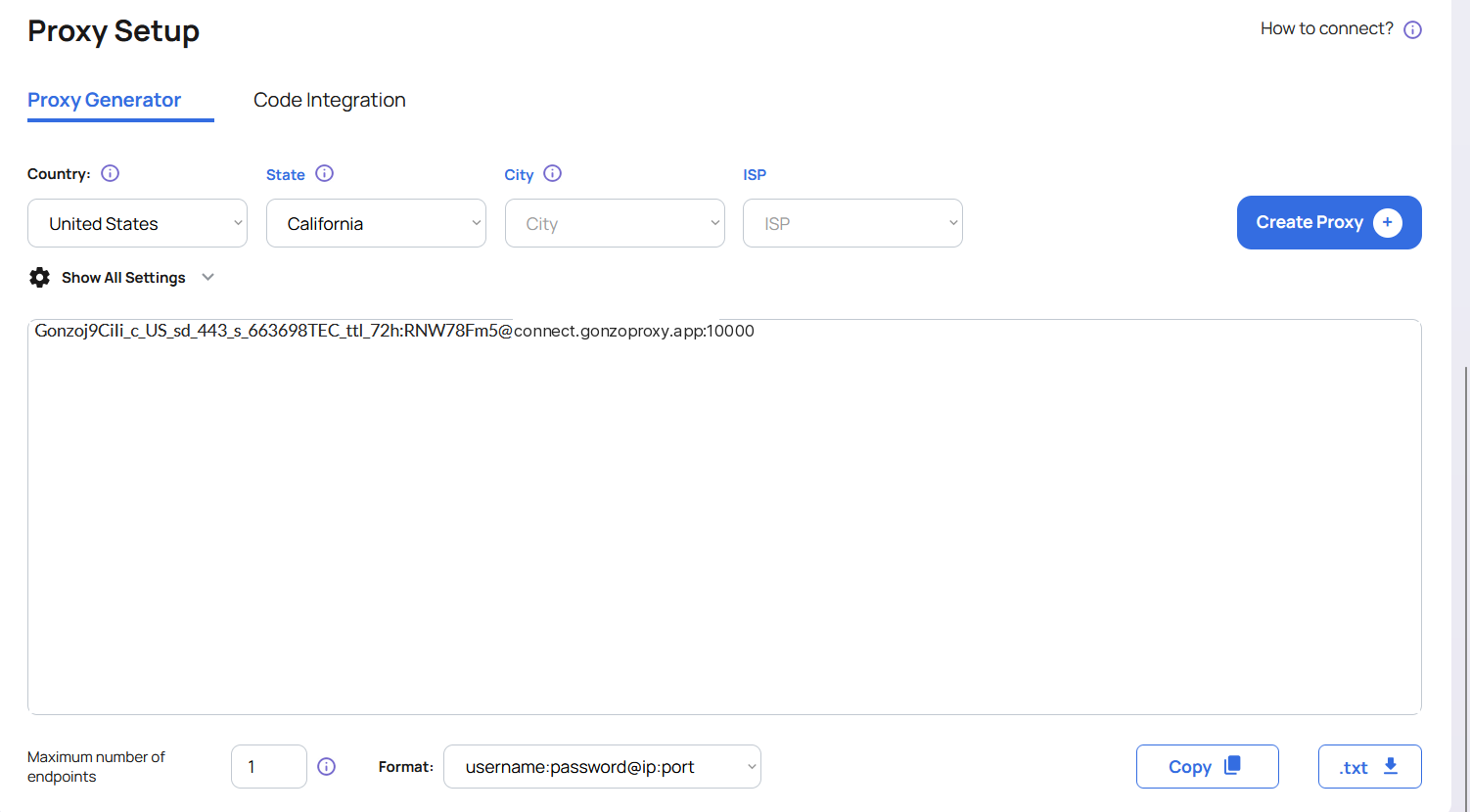
You've purchased US residential proxies from [GonzoProxy ](https://gonzoproxy.com/?utm_source=gitbook\&utm_medium=anti-detekt-brauzer-adspower)and received the following:
`Gonzoj9CiIi_c_US_sd_443_s_663698TEC_ttl_72h:RNW78Fm5@connect.gonzoproxy.app:10000`
**Configuration:**
* **Proxy Type:** Select SOCKS5 or HTTPS.
* **Host:** `connect.gonzoproxy.app`
* **Port:** `10000`
* **Username:** `Gonzoj9CiIi_c_US_sd_443_s_663698TEC_ttl_72h`
* **Password:** `RNW78Fm5`
***
#### ✅ **3. Proxy verification**
After entering the proxy details, click "Check Proxy."
A green checkmark means:
* The proxy answered.
* The IP address is live.
* You can save the profile.
If the check fails, double-check for typos or incorrect entries.
***
#### 4. **Fingerprint settings**
Set the fingerprint fields of the profile:
* **WebRTC:** Disable
* **Timezone:** Based on IP
* **Geolocation:** Based on IP
* **Language:** Based on IP
* **App Language:** Based on IP
* **Screen Resolution:** Predefined
* **Fonts:** Default
* **Hardware Noise:** Enable all
* **WebGL Metadata:** Set manually
* **WebGPU:** Based on WebGL
The profile is now configured.
***
### 📱 Stay Connected
* [Telegram Channel](https://t.me/GonzoProxy)
* [Telegram Chat](https://t.me/GonzoProxy_Chat)
* [Instagram](https://www.instagram.com/gonzoproxy)
* [24/7 Support](https://t.me/GonzoProxy_bot)
💬 Our team is always here for you! Reach out anytime.