> For the complete documentation index, see [llms.txt](https://help.gonzoproxy.com/llms.txt). Markdown versions of documentation pages are available by appending `.md` to page URLs; this page is available as [Markdown](https://help.gonzoproxy.com/setup-morelogin.md).
# Setup MoreLogin
This page shows how to set up a profile in MoreLogin and connect residential proxies from [GonzoProxy](https://gonzoproxy.com/?utm_source=gitbook\&utm_medium=eng\&utm_content=morelogin) to it.
\
[MoreLogin](https://www.morelogin.com/register/?from=GONZO20) manages multiple browser profiles, each with its own fingerprint settings and its own proxy. It is used in digital marketing, traffic arbitrage, e-commerce and SMM.
***
## 🌟 MoreLogin features
### 🔧 Browser extensions
MoreLogin allows you to bulk-add browser extensions and assign them to specific profiles, while easily managing the status of each extension.
> Full documentation is available [here](https://support.morelogin.com/en/articles/10137583-browser-extension).
***
### 📱 Cloud phone app
If you want necessary apps to automatically install on each new cloud phone, configure them once in advance. This saves time on repeated downloads and speeds up your workflow.
> Full documentation is available [here](https://support.morelogin.com/en/articles/10204340-cloud-phone-app).
***
### 🔄 Synchronizer
Synchronize and manage multiple browser profiles simultaneously.
\
In the cloud phone, bulk operations, text input, and file uploads are available only for Model X.
{% embed url="" %}
> Full documentation is available [here](https://support.morelogin.com/en/articles/10137626-browser-synchronizer).
***
### 📹 Automated video publishing
Automatically schedule video posts to TikTok, Instagram, Facebook Video, Facebook Reels, and YouTube. Configuring captions and publishing details saves significant time.
***
### 👥 Team management
The team collaboration feature lets you add members and assign them different roles:
| Role | Functional privileges | Data privileges |
| ------------------------ | ------------------------------------------------------------------------------------------------------------------- | -------------------------------------------------------- |
| Super Administrator | Full access to all features and roles | All data |
| Super Administrator (RU) | Deleting data, creating and editing profiles, managing proxies, main profile settings, transferring profiles | Authorization profiles, proxies, members, and other data |
| Manager | Creating and editing profiles, managing proxies, team assignments, subscription settings (without profile deletion) | Authorization profiles, proxies, members, and other data |
| Member | Access to authorized profiles only | Authorization profiles, proxies, members |
> Full documentation is available [here](https://support.morelogin.com/en/articles/10137638-team-management).
***
## 🛠️ Creating a profile and connecting GonzoProxy
### 👉 Go to advanced profile creation
**Basic settings:**
* Enter profile name
* Select Chrome browser
* Select operating system (Windows/macOS/Android/iOS)
* Leave the UA field unchanged
* Enable end-to-end encryption if desired
* Enable Canvas fingerprinting technology
***
### 🌐 Proxy configuration
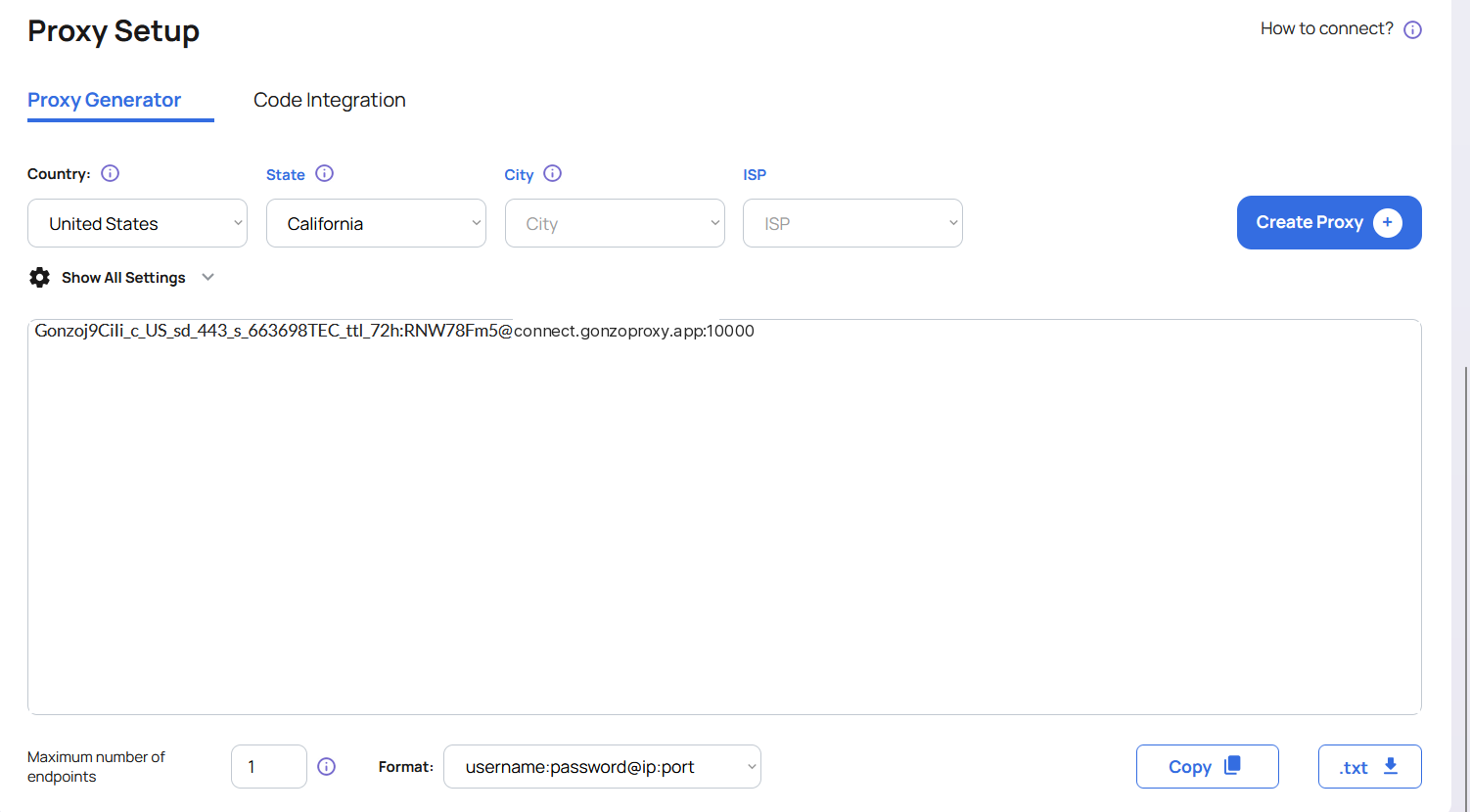
* Get residential proxies from [**GonzoProxy**](https://gonzoproxy.com/?utm_source=gitbook\&utm_medium=eng\&utm_content=morelogin), for example: USA. You will receive a string:
`Gonzoj9CiIi_c_US_sd_443_s_663698TEC_ttl_72h:RNW78Fm5@connect.gonzoproxy.app:10000`
* Enter the proxy credentials and test functionality
**✅ Proxies successfully passed the test**
***
### 🔐 Authorization and cookies
* Enter login credentials for accounts (Facebook, Google, eBay, Telegram, etc.)
* Import cookies if needed
***
### 🌍 Start page
After enabling, choose “Continue browsing last opened page”\
Enable:
* Open the platform page with a configured account simultaneously
* Stay on the detection page after loading
***
### ⚙️ Additional setting
| Parameter | Setting |
| ------------------------- | -------------------- |
| Time zone | Depends on IP |
| WebRTC | Replacement |
| Geolocation | Ask |
| Use IP-based geolocation | Enabled |
| Language | Depends on IP |
| Resolution | Real |
| Font | Custom |
| Canvas | Noise |
| WebGL image | Noise |
| WebGL metadata | Custom |
| WebGPU | WebGL-based matching |
| AudioContext | Noise |
| Media device | Noise |
| ClientRects | Noise |
| SpeechVoices | Private |
| Device name | Custom |
| MAC address | Custom |
| Do Not Track | Disabled |
| Bluetooth | Private |
| Battery | Private |
| Port detection protection | Enabled |
| Disable TLS protocol | Default |
### ❌ Disable the following toggles
* Disable sound playback
* Disable video loading
* Block uploading more than one file at a time
***
## 📌 Summary
Set up the profile in [MoreLogin](https://www.morelogin.com/register/?from=GONZO20), paste the connection string from your [GonzoProxy](https://gonzoproxy.com/?utm_source=gitbook\&utm_medium=eng\&utm_content=morelogin) dashboard into the proxy fields, and run the check in the same window.
***
### 👾 Try it here: [GonzoProxy.com](https://gonzoproxy.com/?utm_source=gitbook\&utm_medium=eng\&utm_content=morelogin)
***
### 📱 Stay Connected
* [Telegram Channel](https://t.me/GonzoProxy)
* [Telegram Chat](https://t.me/GonzoProxy_Chat)
* [Instagram](https://www.instagram.com/gonzoproxy)
* [24/7 Support](https://t.me/GonzoProxy_bot)
💬 Our team is always here for you! Reach out anytime.